Face26 is mainly an AI photo enhancer. It sharpens, upscales, colourises and restores pictures you already have, and it does that job well enough for old family photos and soft snapshots. It now also sells a separate AI dating photo pack that generates new images from 8 to 10 selfies. That pack is cheap per photo, but its sales page makes match claims it never backs up, and user reviews of the service as a whole keep raising credits, billing and support.
This review explains both halves of Face26, what each one costs at the time of writing, what users report on public review platforms, what the research says about editing dating photos, and which tool fits which problem.
- Two products under one name. The editor (upscaling, unblurring, colourising, face zoom, background removal) works on photos you already own. The dating pack trains a model on your selfies and generates new photos: 100 for $12 or 500 for $50, according to its page.
- Enhancement fixes quality, not variety. A sharper copy of the same bathroom selfie is still the same bathroom selfie. A thin profile needs new scenes, and only the generator or a camera can supply them.
- Face restoration invents detail. Modern face restorers fill in missing pixels using what faces "usually" look like. That is why heavily enhanced faces can drift from the real person. Keep edits light.
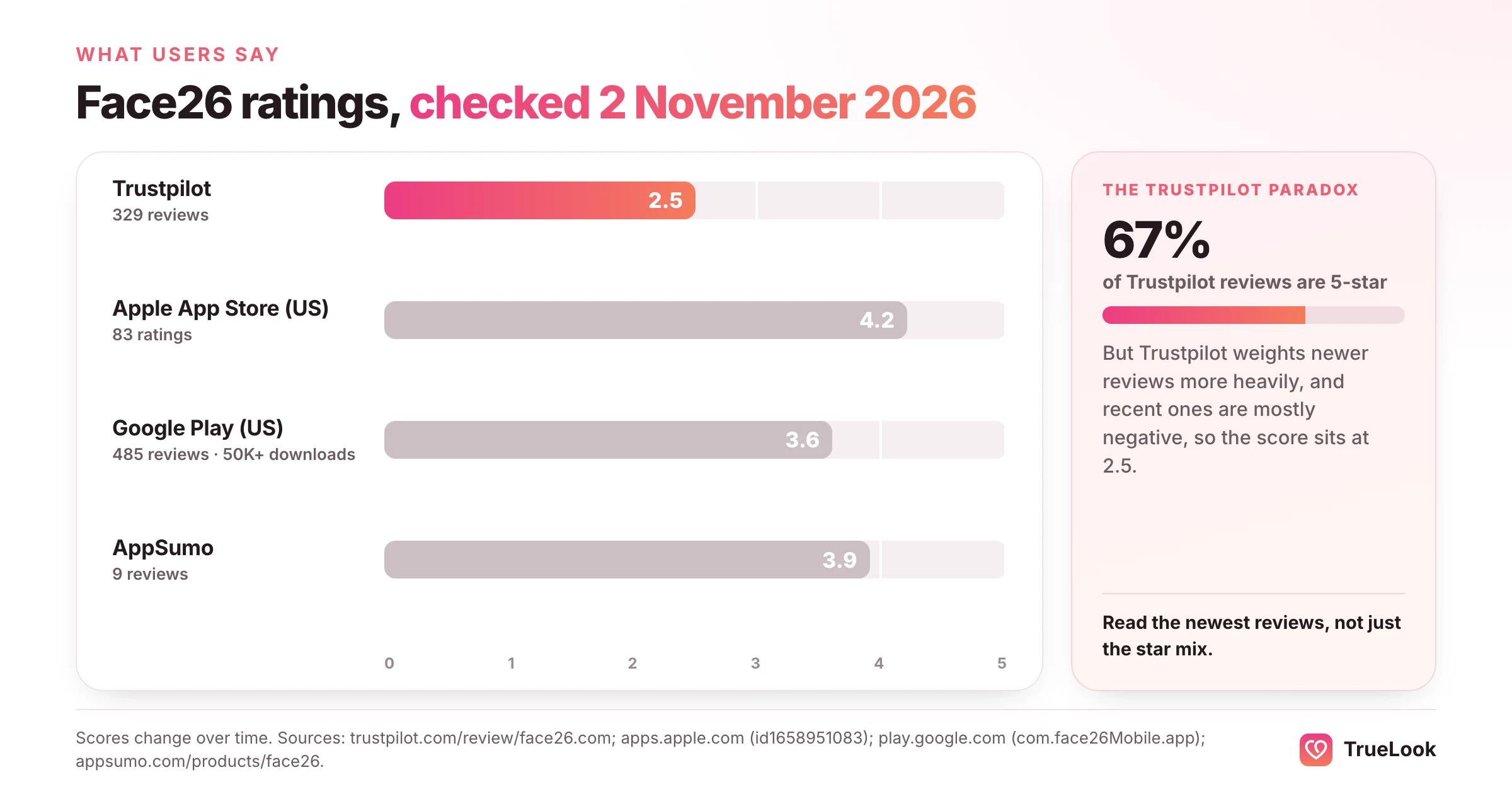
- Review scores are mixed and platform-dependent. On 2 November 2026: Trustpilot 2.5/5 from 329 reviews, Apple App Store 4.2/5 from 83 ratings, Google Play 3.6/5 from 485 reviews.
- The complaints are mostly about accounts, not pixels. Recent Trustpilot reviews mention credits that vanish, unanswered support emails and unexpected renewals far more often than poor image quality.
- Research supports light editing, not heavy filtering. In one experiment, filtered photos made men look more attractive but less trustworthy, and independent judges rated about a third of real dating photos as inaccurate.
- Best fit: restoring and enlarging existing photos. For dating, use it to rescue one good but soft photo, then get variety somewhere else.
What is Face26?
Face26 is a browser-based AI photo service with companion phone apps. Its homepage says the company was founded in 2021, the site footer names Face26 Inc., and the iPhone app is published under the seller name TechArt26 LLC. You can use it on the web, on iOS through the Face26 App Store listing, or on Android through its Google Play listing.
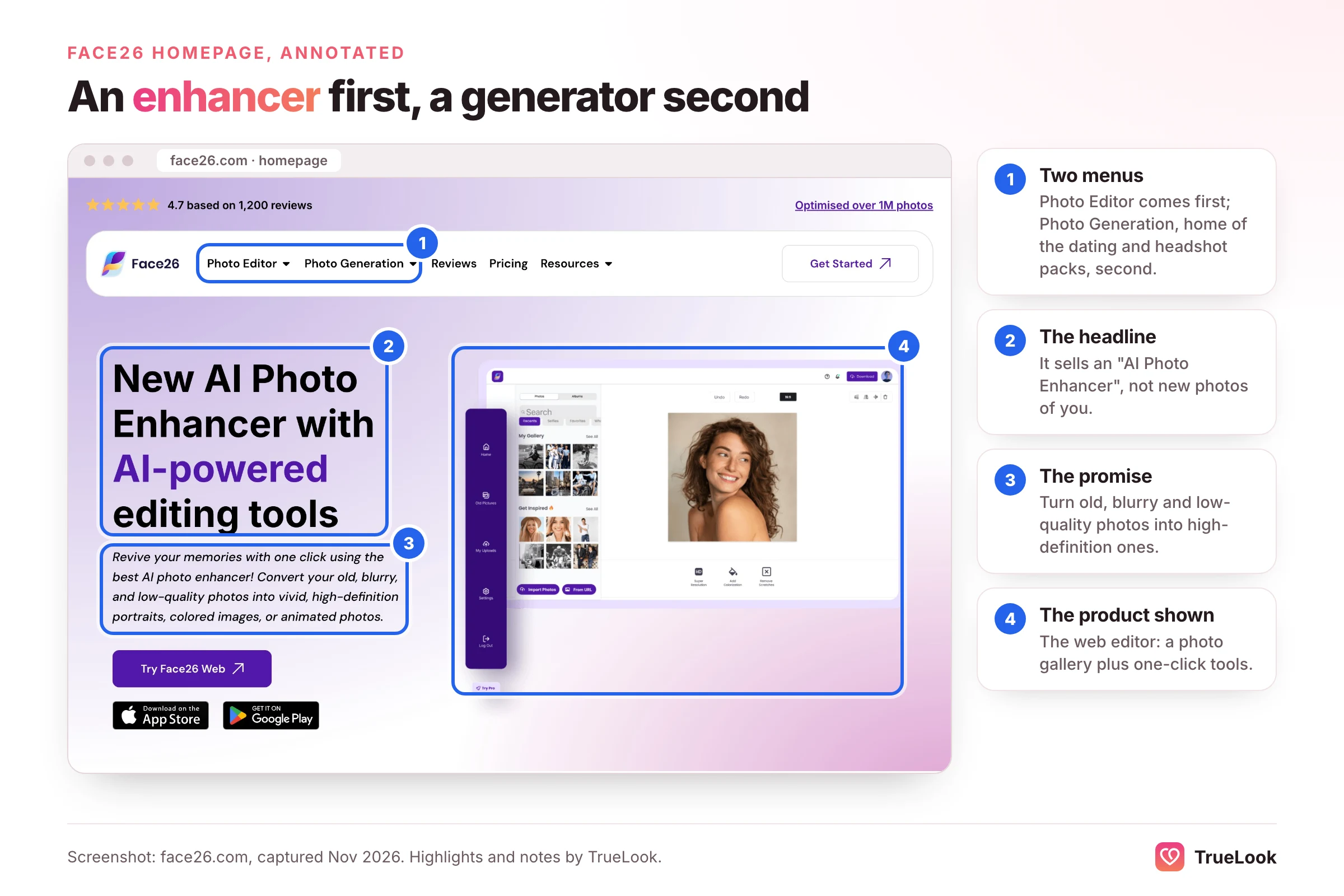
At the time of writing, Face26's homepage splits its menu into two groups, which is the clearest way to understand the product:
- Photo Editor: AI photo enhancer, unblur, colourise black-and-white images, denoise, upscale to HD, recolour, colour correction, restore old photos, photo-realistic art, background remover, AI face retouch and a "Model Mode for Men".
- Photo Generation: professional headshots, AI dating photo generation, "Realify" for AI-made images, e-commerce product photos and animated photos.
The editor is the original product and still the core of the brand. The app store descriptions talk only about enhancement: restoring, unblurring and colourising. The generation tools are newer and live on separate landing pages.
That split matters because the two halves answer different questions. "Can you make this photo look better?" is an editing question. "Can you give me photos I never took?" is a generation question. Most disappointment with photo tools comes from buying one when you needed the other.
How this review was put together
We want to be plain about method, because many software reviews are vague about it.
- Product facts come from Face26's own pages, its privacy policy and its app store listings, all opened on 2 November 2026. Where Face26's pages contradict each other, we say so.
- User sentiment comes from Trustpilot, the Apple App Store, Google Play and AppSumo, opened the same day. We report what each platform showed, not a cherry-picked selection of quotes.
- Advice about dating photos comes from published research and the dating apps' own documentation, cited inline and listed at the end.
- What we did not do: we did not run our own before-and-after tests for this article, and we make no claims about match results from any tool.
A disclosure: TrueLook makes AI dating photos, so Face26's newer dating pack is a direct competitor. We have tried to give it a fair hearing, including where it beats us on price.
Face26 features, tool by tool
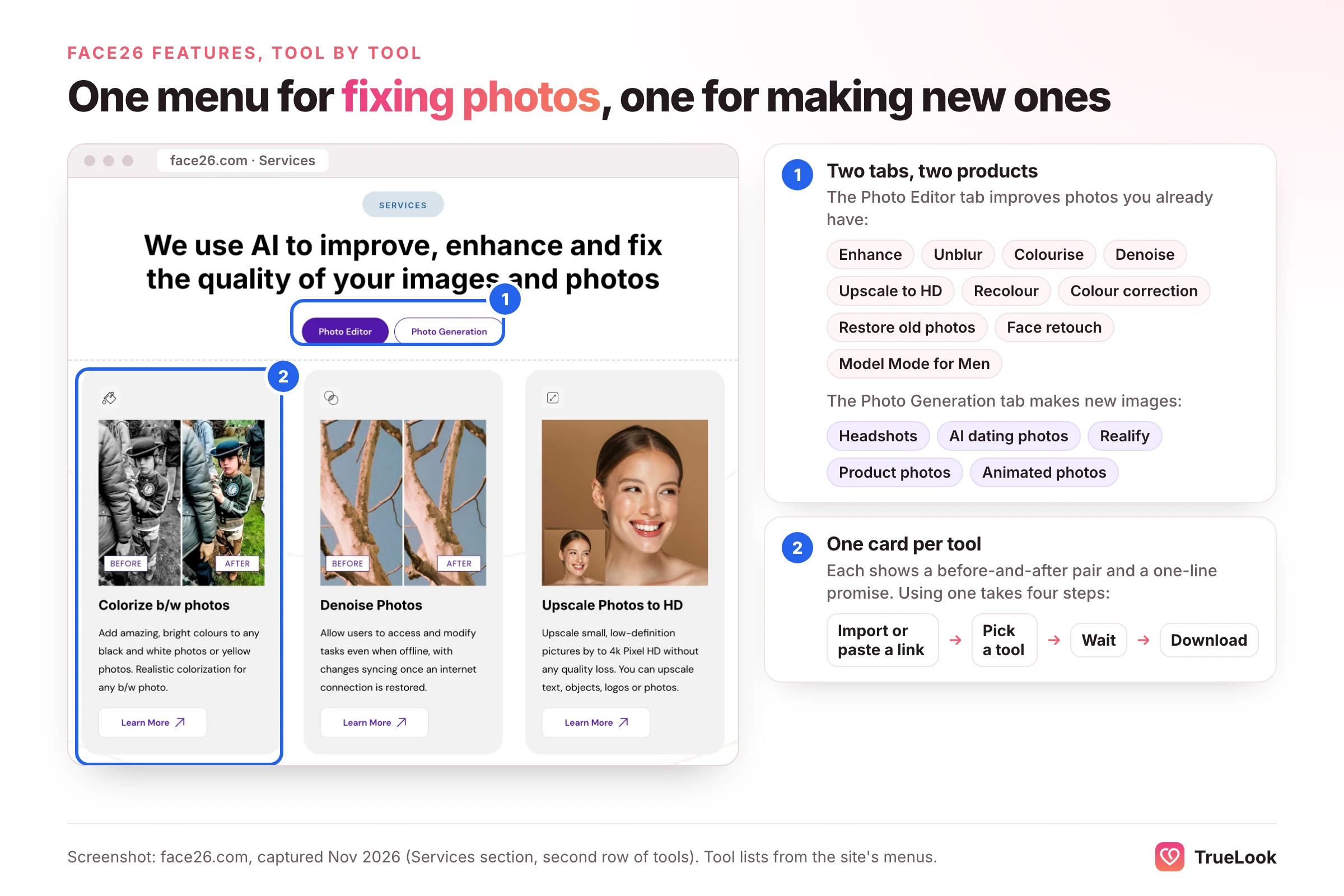
The editor follows a simple pattern. You import a photo or paste a link, choose a tool, wait a few seconds, then download the result. Face26's homepage says no editing skills are needed, and that is fair: there are no sliders or layers to learn. Here is what the main tools do and how much each one matters for a dating profile.
Upscaling and "Super Resolution"
The upscaler enlarges small images. Face26's upscaler page claims enlargement of "up to 800%" and output at 2K or 4K, and says it accepts JPEG and PNG files. Upscaling is useful when your only copy of a photo is a thumbnail saved from an old social account or a group chat. It is less useful when the photo is already a normal phone picture, since a profile photo is viewed on a phone screen, not printed on a poster.
Unblur and enhance
This is the tool most people come for. It sharpens soft edges, reduces grain and brightens faces. On a photo that is slightly out of focus, or was taken indoors in dim light, it can make the difference between "unusable" and "fine".
Face zoom (HD portraits from group photos)
The site footer lists a tool for HD portraits from group photos, and the Google Play description calls it Face Zoom. For dating, this may be the single most useful feature Face26 has. Many people's best expression lives in a group shot where they are a small figure at the edge. Cropping that face out normally leaves a blurry square; face zoom tries to rebuild it at a usable size.
Colourise and restore old photos
Colourisation adds colour to black-and-white images, and the restore tool cleans scratches and fading. These are the features reviewers praise most often, especially for family archives. They have no real role on a dating profile, where every photo should be recent.
Background remover
This cuts the person out of the scene. It is handy for graphics, product images and ID-style photos. A person floating on a plain backdrop looks odd on a dating app, so treat it as irrelevant here.
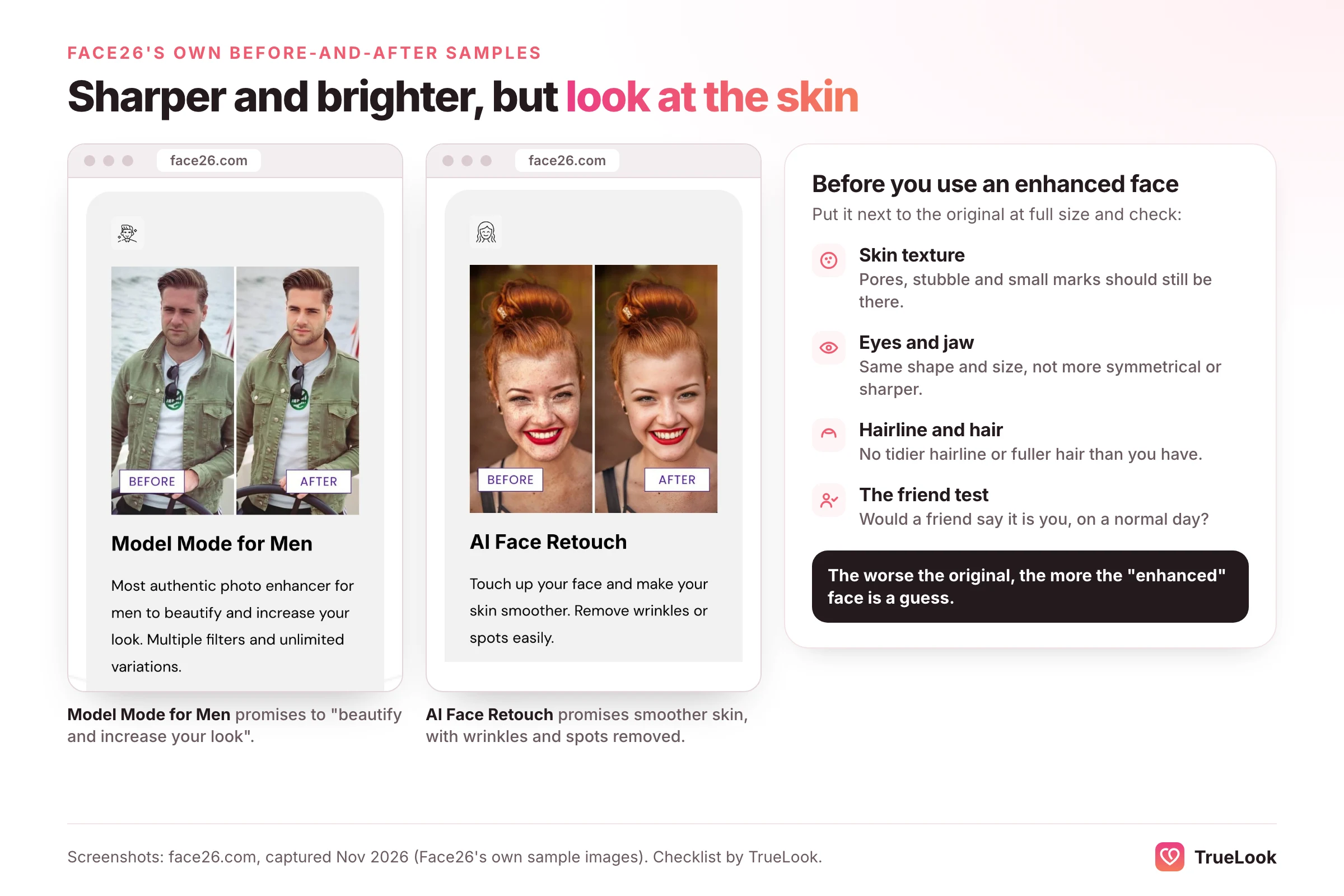
AI face retouch and "Model Mode for Men"
These are listed under the editor menu. The pages we opened did not describe what they change, so we cannot say how far they go. As a rule, any tool whose job is to "retouch" a face deserves the most caution for dating, for reasons covered in the research section below.
| Face26 tool | What it does | Value for a dating profile | Main risk |
|---|---|---|---|
| Upscale / Super Resolution | Enlarges small images | Low to moderate: helps only tiny or pixelated originals | Waxy textures on faces |
| Unblur and enhance | Sharpens, denoises, brightens | Moderate: can rescue a soft or dim photo | Over-smoothed skin |
| Face zoom | Rebuilds a small face at higher resolution | Moderate to high: turns group shots into portraits | Invented facial detail |
| Colourise / restore | Adds colour, removes scratches | None: old photos do not belong on a profile | Wrong skin or hair tones |
| Background remover | Cuts out the subject | Very low | Looks artificial |
| Face retouch | Alters facial appearance | Low, and risky | Looking unlike yourself |
How AI enhancement works, and why it can change a face
It helps to know what happens inside an enhancer, because it explains both the impressive results and the strange ones.
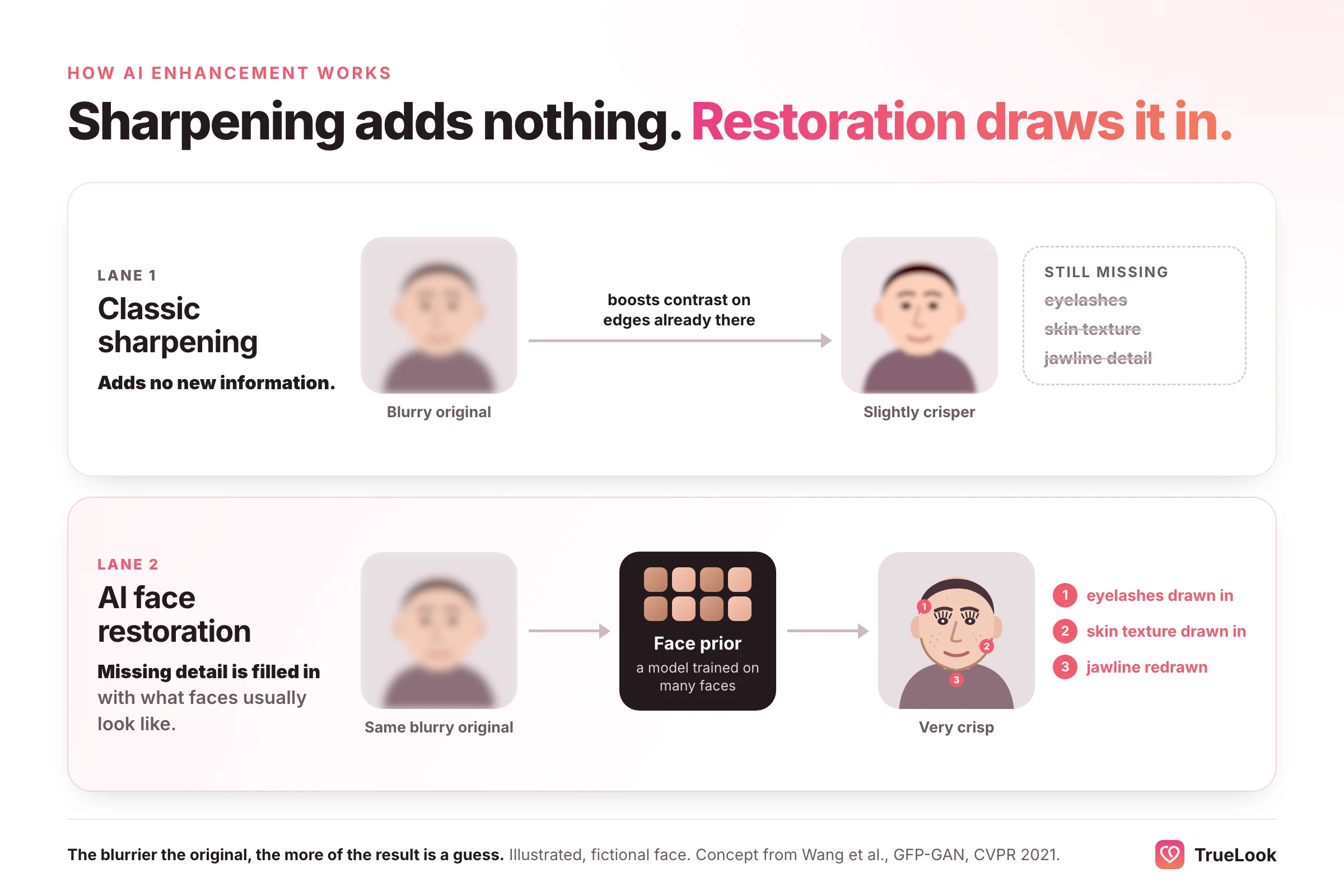
A traditional sharpening filter only boosts contrast along edges that are already in the picture. It cannot add information. Modern AI face restorers work differently. A widely cited example is GFP-GAN, described in a 2021 paper presented at CVPR by Wang and colleagues. It uses a "generative facial prior": a model trained on huge numbers of faces supplies the details that a badly degraded input is missing. The authors describe the design as a balance between realness and fidelity.
In plain terms, when a face is too blurry to contain eyelashes, pores or a crisp jawline, the restorer draws plausible ones based on what faces in its training data look like. Usually that looks great. Sometimes it looks like a slightly different person: smoother skin, more symmetrical eyes, a tidier hairline. We do not know which specific model Face26 uses, and its pages do not say. The point is general: the more detail a tool has to invent, the less the result is a record of your face.
That leads to a useful rule of thumb. The worse the original, the more the "enhanced" face is a guess. A slightly soft phone photo will come back faithful. A tiny, blurry face from a 2012 group photo will come back as an educated reconstruction.
Face26's AI dating photo generator
Many existing reviews say Face26 cannot create dating photos. That is no longer accurate. At the time of writing, Face26 runs a separate AI dating photo landing page that trains a model on your selfies and generates new images of you in different poses, outfits and backgrounds. Here is what that page lists.
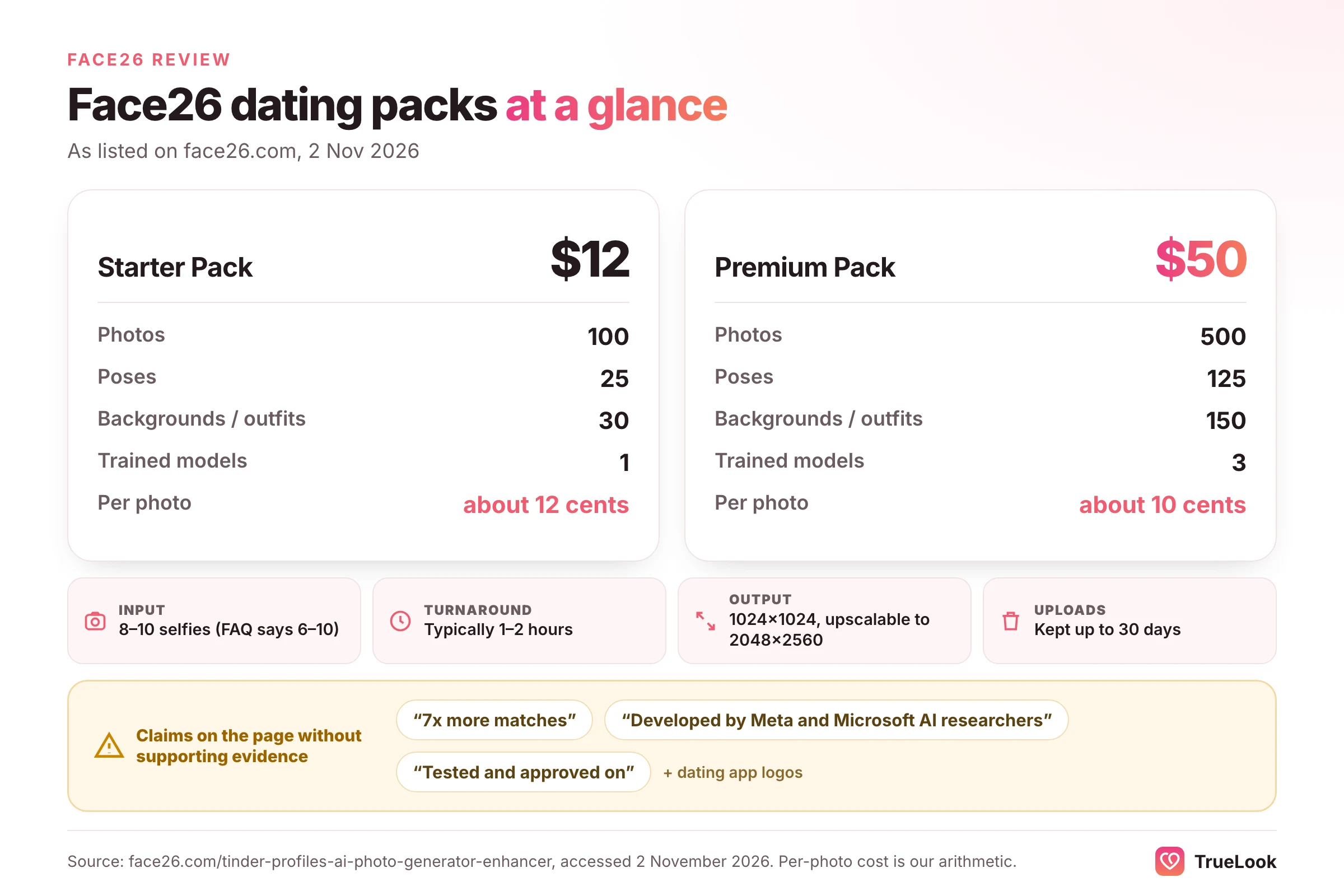
| Starter Pack | Premium Pack | |
|---|---|---|
| Price | $12 | $50 |
| Photos | 100 | 500 |
| Poses | 25 | 125 |
| Backgrounds and outfits | 30 | 150 |
| AI credits | 1,000 | 5,000 |
| Trained models | 1 | 3 |
| Extras | HD upscaler, colouriser | All AI filters, custom image prompts |
| Price per photo | About 12 cents | About 10 cents |
Other details from the same page:
- Input: the steps ask for 8 to 10 selfies, while the FAQ says 6 to 10 photos, including close-ups, side profiles and full-body shots.
- Turnaround: typically 1 to 2 hours, with an email when the photos are ready.
- Resolution: 1024 × 1024 pixels, upscalable to 2048 × 2560.
- Your uploads: stored for up to 30 days for adjustments and then deleted, or earlier on request through support. The page says data is never sold or shared with third parties. It does not say what happens to the trained model of your face.
- Rights: buyers get full rights to use the photos anywhere.
- Guarantee: both packs carry a money-back guarantee if you do not see "a significant improvement" in your matches, handled through live support.
What the page claims but does not support
A fair review has to point out where marketing outruns evidence. On the page we opened:
- It claims "7x more Matches" without a study, sample size or method.
- It says the product was "Developed by Meta and Microsoft AI researchers" without naming anyone.
- It shows app logos under "Successfully tested and approved on", but dating apps do not approve photo tools, and the page gives no detail on any testing.
- Some testimonials on Face26's pages mention a different company, Aragon AI, which suggests copied template content.
- The selfie count differs between the steps (8 to 10) and the FAQ (6 to 10).
None of this proves the photos are poor. It does mean you should judge the pack on the photos it produces for you, not on its headline numbers.
The honest case for it
On price per photo, the Face26 pack is hard to beat. If you enjoy sorting through hundreds of images to find the eight that look most like you, 500 photos for $50 is a lot of raw material. The trade-off is curation. Batch generators produce many near-duplicates and some misses, and the work of spotting which ones look like you, and which have odd hands, hair or backgrounds, falls on you. Our roundup of the best AI dating photo generators compares the main options side by side.
Is Face26 free? Pricing explained
Face26 has free entry points, but its prices are spread across several places and are not shown on a public pricing page. The "Pricing" link on the homepage sends you into the web app, so you only see web plans after you open an account. Here is what we could confirm on 2 November 2026.
Editor: app store prices
The Face26 App Store listing shows these in-app purchases (US store):
| Option | Price listed |
|---|---|
| Weekly subscription | $3.99 |
| Monthly subscription | $9.99 |
| Yearly subscription | $42.99 |
| Lifetime deal | $122.99 |
| Image packs | From $3.99 for 5 images to $42.99 for the largest packs |
The Google Play listing mentions monthly and annual subscriptions "for unlimited access to all features" and says you may cancel at any time, without listing prices in its description. Both apps are free to download.
Dating photo packs
As above: $12 for the Starter Pack and $50 for the Premium Pack. The page presents these as one-off packs, though it also says "Cancel anytime with no minimum commitment", so read the checkout terms before you pay.
Lifetime deals
Face26 once sold lifetime access through AppSumo. The AppSumo listing now marks the deal as sold out and unavailable. If you see a "Face26 lifetime deal" advertised somewhere else, treat it with suspicion.
A word on "Face26 MOD APK"
Searches for modified, unlocked versions of the app are common. Skip them. These files come from outside the Play Store, are not reviewed by Google before you install them, and are exactly the kind of software Google's own help page on Google Play Protect describes as potentially harmful apps from other sources. Uploading your face and logging in through an unofficial build is a poor trade for a few dollars.
How to buy without billing surprises
Billing complaints come up repeatedly in Face26's reviews (see the next section), so it is worth following the U.S. Federal Trade Commission's guidance on free trials and auto-renewals. Adapted to Face26:
- Decide which product you need first. Editor credits, an app subscription and a dating pack are separate purchases.
- Read the renewal terms on the checkout screen, not just the landing page, and note whether the plan renews weekly, monthly or yearly.
- Put the renewal date in your calendar the moment you subscribe.
- Buy through the App Store or Google Play if you prefer, where subscriptions can be cancelled from your phone's own settings.
- Keep a record of your cancellation: a screenshot or the confirmation email.
- If you are charged without consent and the company does not fix it, the FTC advises contacting your card issuer to dispute the charge.
What users say: Face26 ratings on review platforms
We opened each platform on 2 November 2026. Scores change, so treat these as a snapshot.
| Platform | Score | Volume | Notes |
|---|---|---|---|
| Trustpilot | 2.5 / 5 ("Poor") | 329 reviews | Most recent reviews dated June to September 2026 |
| Apple App Store (US) | 4.2 / 5 | 83 ratings | Listing for "Face26 AI Photo Enhancer in HD" |
| Google Play (US) | 3.6 / 5 | 485 reviews | 50K+ downloads; last updated 17 February 2026 |
| AppSumo | 3.9 / 5 | 9 reviews | Lifetime deal now sold out |
Why Trustpilot looks so different
Trustpilot's breakdown shows 67% five-star reviews and only 15% one-star, yet a TrustScore of 2.5. That seems contradictory until you know that Trustpilot says its score is weighted to reflect that newer reviews tend to be more relevant than older ones. Face26's older reviews skew positive; its recent ones skew negative. In other words, the low score is telling you that experiences have got worse recently, not that most people ever hated the product. Trustpilot also notes that Face26 has not replied to negative reviews.
Recurring themes
Negative themes in recent Trustpilot reviews:
- Credits showing zero or disappearing, including on lifetime and renewed plans.
- Support emails going unanswered.
- Login failures, and processing that stalls or returns errors.
- Watermarks appearing on downloads after a renewal.
- Unexpected charges, including auto-renewals and one reported double payment.
- Disappointing colourisation on some photos.
Positive themes, more common among older reviews and on AppSumo:
- Easy one-click enhancement that works well on many photos.
- Strong results colourising and restoring old family pictures.
- Face zoom and upscaling quality.
The pattern is consistent across platforms: when people talk about the images themselves, they are often satisfied. When they talk about accounts, credits and support, they often are not. That is useful when deciding how to buy: a cheap, short commitment limits the downside if your account runs into trouble.
Face26 pros and cons
Strengths
- Runs in a browser, with iPhone and Android apps as well, and needs no editing skill.
- Bundles many common fixes in one place: unblur, upscale, denoise, colourise, restore and background removal.
- Face zoom can turn a tiny face in a group shot into a usable portrait.
- Low entry prices for the editor, with app store purchases from a few dollars.
- The dating pack offers a very low price per generated photo.
- Its homepage describes encrypted uploads, and the privacy policy lets you delete your account from settings.
Weaknesses
- The editor can only improve photos you already have, so it cannot fix a profile that lacks variety.
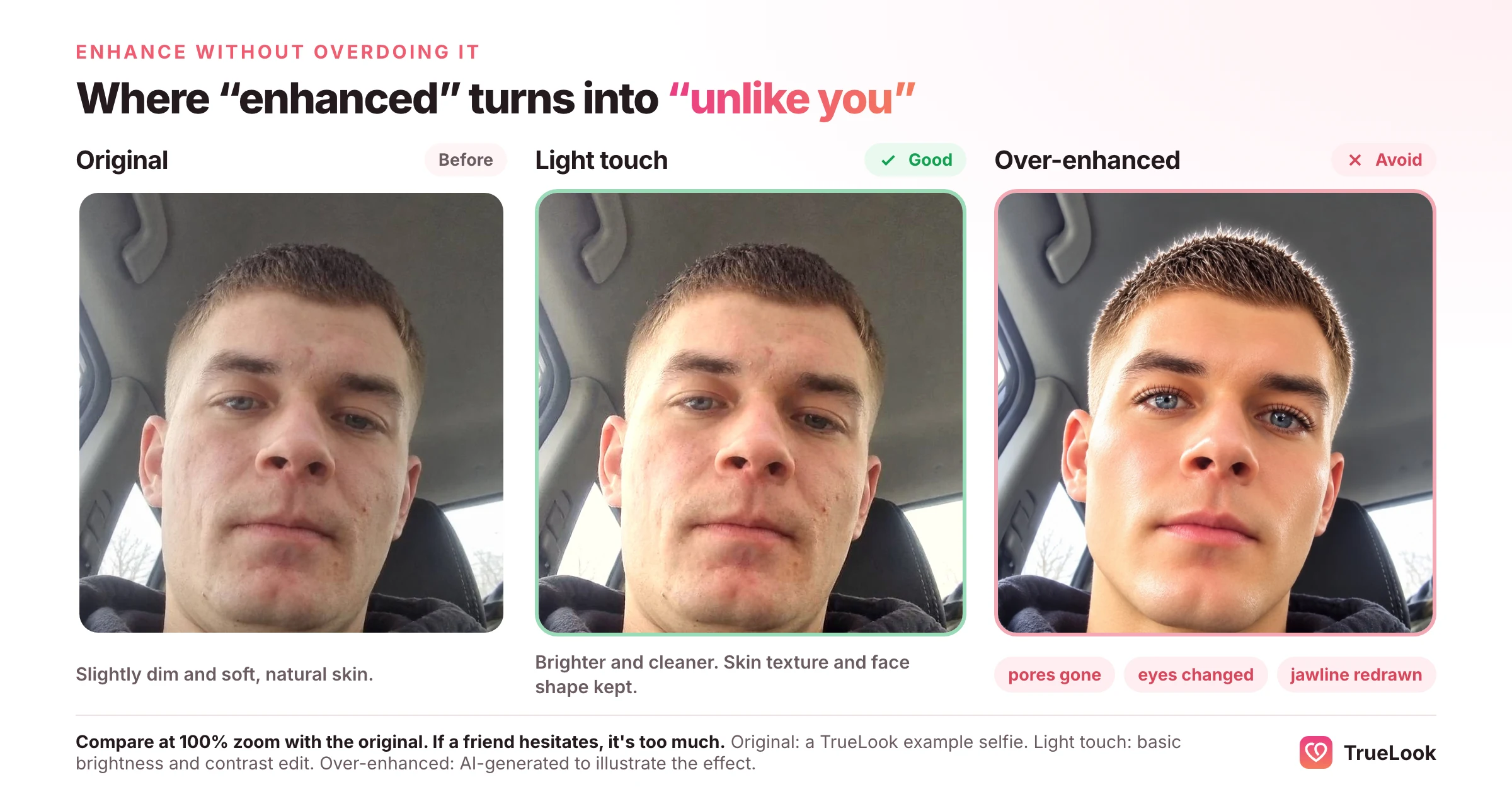
- Heavy restoration and retouching can change facial features, which is a problem on dating apps.
- Pricing is scattered across the web app, two app stores and a separate dating page, with no public pricing table.
- Recent reviews report vanished credits, unexpected renewals and slow or absent support, and the company does not reply on Trustpilot.
- The dating page relies on claims it does not substantiate, and contains copied testimonials and inconsistent instructions.
- The privacy policy's effective date is July 2022 and it does not address AI model training on uploaded photos either way.
Is Face26 good for dating profile photos?
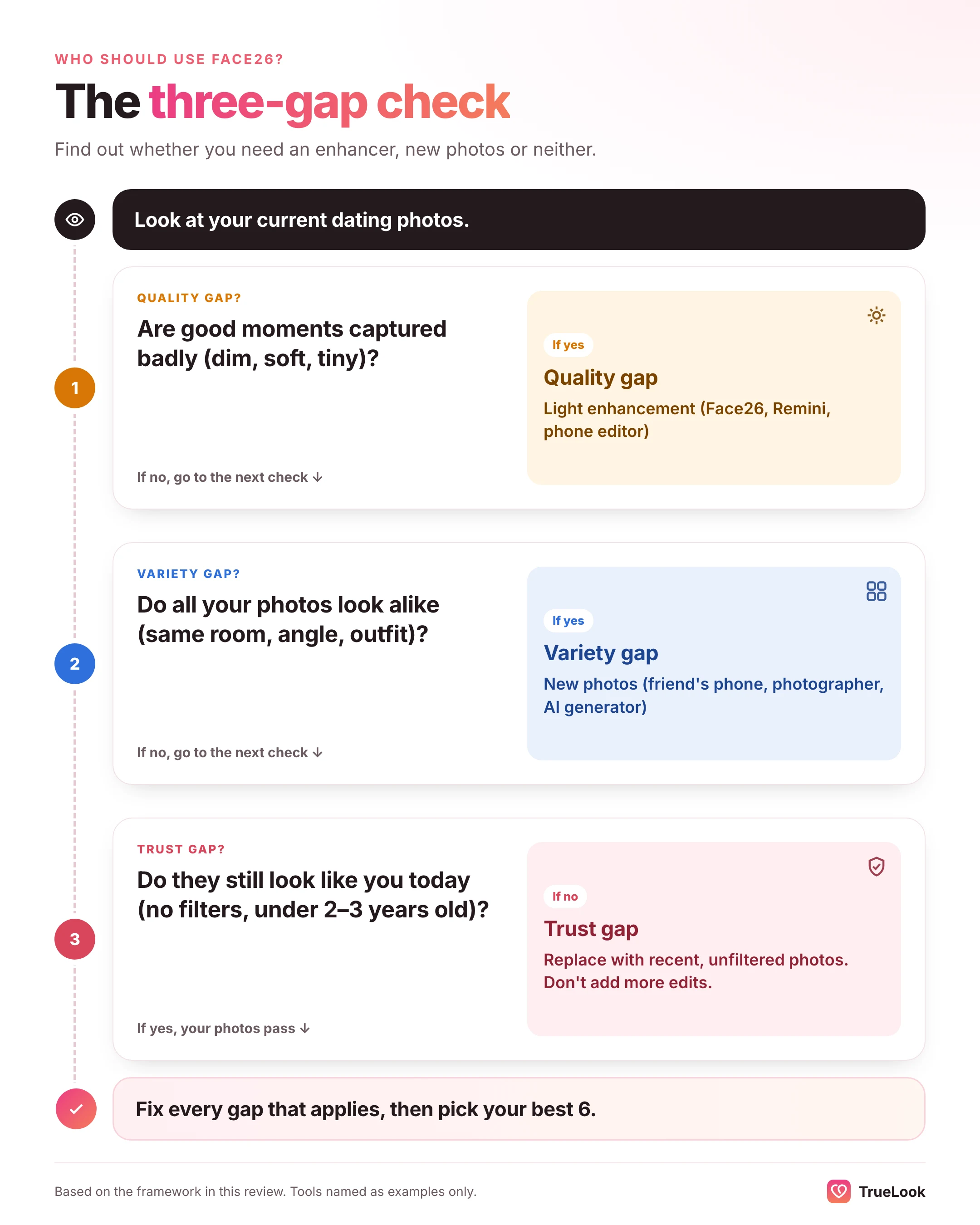
It depends on which problem your profile has. A quick way to work it out is what we call the three-gap check. Look at your current photos and ask three questions.
- The quality gap: are good moments captured badly? Think dim, soft, grainy or tiny.
- The variety gap: do all your photos look alike? Same room, same angle, same outfit, all selfies?
- The trust gap: do your photos still look like you today? Think age of photo, filters, heavy edits.
Face26's editor closes the first gap. It cannot close the second, and if used heavily it can widen the third. Its dating pack, like any generator, targets the second gap, and your job is to make sure it does not open the third.
| If your profile looks like this | The gap | What to do |
|---|---|---|
| Your best photo is a great moment but blurry or dark | Quality | A light enhancement pass in Face26 or a similar editor |
| Your favourite smile is in a group shot | Quality | Face zoom, then check the face still looks like you |
| Five selfies from the same sofa | Variety | New photos: a friend with a phone, a photographer or an AI generator |
| No full-length photo, no hobby or social photos | Variety | New photos covering the missing types |
| Photos are three or more years old | Trust | Replace them; enhancement will not make them current |
| Photos already use beauty filters | Trust | Go back to the unfiltered originals; do not stack more edits on top |
What the research says about edited dating photos
Photos are judged in a flash. In a classic experiment published in Psychological Science, Willis and Todorov (2006) found that trait judgments made after seeing a face for just 100 milliseconds closely matched judgments made with no time limit. Clarity matters in that split second: a face that is hard to see is hard to judge kindly.
Light corrections can help a lot. Photofeeler, which collects ratings from voters on dating and profile photos, published a set of small before-and-after tests. In one dating photo, fixing harsh shadows and highlights raised the "trustworthy" score from 5.3 to 8.4, according to its post on how tiny differences affect scores. That test used about 20 votes on one photo, so read it as an illustration rather than proof. Photofeeler's larger "perfect profile photo" study, based on more than 60,000 ratings of 800 photos, found that photos that were too dark lowered likability and that very high saturation hurt every trait it measured. Its advice was moderation: correct problems, avoid extremes.
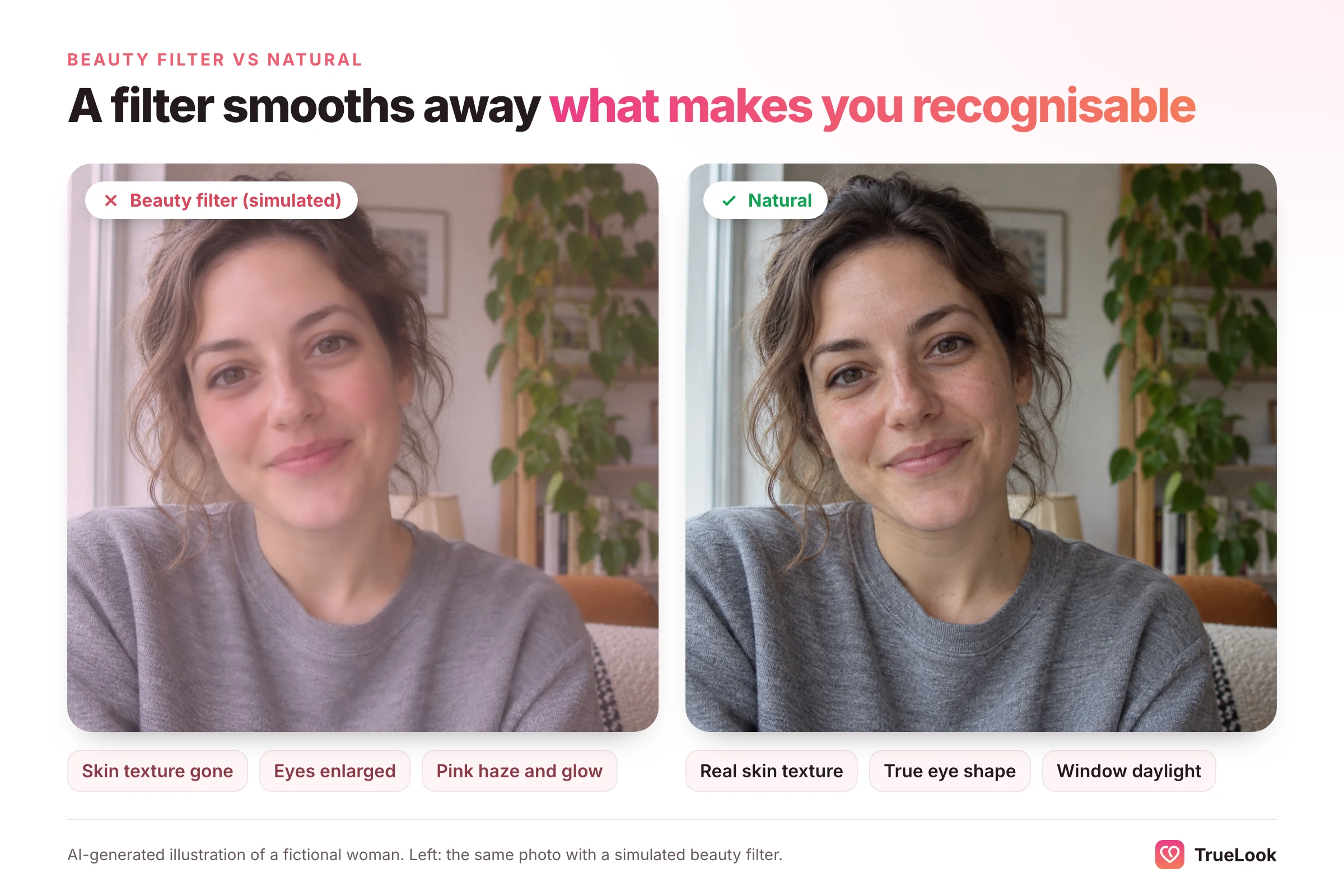
Heavy edits carry a trust cost. In a pre-registered experiment in Computers in Human Behavior, Appel and colleagues (2023) showed 241 women Tinder-style profiles of men with and without beauty filters. Filtered photos were rated more physically attractive but less trustworthy. In that study, attractiveness won out and dating intention rose overall. The authors note the sample was limited to women judging white men in Western countries. A filter may get you more right swipes, but you start the conversation with a little less credit.
Inaccurate photos are common, and people notice. In a study in the Journal of Communication, Hancock and Toma (2009) compared 54 online daters' photos with how they looked in person. The daters rated their own photos as accurate. Independent judges rated about one third as not accurate. Retouching, older photos and changes in skin appearance were among the inconsistencies the researchers coded. The authors describe the tension every dater faces: look attractive, but not so different that the first date feels like a bait-and-switch.
Verification makes accuracy practical, not just polite
Dating apps now check faces as well as people. Tinder's Face Check FAQ explains that a short video selfie is used to confirm a real, live person and to check whether that person appears to be the same as in the profile photos. Match Group's October 2025 announcement says Face Check was already required for new users in several countries and California, with more U.S. states and other Match Group apps to follow.
No one outside the apps knows exactly how much editing their systems tolerate, and we will not guess. The sensible conclusion is simple: photos that look like your face today are the safest kind to upload. If a check does go wrong, our guide to fixing a failed Tinder photo verification walks through the usual causes. For the rules on AI-made images specifically, see whether AI photos are allowed on dating apps.
Worked example (illustrative)
Example profile, made up for illustration: a 31-year-old nurse has four photos. One is a lovely laughing shot from a friend's wedding, but she is small and slightly out of focus at the edge of a group. The other three are bathroom-mirror selfies taken in the same month.
- The wedding shot has a quality gap. Face zoom plus a gentle enhancement could turn it into her best photo. She should compare it with the original at full size and drop it if her face looks altered.
- The three selfies have a variety gap. Sharpening them gives her three crisper mirror selfies. What she needs is a clear daylight headshot, a full-length photo, something outdoors and something that shows a hobby.
- Result: one enhanced photo from Face26, plus three or four new ones from a friend's phone, a photographer or a generator. Our guide to choosing dating profile pictures covers which shots to aim for.
How to enhance a dating photo without overdoing it
- Start with the best original you have: the full-resolution file, not a screenshot or a messaging-app copy.
- Use the mildest tool first. Brightness and noise fixes before full face restoration.
- Process once. Running the output through the enhancer again multiplies the invented detail.
- Compare at 100% zoom with the original, side by side. Check eyes, teeth, jawline, hairline and skin texture.
- Ask a friend the honest question: "Does this look like me, or like my cousin?"
- Keep skin texture. If pores and fine lines have vanished, it is too much.
- Check the background for warped text, melted objects or odd hands. These are tell-tale signs of AI processing.
- Use it alongside unedited photos, not instead of them.
Face26 alternatives
The right alternative depends on which job you need done.
If you want another enhancer
- Remini. The best-known mobile face enhancer, published by Bending Spoons. Its App Store listing showed 4.6 out of 5 from about 358,000 ratings on 2 November 2026, with weekly plans listed from $4.99 to $9.99 and a monthly option at $9.99. It focuses on faces and old photos rather than offering Face26's wide toolbox.
- FotorPea (formerly HitPaw Photo Enhancer). Desktop software for Windows and Mac, with an online version and phone apps. Its product page lists separate AI models for faces, denoising, low light, colourising and scratch repair, plus batch processing and a 7-day desktop trial. It suits people working through a large box of scanned photos.
- The editor already on your phone. The built-in photo app, Google Photos or Lightroom's mobile app can fix exposure, colour and mild softness without credits or a new account. For most dating photos, this is enough.
If you need new dating photos
Then you want a generator, or a camera. Generators learn your face from a few uploads and produce new images of you in different settings, clothes and light. They differ a lot in realism, in how much you have to sort through, and in how they handle your data. We compare the main ones in our AI dating photo generator comparison.
TrueLook is one of them. It works from four of your selfies using its HyperReal™ method, takes about a minute per photo, and is sold as two one-time packs with no subscription: Fix Pack at $29 for up to 30 photos, or Pro Pack at $49 for up to 140 photos, with all 43 styles on both packs. Uploaded photos are never used for AI training, and there is a 14-day refund under the conditions on our refund page. You can see sample results on our AI dating photos page.
If you would rather avoid AI
A friend with a recent phone, soft daylight and half an hour is still the cheapest way to get new, real photos. A dating photographer is the premium version, with coaching on posing and wardrobe. We weigh the costs in our photographer vs AI comparison.
| Tool | Type | Platforms | Price at the time of writing | Best for |
|---|---|---|---|---|
| Face26 editor | Enhancer | Web, iOS, Android | App plans from $3.99/week; image packs from $3.99 | Restoring, upscaling, face zoom |
| Face26 dating pack | Generator | Web | $12 (100 photos) or $50 (500 photos) | High volume at low cost, if you will curate |
| Remini | Enhancer | iOS, Android, web | Weekly plans listed from $4.99 | Quick face restoration on a phone |
| FotorPea (HitPaw) | Enhancer | Windows, Mac, online, mobile | 7-day desktop trial; plan prices not listed on product page | Batch work on scanned archives |
| Phone or Lightroom editor | Manual editor | Phone, desktop | Usually free | Light exposure and colour fixes |
| TrueLook | Generator | Web | $29 (30 photos) or $49 (140 photos), one-time | A curated set of new dating photos from four selfies |
Face26 vs TrueLook
The Face26 editor and TrueLook do not really compete: one improves existing photos, the other makes new ones. The Face26 dating pack and TrueLook do compete, so here they are side by side, with each company's figures as listed on its own site at the time of writing.
| Face26 dating pack | TrueLook | |
|---|---|---|
| Selfies needed | 8 to 10 (6 to 10 in its FAQ) | 4 |
| Output | 100 or 500 photos per pack | Up to 30 or up to 140 photos per pack |
| Price | $12 or $50, presented as one-off packs | $29 or $49, one-time; no subscription |
| Speed | Typically 1 to 2 hours for the batch | About a minute per photo |
| Styles | 25 to 125 poses, 30 to 150 backgrounds and outfits | 43 styles on both packs, 4 shots per style |
| Uploads and training | Uploads kept up to 30 days; training use not addressed | Photos never used for AI training |
| Refunds | Money-back guarantee tied to match improvement | 14-day refund under stated conditions |
| Best for | Maximum volume for the money | Fewer, closely controlled photos built for dating apps |
Both are sold as single purchases rather than plans (check Face26's checkout terms, as noted above), so the choice comes down to volume against control. If budget is everything and you are happy to sift, Face26's pack offers more photos per dollar. If you want fewer photos that you steer one at a time, TrueLook is built for that. Neither tool can promise matches. Each dating app makes its own decisions about verification and visibility, and the people swiping make theirs.
The two kinds of tool also combine well. Enhance the one great but soft real photo you already have, then add generated or newly shot photos to fill the gaps.
Who should use Face26?
| You are… | Recommendation |
|---|---|
| Restoring a box of old family prints | A good fit. Colourise and restore are Face26's strongest, most praised tools. |
| Rescuing one blurry but lovely recent photo for your profile | Reasonable. Use the lightest setting and compare carefully with the original. |
| Building a dating profile from three similar selfies | The editor will not help. You need new photos. |
| On a tight budget and want lots of AI dating photos to choose from | The dating pack is cheap per photo. Budget time to curate, and ignore the match claims. |
| Worried about subscriptions and support | Buy the smallest option, ideally through an app store, and set a renewal reminder. |
| Wanting photos that pass a quick "is that really you?" test | Avoid heavy retouching on any tool. Natural beats flawless. |
Verdict
Face26's editor is a capable, low-cost way to enlarge, sharpen and restore photos you already have. Its face zoom tool earns a place in a dating toolkit, because it can rescue the good expression trapped in a group shot. Its weaknesses are mostly around the product: scattered pricing, recent complaints about credits and renewals, and a support team that reviewers say is hard to reach.
Its newer dating pack changes the old verdict that "Face26 cannot make dating photos". It can, and it is cheap per image. But its sales page leans on unsupported claims, so judge it only on the photos it gives you.
Above all, work out which gap you are closing. If your photos are good moments captured badly, enhance them lightly. If they are all the same moment, no amount of sharpening will fix that. Either way, the photo you upload should look like the person who turns up for the date.
Frequently asked questions
Is Face26 free?
Face26's web app and phone apps are free to start, but meaningful use needs credits or a subscription. At the time of writing, its App Store listing shows plans from $3.99 a week, $9.99 a month or $42.99 a year, plus image packs from $3.99. Its separate AI dating photo packs cost $12 or $50.
Is Face26 safe and legit?
Face26 is a real company that has operated since 2021, with apps on both major app stores. Its homepage says uploads are encrypted, and its privacy policy lets you delete your account. The main risks reported by users are about billing, vanished credits and slow support, so buy the smallest plan, keep records and set a renewal reminder.
Can Face26 make dating profile photos?
Yes, in two different ways. Its editor can improve photos you already have, for example by sharpening a soft shot or zooming in on your face in a group photo. Its separate dating pack generates new photos from 8 to 10 selfies, with 100 photos for $12 or 500 for $50 according to its page.
What is the difference between photo enhancement and generation?
Enhancement improves a photo that already exists: sharper, larger, brighter or in colour. Generation creates new images of you in scenes that were never photographed, after learning your face from several uploads. Enhancement fixes quality; generation adds variety.
Is Face26 better than Remini?
They overlap. Face26 offers a wider toolbox in the browser, including colourisation, background removal and face zoom. Remini is a phone-first face enhancer with a much larger user base, showing 4.6 out of 5 from about 358,000 ratings on the App Store when we checked. Try each on the same photo and keep whichever looks more like you.
What are the best Face26 alternatives for dating?
For light fixes, your phone's built-in editor or Remini is usually enough. For new dating photos, use an AI dating photo generator such as TrueLook, a friend with a phone, or a dating photographer. The right choice depends on whether your profile lacks quality or variety.
Can I use AI-enhanced photos on dating apps?
Light corrections such as brightness and mild sharpening are generally fine. Avoid retouching that changes your face, body or apparent age. Apps such as Tinder use video-selfie checks that compare your face with your profile photos, and research shows heavy edits can reduce how trustworthy you seem.
Why do some users complain about Face26?
On Trustpilot, which showed 2.5 out of 5 from 329 reviews on 2 November 2026, recent complaints focus on credits disappearing, unanswered support emails, login problems and unexpected renewals. Comments about the image results themselves are more often positive.
Sources
- Face26 homepage, Face26 Inc. (accessed 2026). https://face26.com/
- Tinder AI dating profile photo generator, Face26 (accessed 2026). https://face26.com/tinder-profiles-ai-photo-generator-enhancer/
- AI image upscaler, Face26 (accessed 2026). https://face26.com/ai-image-upscaler-4k-images/
- Privacy Policy, Face26 (effective 2022). https://face26.com/privacy-policy/
- Face26 AI Photo Enhancer in HD, Apple App Store (accessed 2026). https://apps.apple.com/us/app/face26-ai-photo-enhancer-in-hd/id1658951083
- Face26 – AI Photo Enhancer, Google Play (accessed 2026). https://play.google.com/store/apps/details?id=com.face26Mobile.app
- Face26 reviews, Trustpilot (accessed 2026). https://www.trustpilot.com/review/face26.com
- Face26 lifetime deal, AppSumo (accessed 2026). https://appsumo.com/products/face26/
- Six things that might surprise you about Trustpilot, Trustpilot (2024). https://uk.corporate.trustpilot.com/public-affairs/news/six-things-that-might-surprise-you-about-trustpilot
- Towards Real-World Blind Face Restoration with Generative Facial Prior, Wang et al., CVPR / arXiv (2021). https://arxiv.org/abs/2101.04061
- First impressions: making up your mind after a 100-ms exposure to a face, Willis and Todorov, Psychological Science (2006). https://pubmed.ncbi.nlm.nih.gov/16866745/
- How Tiny Differences Can Affect Photofeeler Scores, Photofeeler (2024). https://blog.photofeeler.com/how-tiny-differences-can-affect-photofeeler-scores/
- New Research Study Breaks Down "The Perfect Profile Photo", Photofeeler (updated 2023). https://blog.photofeeler.com/?p=32
- Swipe right? Using beauty filters in male Tinder profiles reduces women's evaluations of trustworthiness but increases physical attractiveness and dating intention, Appel, Hutmacher, Politt and Stein, Computers in Human Behavior 148 (2023), doi:10.1016/j.chb.2023.107871. https://www.mcm.uni-wuerzburg.de/fileadmin/06110000/2026/1-s2.0-S0747563223002224-main.pdf
- Putting Your Best Face Forward: The Accuracy of Online Dating Photographs, Hancock and Toma, Journal of Communication (2009). https://sml.stanford.edu/publications/2009/putting-your-best-face-forward-accuracy-online-dating-photographs
- FAQ: Mandatory Liveness Check (Face Check), Tinder (accessed 2026). https://policies.tinder.com/faq-mandatory-liveness-check/intl/en
- Tinder to Expand Facial Verification Feature Across the U.S., Match Group (2025). https://mtch.com/?p=1143
- Getting In and Out of Free Trials, Auto-Renewals, and Negative Option Subscriptions, U.S. Federal Trade Commission (accessed 2026). https://www.consumer.ftc.gov/articles/getting-and-out-free-trials-auto-renewals-and-negative-option-subscriptions
- Use Google Play Protect to help keep your apps safe and your data private, Google Play Help (accessed 2026). https://support.google.com/googleplay/answer/2812853?hl=en
- Remini – AI Photo Enhancer, Apple App Store (accessed 2026). https://apps.apple.com/us/app/remini-ai-photo-enhancer/id1470373330
- FotorPea (formerly HitPaw Photo Enhancer), HitPaw (accessed 2026). https://www.hitpaw.com/photo-enhancer.html
Get better dating photos from your own selfies
TrueLook’s HyperReal™ method turns 4 selfies into hyperrealistic photos of you for Tinder, Hinge and Bumble.
TrueLook compared with other AI photo tools
Written by the TrueLook Team
TrueLook makes hyperrealistic dating photos from your own selfies. Our articles cover dating profile photos, the apps and how to get noticed.