Tinder photo verification fails for one of two reasons: the video selfie did not pass Tinder's liveness check (usually because it was too dark, blurry, partly covered or badly framed), or it passed but Tinder could not find a clear solo photo on your profile that matches the face in the video. Fix the light and framing for the first, add a recent, unfiltered solo face photo for the second, then exit the flow and try again; Tinder says a normal check takes only a few minutes.
This guide shows how to tell which of Tinder's several selfie checks you are facing, what each of Tinder's five listed rejection reasons means in practice, fixes by symptom, what to do if your account is locked or under review, and what Tinder keeps from your face scan.
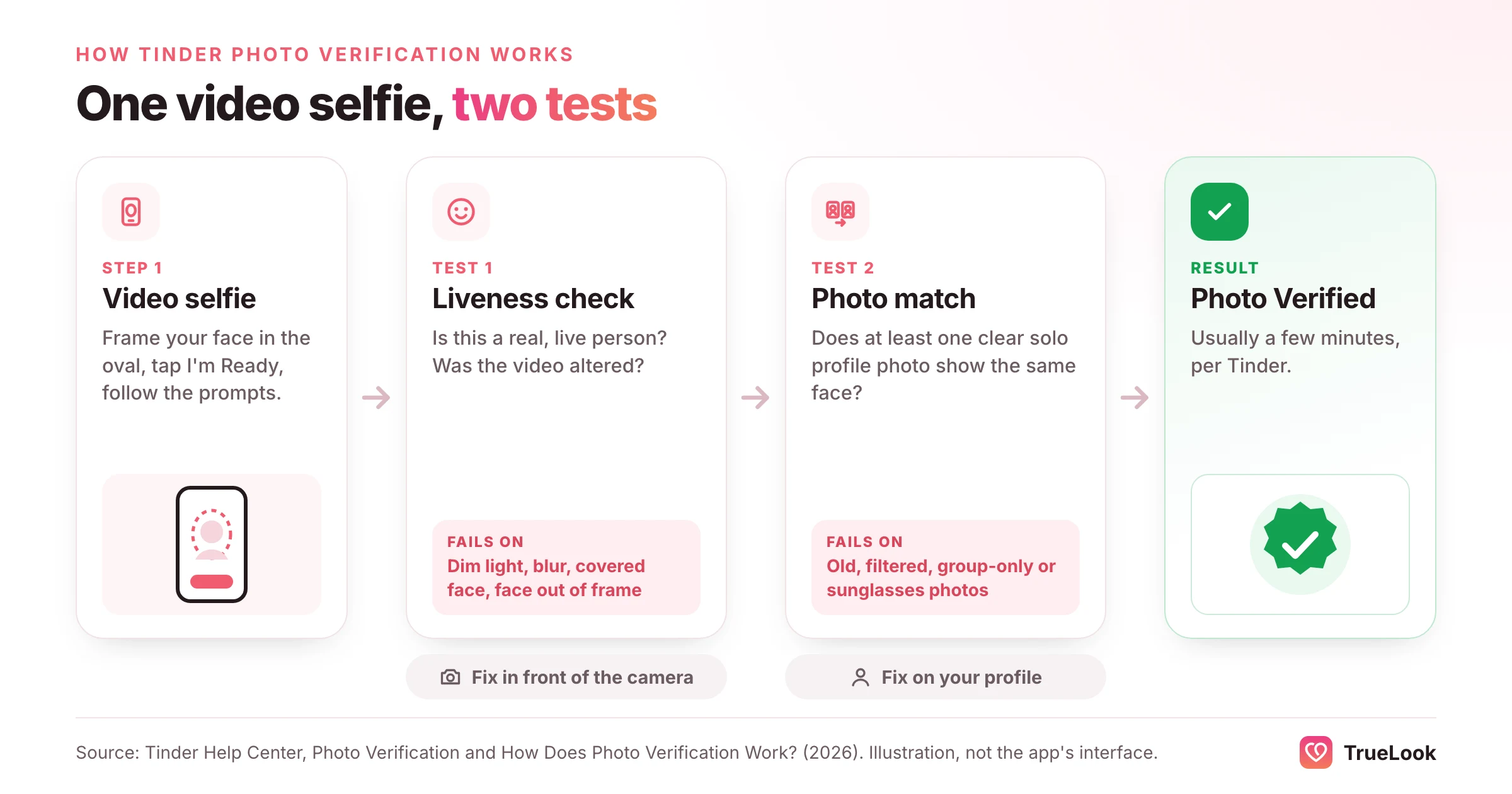
- Tinder runs one video selfie through two tests: a liveness check (is this a real, unaltered person?) and a photo match (does a clear solo profile photo show the same face?). Diagnose which one failed before retrying.
- Tinder's help centre lists five rejection reasons: face not prominent in the frame, face blocked, expression not neutral, video not bright or clear, and a face that does not match the profile photos.
- Optional Photo Verification only costs you the blue badge. Face Check at sign-up and Photo Check on an existing account block normal use until you pass, and an account left locked by Photo Check is closed after two years.
- Covering the face matters more than people expect: in NIST testing, even the best face-matching algorithms went from about 0.3% failures to about 5% when a mask covered the lower face.
- Tinder deletes the video selfie but keeps a face map and face vector for the life of your account, plus two audit images; outside the EEA and Switzerland, deleting that data means deleting the account.
- Match Group says Face Check cut views of profiles later identified as bad actors by 60% and bad-actor reports by 40% in its first markets, which is why it is becoming mandatory in more places.
First: which Tinder check are you facing?
Tinder uses a video selfie in several different features, and the consequences of failing each are very different. Work out which one you hit before you do anything else.
| Check | When you see it | Required? | What failing means |
|---|---|---|---|
| Photo Verification | You tapped the grey checkmark next to your name to earn the blue badge | No | No badge yet. The app works normally and you can try again. |
| Face Check | During sign-up, in regions where Tinder requires it for new accounts | Yes, where rolled out | You cannot finish creating the account. |
| Photo Check | Suddenly, on an existing account, after Tinder's systems or moderators flag unusual activity | Yes | The account stays locked until you pass; Tinder closes it after two years if you never do. |
| Age Check (face photo, Face Check scan or video selfie) | In regions with age-assurance laws, such as the UK, Australia, Brazil and the EEA | Yes, in those regions | Your profile is hidden and likes and messages are blocked until it is resolved, sometimes after manual review or an ID check. |
| ID + Photo Verification | An optional ID upload offered to some users in test markets | No | No ID badge. |
| "Your profile is hidden" notice | Not a selfie check: Tinder cannot detect a face photo on your profile | Yes, in many regions | Others cannot see you, and Likes and Boosts are disabled, until you add a clear face photo. |
Two of these are commonly confused. Tinder's Photo Check page says it appears when Tinder's automated systems or its moderators spot unusual activity on an account, that completing it is the only way back to normal use, and that a person may look at your photos as well. The hidden-profile message, by contrast, is not about your selfie at all. Tinder's hidden-profile article explains that its system only roughly detects whether any photo contains a face, without facial recognition, and hides profiles where it cannot find one.
If you only want the badge, there is no deadline. If you are blocked at sign-up, locked out or hidden, treat it as urgent and work through the steps below before contacting support.
How Tinder photo verification works
The process is the same for the optional badge, Face Check and Photo Check: a short video selfie, then two tests on it.
The steps Tinder lists
According to Tinder's Photo Verification page, to get verified on an existing account you:
- Open the app and go to your profile.
- Tap the grey checkmark beside your name.
- Choose Continue on the "Get Verified" screen.
- Allow camera access if you have not already.
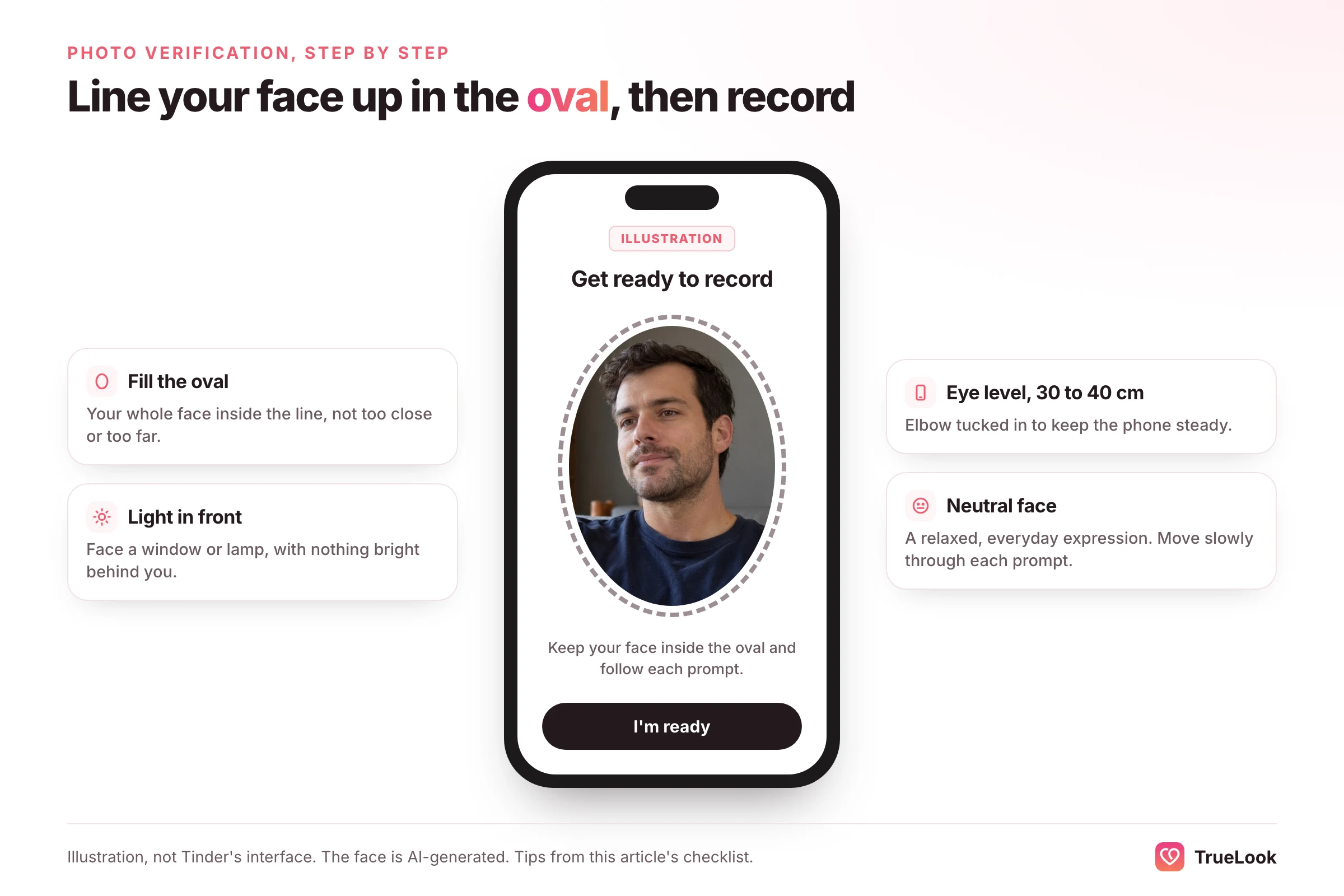
- Line your face up inside the oval and tap "I'm Ready".
- Do what each prompt asks while a brief video is recorded.
Test one: the liveness check
Tinder's explanation of how verification works says it uses facial scanning to confirm that the video shows a real, live person and was not digitally altered or manipulated. This step happens before any comparison with your photos. If the video is dark, shaky, partly covered or your face keeps leaving the frame, it can fail here.
Test two: the photo match
The same technology detects your face in the video and in your profile photos and turns your facial geometry into what Tinder calls a FaceMap and a numeric FaceVector. You get the badge only if at least one profile photo shows you alone, face clearly visible, and resembles the person in the video. One good photo is enough. Zero is an automatic fail, however perfect the selfie.
The FaceVector is also compared against other accounts, so the same face cannot quietly sit behind multiple accounts, and so nobody else can borrow yours. Tinder's terms allow one account per person.
What research says about face matching
Tinder does not publish its error rates, but independent testing of face-matching software explains why some ordinary conditions cause failures.
- Covering the face has a big effect. In 2020, the US National Institute of Standards and Technology (NIST) tested 89 commercial algorithms on masked faces. The most accurate ones failed to match the same person about 0.3% of the time without a mask and about 5% with one; many others failed 20% to 50% of the time. Accuracy dropped further the more of the nose was covered.
- Performance varies between algorithms and between people. A 2019 NIST study of race, age and sex effects found demographic differences in error rates for most algorithms, while noting that different algorithms perform very differently and that false non-matches can usually be fixed with a second attempt.
The practical takeaway: give the software the easiest possible job. Full face visible, even light, steady camera, and a profile photo taken recently in similar conditions.
Tinder's five rejection reasons, and what each means
Tinder's Photo Verification page lists five common reasons a submission is rejected. Here is what each looks like in real life and how to fix it.
| Reason Tinder lists | Which test it hits | Where you fix it | Typical fix time |
|---|---|---|---|
| Face not featured prominently in the frame | Liveness | In front of the camera | Seconds |
| Face blocked or obscured | Liveness and match | In front of the camera | Seconds |
| Expression not neutral | Match | In front of the camera | Seconds |
| Video not bright or clear enough | Liveness | Your room and your phone | Minutes |
| Person in the video does not match the profile photos | Match | Your profile | An hour to a day |
1. Your face is too small in the frame
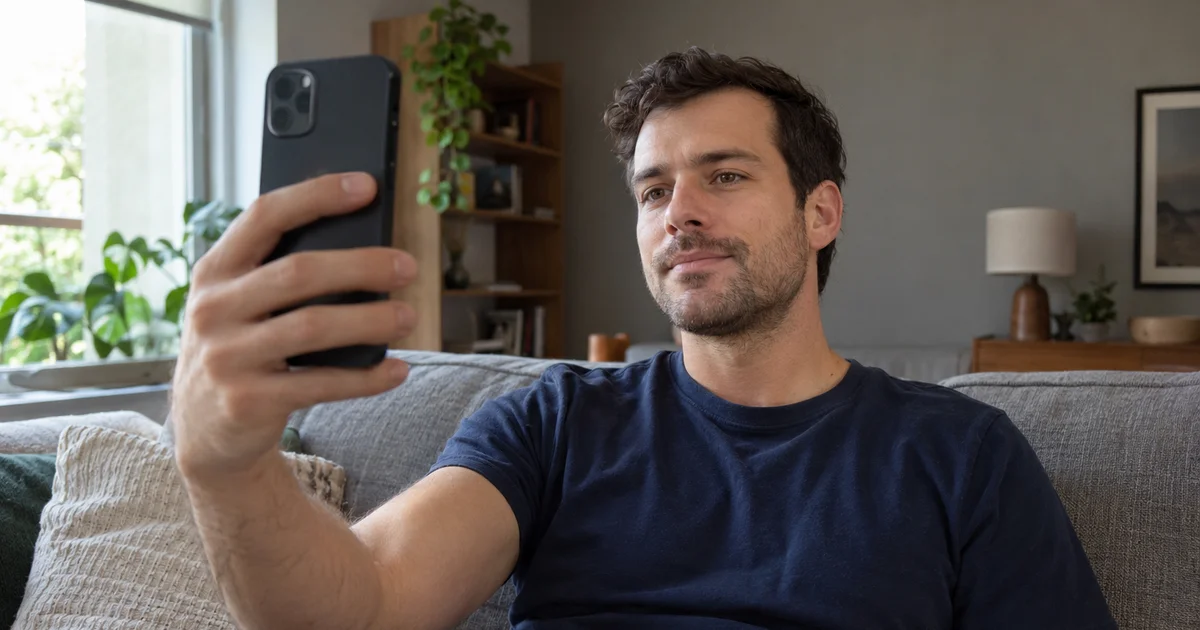
If you hold the phone at full stretch, your face may not fill the oval. If you turn too far while following the head-movement prompts, it can drift out altogether. Keep a slight bend in your elbow so the phone is about 30 to 40 centimetres away, let your face fill most of the guide, and turn your head slowly and only as far as the prompt asks.
2. Something is covering your face
Sunglasses, a cap brim, a mask, a hand, a fringe over your eyes, a thick scarf or a hood can all block parts of the face the software relies on. The NIST mask findings above show how much a partial covering can matter. Take off anything that hides your eyes, nose, mouth or jawline. If you wear clear prescription glasses, try once with them, and if you get a rejection, retry without them in case reflections are the problem.
3. Your expression is not neutral
A wide grin, squinting, raised eyebrows or puffed cheeks changes the measured shape of your face. Keep a relaxed, everyday expression from start to finish, unless the app tells you to do otherwise. Your profile photos can smile; the verification video should not perform.
4. The video was not bright or clear enough
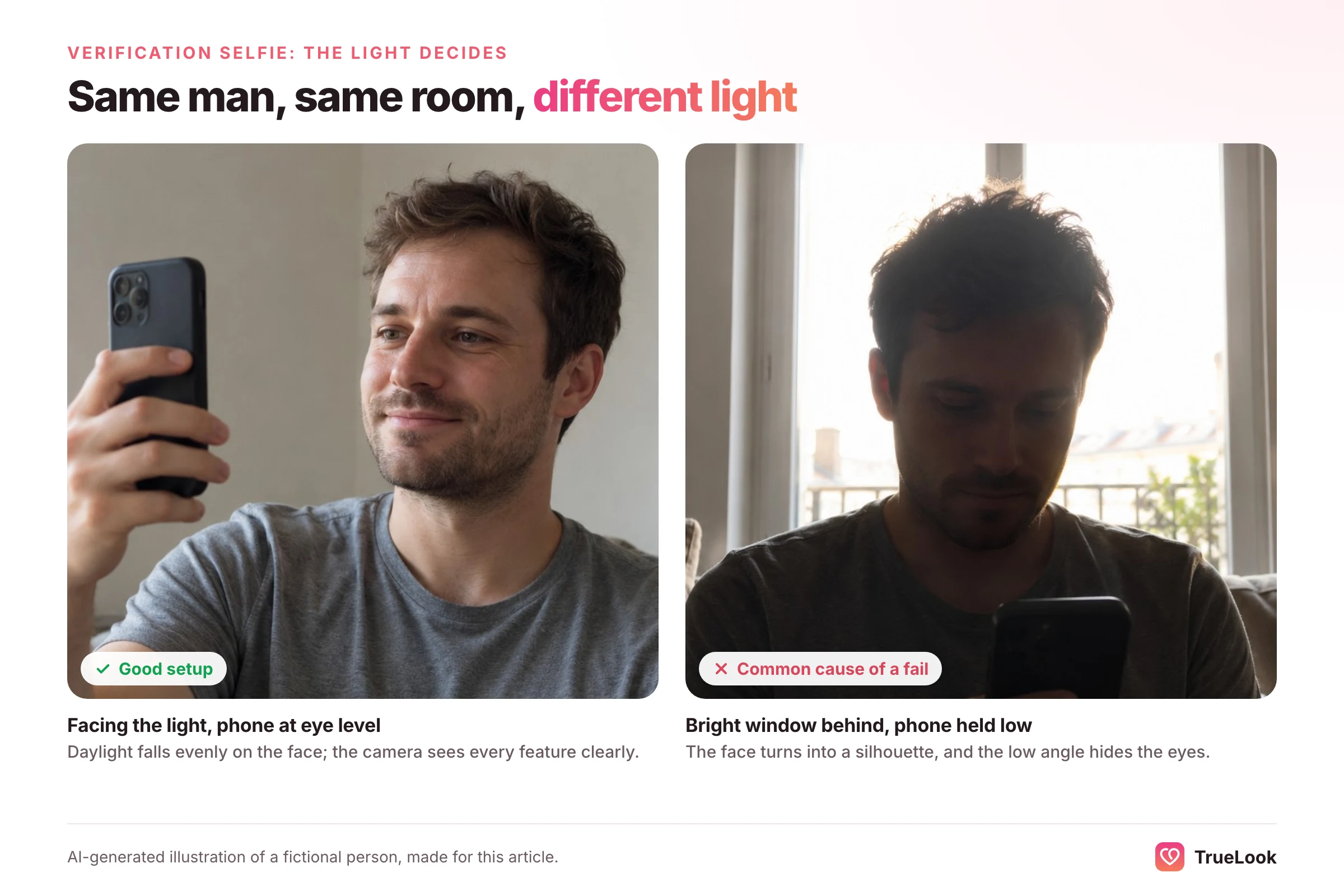
The most common physical cause. A dim room makes the camera raise sensitivity and smooth the image, which smears detail. A bright window behind you turns your face into a silhouette. A smudged front lens softens every frame. Shaky hands add motion blur. Face a window or lamp, wipe the front camera with a soft cloth, and tuck your elbow against your body to steady the phone.
5. You do not match your profile photos
This catches people who did everything right in front of the camera. If your profile is made of photos from years ago, heavily filtered images, group shots, photos in sunglasses, or pictures from before a big change in hair, beard, glasses or weight, the comparison can fail even with a flawless selfie. Retrying will fail the same way until the profile changes. The section on mismatched photos below covers this in detail.
Tinder verification not working: fixes by symptom
The way the failure happens is a strong clue to the cause.
| Symptom | Most likely cause | What to do |
|---|---|---|
| Rejected almost immediately after submitting | Photo match: no clear solo face photo that resembles you | Add a recent, unfiltered solo face photo, ideally in slot 1, then retry |
| Selfie keeps coming out blurry | Smudged lens, low light or hand shake | Clean the lens, turn toward a window or lamp, steady your arm, slow down |
| Camera screen is black or will not open | Camera permission or app problem | Allow camera access in phone settings, close other camera apps, update Tinder, restart |
| Spinning or "processing" for a long time | Stalled upload or app glitch; or a manual review | Force-close, reopen and restart the flow once; then contact support |
| Blue badge disappeared | You deleted or changed photos | Make sure a clear solo face photo is on the profile; re-verify if prompted |
| Locked out and asked for a selfie | Photo Check after unusual activity | Complete Photo Check; there is no in-app way around it |
| Profile hidden, no selfie requested | No face photo detected on the profile | Upload a well-lit close-up with your full face visible |
| Under review after an age check | Automated age estimate was inconclusive | Wait for manual review; complete the ID check if asked |
"Rejected" within seconds
A fast rejection usually means the camera part worked and the comparison did not. Check your profile: is there at least one photo of just you, face clearly visible, no sunglasses, no heavy filter, taken in roughly the last year or two? If not, add one before retrying.
The camera shows a black screen
This is almost never about your face. On iPhone, check Settings, then Tinder, then Camera. On Android, check the app's permissions in Settings. Close video-call and camera apps running in the background, update Tinder from your app store, and restart the phone.
Stuck processing
Tinder says verification should only take a few minutes. If the screen is still spinning well beyond that, close the app completely, reopen it and start again; Tinder's help centre confirms you can exit the flow and restart if capture stalls. Do not retry over and over in a short space of time. Restart once, then contact support with details.
The badge vanished
Tinder's Photo Verification page says you may need to repeat verification if you delete one or more profile photos, and that any new photo you upload after verifying is subject to continued verification and can affect your status. Swapping in a photo that looks quite different from you, or removing your only clear solo face photo, can cost you the badge.
How to fix a failed Tinder verification, step by step
Go through the list from the top. Every step rules out a frequent cause, and together they cover each of the five reasons Tinder gives.
- Identify the check. Optional badge, sign-up Face Check, Photo Check lock, or an age check. This tells you how urgent it is and whether support may need to be involved.
- Fix the profile first. Upload a current photo of just you with your face easy to see, and make it photo one. Remove filters, sunglasses and hats from it. Move group shots further down.
- Update Tinder and check camera permission. Old app versions and blocked permissions cause black screens and stalls.
- Set up the light. Face a window in daylight or a lamp at face height. Nothing bright behind you.
- Prepare the camera. Wipe the front lens. Hold the phone at eye level, elbow slightly bent and tucked in.
- Clear your face. Hair off the eyes, hat off, mask off, glasses off if they reflect.
- Record calmly. Neutral expression, slow head movements, follow each prompt fully before moving on.
- Restart cleanly if it stalls. Exit, force-close the app, reopen and begin again. Once.
- Contact Tinder if it still fails. Use the contact form in Tinder's help centre and describe exactly what you see (see the template below).
The 60-second pre-flight checklist
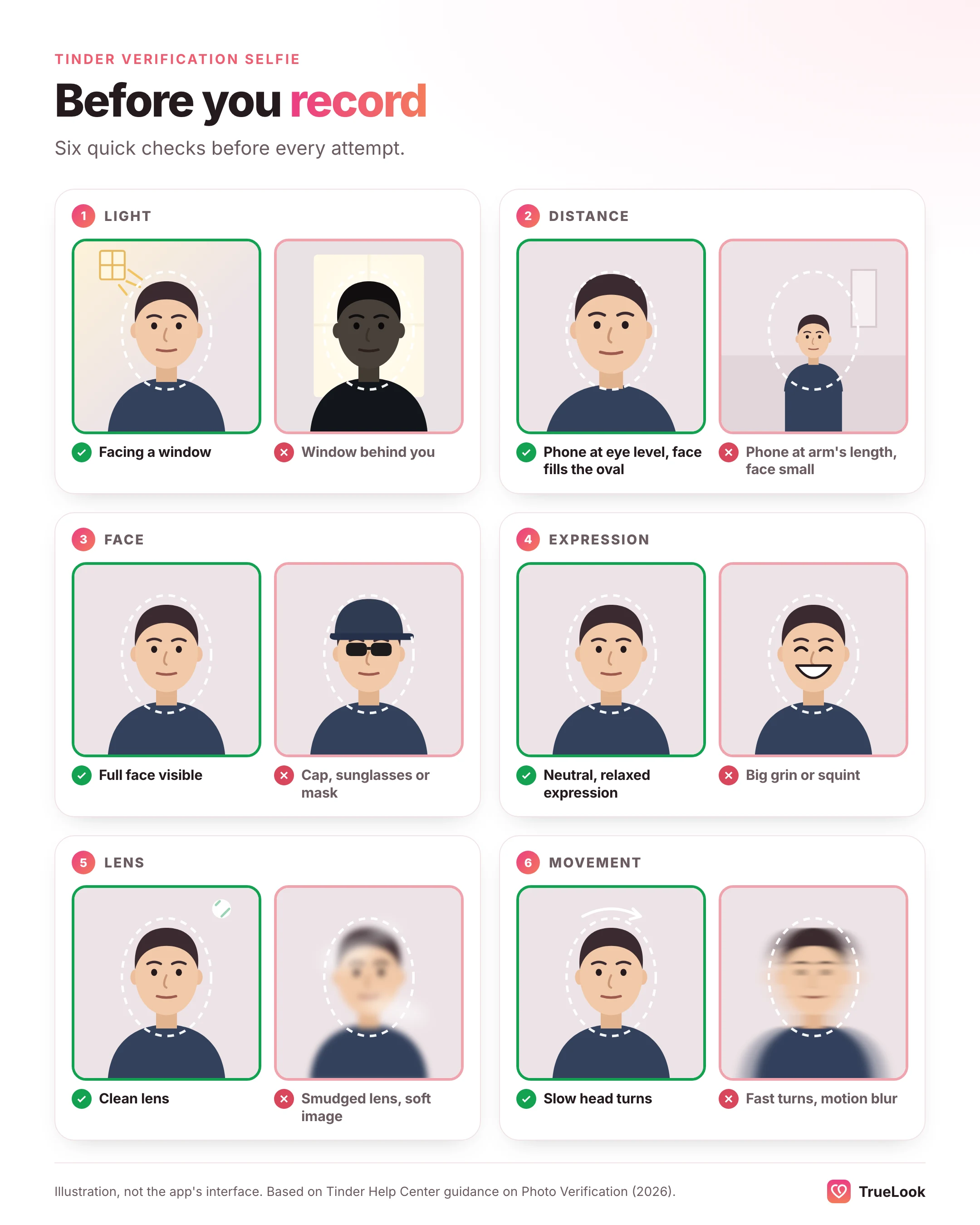
Before each attempt, check:
- Your profile includes a current photo of only you, face plainly visible.
- That photo has no sunglasses, mask, hat brim shadow or strong filter.
- Tinder is up to date and has camera access.
- You are facing a window or lamp, with no bright light behind you.
- The front lens is clean.
- The phone is at eye level, 30 to 40 centimetres away, and your face fills the oval.
- Your expression is neutral and relaxed.
- You will move slowly through every prompt.
When the selfie is fine but your profile photos are not
Many people fail with a perfect selfie because nothing on their profile looks like them today. A single matching photo of you alone is all Tinder asks for. Profiles built from old holidays, nights out with friends, sunglasses shots and filtered images often contain none.
What counts as a clear solo face photo
- You are the only person in the frame, or clearly the only main subject.
- Your whole face is visible, roughly facing the camera, not in profile.
- Your face takes up a reasonable share of the image, not a tiny figure in a landscape.
- The light is even enough to see your features; no deep shadow across half the face.
- No sunglasses, mask or hand over the face, and no heavy beauty filter.
Appearance changes that commonly cause mismatches
| Change since your photos | Risk of mismatch | What to do |
|---|---|---|
| New haircut or colour | Low | Usually fine; update photos for honesty anyway |
| Grew or shaved a full beard | Medium | Add at least one photo with your current facial hair |
| Started or stopped wearing glasses | Medium | Add a current photo in your usual look |
| Significant weight change | Medium to high | Replace older photos with recent ones |
| Photos more than three or four years old | High | Take new photos before retrying |
| Heavy filters or face-reshaping edits | High | Use unedited or lightly colour-corrected originals |
| Gender transition in progress | Variable | Add a recent photo that reflects how you look now; contact support if repeated failures follow |
Example: fixing a profile that keeps failing
This is an illustrative example, not a real user.
Before: a 31-year-old with five photos: a ski trip in goggles, a wedding group photo of eight people, a festival shot in sunglasses, a filtered selfie from four years ago with longer hair, and a photo of his dog. He has a full beard now. Every attempt is rejected within seconds.
Diagnosis: the selfie is fine; there is no clear, current solo face photo. The closest candidate is the old filtered selfie, without the beard he has today.
After: he takes a chest-up portrait by a window with a phone on a timer, beard and current haircut visible, no filter, and puts it first. He keeps the ski and festival photos further down. Verification passes on the next attempt. Our guide to the best photos for Tinder explains how to shoot that kind of portrait on your own, and why it also helps matches.
Tinder's own Photo Enhance tool
Tinder is testing a feature in some markets called Photo Enhance, which suggests fixes for blurry, dark or low-clarity profile photos. Tinder says it includes an automatic check to help confirm the enhanced photo still looks like you. That tells you where the line sits for Tinder: improving the technical quality of your real photo is fine; changing who you look like is not.
How long does Tinder photo verification take?
For the standard check, Tinder says processing should take only a few minutes, and once you pass, you get a notification and the blue Photo Verified check appears on your profile. Other situations take longer:
| Situation | Typical timing, per Tinder |
|---|---|
| Photo Verification (badge) | A few minutes |
| Photo Check where a moderator looks at your photos | No published timeline |
| Age check, manual ID review | Up to 24 hours |
| Age check, automated ID review | Faster than manual |
| Returning within 30 days of deleting your account | Face Check not repeated; stored data reused |
| Returning after 30 days | Face Check required again |
The 24-hour figure comes from Tinder's Age Checks page, which describes ID review in regions with age-assurance laws. The 30-day rule comes from Tinder's restore-your-profile page: if you come back within 30 days with your previous login, Tinder uses your stored verification data instead of asking for a new Face Check, and you get the badge if your stored face map matches your new photos. After 30 days that data has been deleted, so you start again. Note that the badge itself is not restored when you delete and recreate an account.
Be sceptical of guides that quote exact hour counts for Photo Check reviews. Tinder does not publish one.
If your account is locked, hidden or under review
Photo Check lock
Tinder describes Photo Check as a response to unusual activity detected by its automated systems or moderators; it does not publish the specific triggers. Completing it unlocks the account. Tinder's Photo Check page says that if you choose not to complete it, your account will be closed after two years, and you can still download your data during that time.
Age check under review
In regions with age-assurance laws, Tinder estimates age from your face photo or audit images. If it cannot confirm you are an adult, a trained agent reviews the account, sometimes asking for an ID check. Your profile is hidden while that happens. If a reviewer decides you are likely under 18 or you fail the ID check, the account is banned, and Tinder directs people to its appeals process.
Profile hidden for no face photo
Upload a well-lit close-up with your full face visible. Tinder says it will consider exceptions to the face photo requirement for legitimate religious and safety reasons, and asks people with those concerns to contact it.
What to send support
Support requests get resolved faster when they are specific. A template:
"I'm trying to complete [Photo Verification / Face Check / Photo Check] on [iPhone 15, iOS version / Pixel 8, Android version], Tinder version [x]. I've updated the app, allowed camera access, and tried [number] times in daylight with my full face visible. Each time I see [exact message, or describe the screen]. My first profile photo is a recent, unfiltered solo photo. Can you help?"
Why Tinder is making more people verify
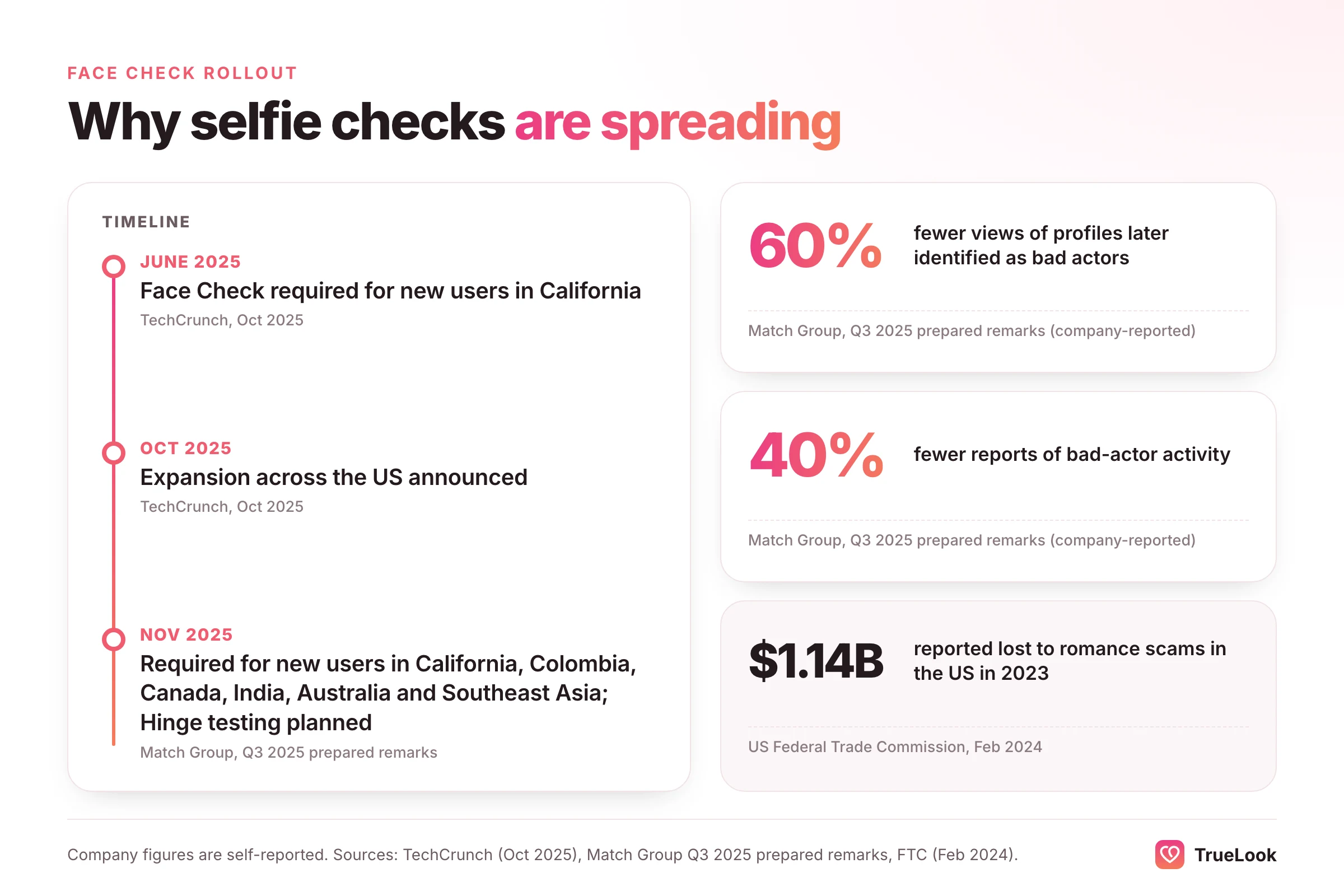
If it feels as if Tinder suddenly asks for selfies more often, that is because it does. New users in California have had to complete Face Check since June 2025, and in October 2025 TechCrunch reported that Tinder was expanding it across the US, after earlier launches in Colombia and Canada. In its Q3 2025 prepared remarks to investors, Match Group said Face Check was required for all new users in California, Colombia, Canada, India, Australia and Southeast Asia, and reported a 60% reduction in views of profiles later identified as bad actors and a 40% drop in reports of bad-actor activity. It also said it planned to test Face Check on Hinge and expand it across its other apps.
The motivation is not hard to see. The US Federal Trade Commission received 64,003 romance scam reports in 2023, with reported losses of $1.14 billion and a median loss of $2,000, the highest of any impostor scam type. Fake profiles built on stolen photos are a core tool of those scams, and a live face check makes them harder to run at scale.
Is Tinder photo verification safe? What Tinder keeps
Many people hesitate because they are unsure what happens to their face data. Tinder's verification data page is unusually specific. In summary:
| Data | What Tinder says it does | How long it is kept |
|---|---|---|
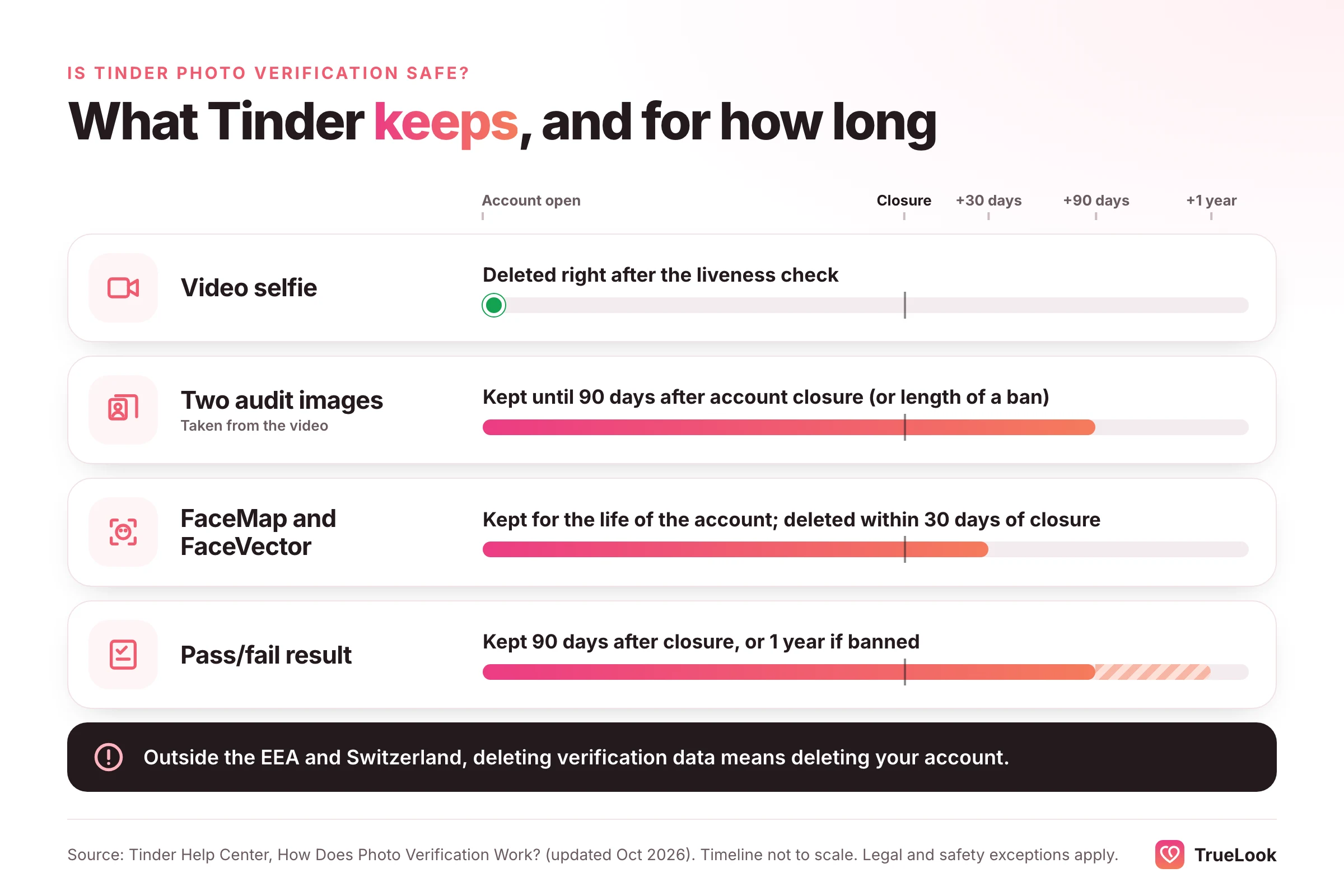
| Video selfie | Checked for liveness, then promptly deleted; never added to your profile | Deleted after the check |
| Two audit images from the video | Used to audit and manage the feature and confirm likeness; in some regions also to estimate age | 90 days after account closure, or the length of a ban |
| FaceMap and FaceVector | Used to check new profile photos and detect other accounts using your likeness | Life of the account; deleted within 30 days of closure, with legal and safety exceptions |
| Verification result (pass or fail) | Record of the outcome | 90 days after closure, or 1 year if banned |
Other points from the same page: verification data is stored on Tinder's Amazon Web Services servers, may be shared within the Match Group family of apps to help identify banned users, and, for US residents, is not "sold" or "shared" as state privacy laws define those terms. Tinder processes it on the basis of consent. You can ask Tinder to delete the two audit images by writing to its community team.
One condition is easy to miss. Unless you live in the EEA or Switzerland, removing your verification data means removing your whole Tinder account. In the EEA and Switzerland, you can delete it in settings, but your matches may be told you are no longer Photo Verified. In regions where Face Check is mandatory, the Face Check FAQ makes the same point: you cannot delete the data and keep the account.
Whether that trade is worth it is a personal decision. For many people the badge, and access to the app in mandatory regions, is worth a face map tied to an account they can delete. For others, it is not.
Can Tinder photo verification be fooled?
The live part is designed to be hard to fool: the liveness check looks for signs that the video was altered or is not a real person in front of the camera, and the face vector is compared across accounts to catch one face on several profiles.
The photo part is looser, and that has drawn criticism. In April 2026, Thred reported on a content creator who found impersonators using real men's photos at the end of verified profiles, and who tried photoshopped and AI face-swapped versions of himself: both Tinder and Hinge let them through provided he was still recognisable, while Bumble rejected most. Because only one matching photo is required, other photos on a profile are not all held to the same test.
Two conclusions follow. For honest users, the test is about likeness rather than editing, so a well-lit, lightly corrected photo of your real face is fine. For safety, a blue badge is a useful signal but not proof of identity. Tinder itself says the checkmark is not a guarantee, and the FTC recommends running a reverse image search on a match's photos if anything feels off, and never sending money to someone you have not met in person.
AI photos and Tinder verification
Because the photo match compares your live face with your profile photos, the question for any AI photo is simple: does it still look like you? Images of another person violate Tinder's rules outright. Images generated from your own face can resemble you closely or drift away from you, depending on the tool and the settings. Photos that reshape your jaw, enlarge your eyes, smooth your skin into plastic or change your build produce exactly the mismatch the comparison looks for, and they set up a disappointing first date even if they slip through.
TrueLook makes photos from four of your own selfies using its HyperReal™ method, with the aim of keeping your real features. If you use any AI tool, ours included, keep at least one ordinary, recent phone photo of your face on the profile, choose generated images that a friend would instantly recognise as you, and remember that every verification decision is Tinder's. Our page on AI Tinder photos made from your own selfies explains how TrueLook works, our comparison of AI Tinder photo generators covers the alternatives, and our guide on whether AI photos are allowed on dating apps sets out each app's rules.
Common verification mistakes, and the fix for each
| Mistake | Why it fails | Fix |
|---|---|---|
| Retrying again and again with the same profile | The photo match fails the same way each time | Add a current solo face photo first |
| Recording with a window behind you | Face in silhouette; liveness and match both struggle | Turn around so the light is on your face |
| Keeping a cap or sunglasses on | Covers features the software measures | Remove them for the video |
| Smiling widely or pulling faces | Changes measured face shape | Neutral, relaxed expression |
| Rushing the head-turn prompts | Motion blur and face leaving the oval | Slow, small movements |
| Only filtered or edited profile photos | No photo resembles the live face closely enough | Upload an unfiltered recent photo |
| Deleting your only clear face photo after verifying | Can trigger re-verification or loss of the badge | Keep at least one clear solo face photo at all times |
| Using an old app version | Bugs, black screens, stalled uploads | Update before trying |
Myths and facts about Tinder verification
| Myth | Fact |
|---|---|
| "Tinder keeps my verification video." | Tinder says the video is promptly deleted; it keeps two audit images and a face map. |
| "All my photos must match." | Tinder requires at least one clear solo face photo that matches, though new photos remain subject to checks. |
| "A blue check proves someone's identity." | Tinder says the badge is not a guarantee of authenticity or safety. |
| "Failing once flags my account." | For the optional badge, Tinder says you can exit the flow and try again. Tinder describes lockouts (Photo Check) as a response to unusual activity, not as a penalty for a failed badge attempt. |
| "Verification is the same everywhere." | It depends on region: Face Check, age checks and the face photo requirement are rolled out country by country. |
| "A newer phone will fix it." | Light, framing and a matching profile photo matter far more than the device. |
The honest limits
- Tinder decides, not you or us. No setup or photo guarantees a pass. If you have done everything here and still fail, support is the only route.
- Some people fail more often through no fault of their own. NIST's research shows face-matching error rates vary across algorithms and demographic groups. Facial differences, recent surgery, identical twins and people mid-transition may also run into repeat failures. Contact support with details rather than retrying endlessly.
- Policies change. Tinder updated several of the help pages cited here in October 2026, and rollouts differ by country. Check the current page for your region.
- Verification is about access, not attraction. Passing gets you a badge or unlocks the app. It does not change who swipes right; if things are quiet after you are verified, our guides on why you get no matches on Tinder and how to get more matches on Tinder cover what to do next.
Frequently asked questions
Why did my Tinder photo verification fail?
Tinder lists five common reasons: your face was not prominent in the frame, it was blocked or obscured, your expression was not neutral, the video was not bright or clear enough, or the face in the video did not match your profile photos. A quick rejection usually points to the last one, which you fix by adding a recent, unfiltered solo face photo.
How does Tinder verify photos?
You record a short video selfie. Tinder first checks that it shows a real, live person and was not altered, then converts your facial geometry into a face map and compares it with your profile photos. You pass if at least one profile photo is a clear solo face photo that matches.
Why is Tinder making me verify my photos?
Either you are a new user in a region where Face Check is mandatory, your account triggered Photo Check after Tinder's systems or moderators detected unusual activity, or you are in a region with age-assurance laws. Photo Check and Face Check must be completed to use Tinder normally; the blue-badge Photo Verification is optional.
How long does Tinder photo verification take?
Tinder says a standard verification should take only a few minutes, after which you are notified and the Photo Verified checkmark appears. A Photo Check that involves a moderator has no published timeline, and manual ID reviews for age checks can take up to 24 hours.
What happens if you fail Tinder photo verification?
It depends on the check. A failed badge attempt changes nothing except that the blue check is missing, and you may try again whenever you like. A failed Face Check leaves sign-up unfinished. An unfinished Photo Check keeps the account locked, and Tinder closes such accounts after two years.
How do I redo Tinder photo verification?
Leave the flow, close the app fully, open it again and start from the grey check next to your name on your profile. First, though, upload a current photo of only you with your face in full view; an unchanged profile tends to produce the same rejection.
Can I wear glasses for Tinder verification?
Sunglasses should always come off, since Tinder lists a blocked or obscured face as a rejection reason. Clear prescription glasses are often fine, especially if you wear them in your profile photos, but if you are rejected, retry without them in case reflections are interfering.
Will AI photos pass Tinder photo verification?
Tinder checks whether a profile photo matches the face in your live selfie, so what matters is resemblance. Photos of another person break Tinder's rules, and AI photos that reshape your features are likely to fail the match. Keep at least one ordinary recent photo of your face on the profile; the decision is always Tinder's.
Sources
- Photo Verification, Tinder Help Center (2026). https://www.help.tinder.com/hc/en-us/articles/360034941812-Photo-Verification
- How Does Photo Verification Work?, Tinder Help Center (2026). https://www.help.tinder.com/hc/en-us/articles/4422771431309-How-Does-Photo-Verification-Work
- Photo Check data and privacy information, Tinder Help Center (2026). https://www.help.tinder.com/hc/en-us/articles/26147205007885-Photo-Check-data-and-privacy-information
- My profile is hidden, Tinder Help Center (2026). https://www.help.tinder.com/hc/en-us/articles/26151863213837-My-profile-is-hidden
- Restore your profile, Tinder Help Center (2026). https://www.help.tinder.com/hc/en-us/articles/17623691184781-Restore-your-profile
- Photo Enhance, Tinder Help Center (2026). https://www.help.tinder.com/hc/en-us/articles/45822968057357-Photo-Enhance
- Age Checks at Tinder, Tinder Help Center (2026). https://www.help.tinder.com/hc/en-us/articles/41083211035917-Age-Checks-at-Tinder
- Face Check FAQ (mandatory liveness check), Tinder (current). https://policies.tinder.com/faq-mandatory-liveness-check/intl/en/
- Tinder will require new users in the US to verify their identity with a selfie, TechCrunch (2025). https://techcrunch.com/2025/10/22/tinder-will-require-new-users-in-the-us-to-verify-their-identity-with-a-selfie/
- Q3 2025 Match Group Prepared Remarks (Form 8-K, Exhibit 99.2), Match Group via SEC EDGAR (2025). https://www.sec.gov/Archives/edgar/data/891103/000089110325000179/mtch8-k20251104ex992.htm
- NIST Launches Studies into Masks' Effect on Face Recognition Software, National Institute of Standards and Technology (2020). https://www.nist.gov/news-events/news/2020/07/nist-launches-studies-masks-effect-face-recognition-software
- NIST Study Evaluates Effects of Race, Age, Sex on Face Recognition Software, National Institute of Standards and Technology (2019). https://www.nist.gov/news-events/news/2019/12/nist-study-evaluates-effects-race-age-sex-face-recognition-software
- "Love Stinks" – when a scammer is involved, Federal Trade Commission (2024). https://www.ftc.gov/node/82596
- Facial verification on dating apps is failing miserably, Thred (2026). https://thred.com/tech/facial-verification-on-dating-apps-is-failing-miserably/
Get better dating photos from your own selfies
TrueLook’s HyperReal™ method turns 4 selfies into hyperrealistic photos of you for Tinder, Hinge and Bumble.
AI Tinder photos made from your selfies
Written by the TrueLook Team
TrueLook makes hyperrealistic dating photos from your own selfies. Our articles cover dating profile photos, the apps and how to get noticed.