
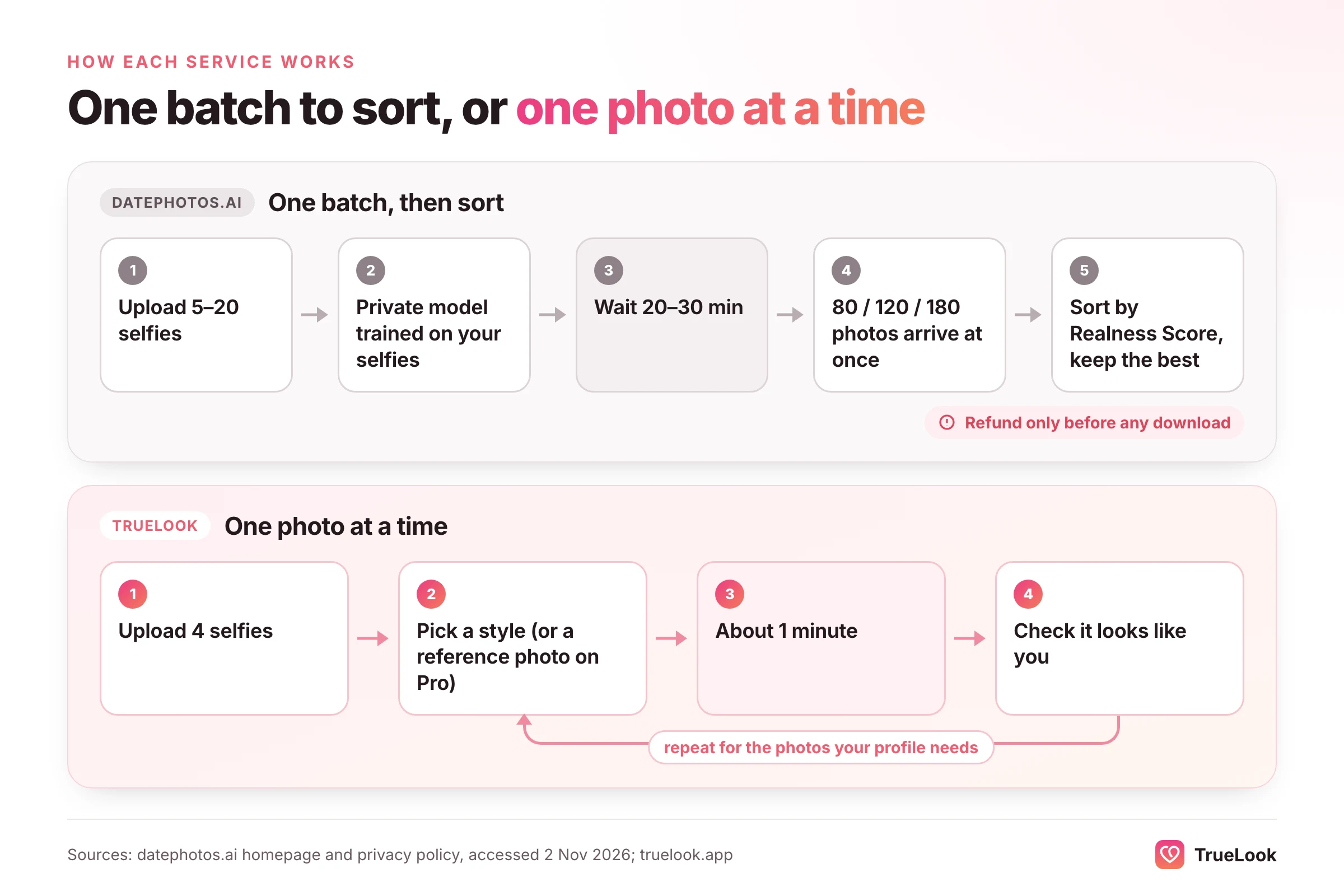
DatePhotos.AI sells one large batch: you pay once, upload 5 to 20 selfies and get 80, 120 or 180 AI photos about half an hour later, then sort them by its own "Realness Score" and keep the best. TrueLook is also paid once, with no subscription, but it works the other way round: you make photos one at a time from 4 selfies, choosing each style, with your face kept the same and only the place, outfit and light changing. If you want a big batch for $29 and don't mind sorting it, DatePhotos.AI is the cheaper way to get volume. If you want to choose every scene yourself and see each photo in about a minute, TrueLook fits better.
This page sets out what DatePhotos.AI is, what each package costs at the time of writing (November 2026), what its privacy policy and refund terms actually say, what users report in public, and how the two services compare on every point that matters for a dating profile. Every fact about DatePhotos.AI below comes from its own pages or a public source that we opened on 2 November 2026, listed at the end. We have not run a side-by-side test of the two services, so you won't find scores or "usable rates" here.
What DatePhotos.AI is and how it works
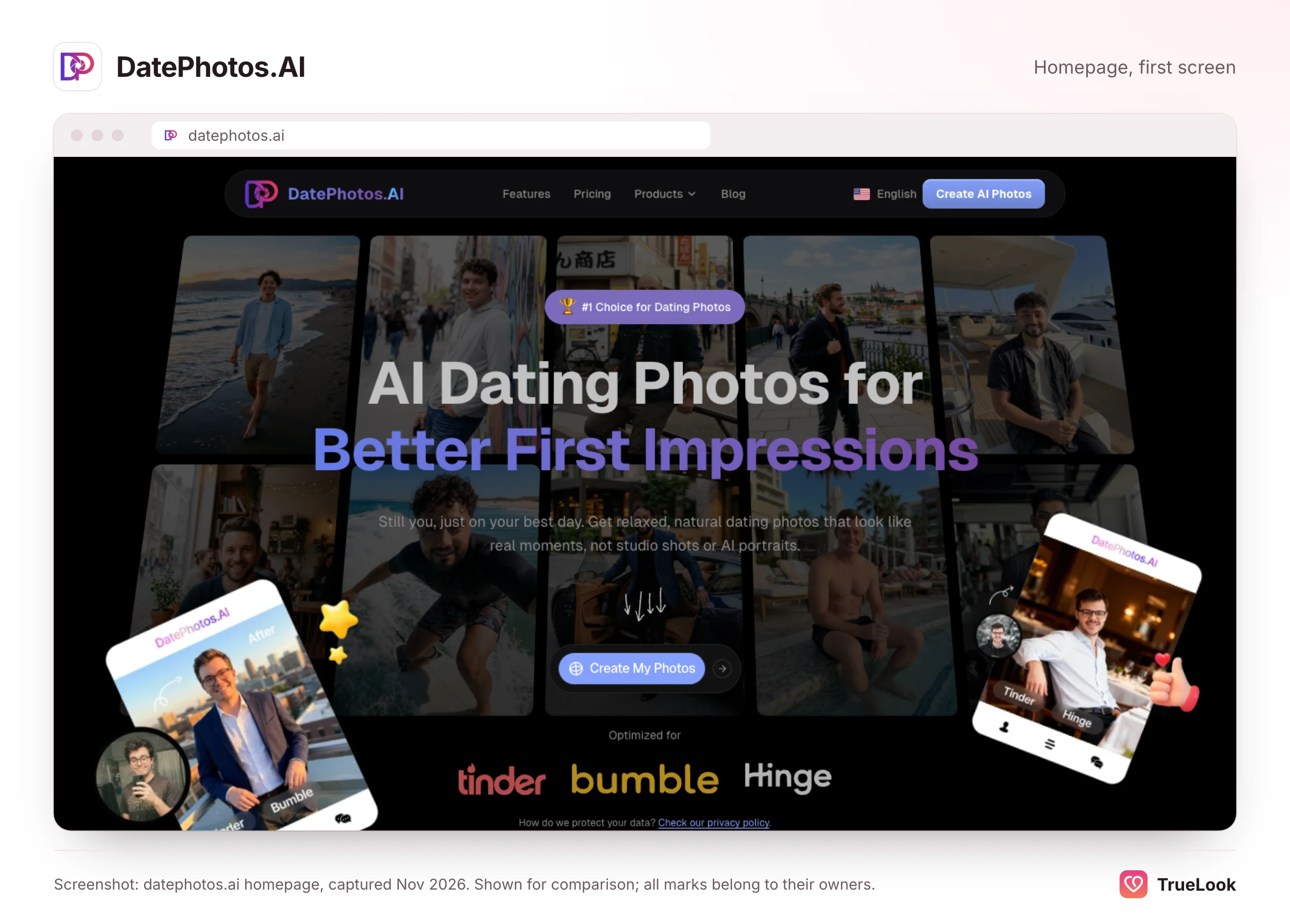
DatePhotos.AI is a browser-based AI dating photo generator aimed at Tinder, Bumble and Hinge. Its homepage describes the process in three steps: upload selfies you already have, choose the app you're building for, and receive a batch of generated photos by email when they're ready.
Who runs it
The company is young and small. Its terms of service, last updated 30 October 2026, name a limited liability company in Cheyenne, Wyoming, as the operator and set Wyoming law as the governing law. The About page names one founder, with a background in front-end development and product design. We couldn't find a launch date on the company's own pages, but its public record starts in 2026: Global Dating Insights covered its Realness Score launch in May 2026, based on the company's own press release, and the oldest posts we could see on its blog date from July 2026.
What you upload
The homepage asks for 5 to 20 selfies, although one of its FAQ answers says 10 to 20, so plan on uploading at least 10 if you have them. It asks for a spread of angles, lighting, expressions and outfits, and tells you to avoid heavy filters, sunglasses, hats that hide your face, blurry shots and photos with other people in them. Those are sensible rules that apply to every tool of this kind, TrueLook included.
What happens next
According to its privacy policy, your selfies are used "to train your own private AI model". That model then generates photos of you across a set of scenes, with three or four poses per scene depending on the package. Delivery is quoted at "20-30 minutes from upload to download, on every plan", with a progress bar and an email when the batch is done.
Each photo then gets a 0 to 100 Realness Score. You can sort the gallery by score and download only the ones that look real to you. Paid packages also include a number of free single-photo regenerations and, according to the terms, one free full redo within 30 days if you're unhappy with the overall result.
What else it sells
The terms describe two other products. "Dating Profile Pro" is an optional monthly subscription for an AI dating coach and related tools, at $19.90 a month for 40 credits or $49.90 a month for 240 credits, and the terms say plainly that it "does not include Photo Packages". The same terms list iOS subscriptions at $4.99 a week or $39.99 a year. Those belong to a companion iPhone app: the DatePhotos AI App Store listing, first released on 31 May 2026, describes a photo scorer, chat-opener helper and profile audit, not a photo generator. The photo packages are bought on the website.
DatePhotos.AI pricing in detail
At the time of writing (November 2026), DatePhotos.AI's pricing page lists three one-time photo packages. There is no subscription for photos: you pay once per batch, and if you want another batch later, you buy another package.
| Package | Price (one-time) | Photos | Scenes | Poses per scene | Free regenerations | Resolution | Price per photo |
|---|---|---|---|---|---|---|---|
| Basic | $29 | 80 | 25 | 3 | 5 | 1K standard | $0.36 |
| Pro ("most popular") | $49 | 120 | 35 | 4 | 10 | 1K standard | $0.41 |
| Ultimate | $79 | 180 | 45 | 4 | 20 | 2K enhanced | $0.44 |
Price per photo is simply the package price divided by the number of photos. Two things stand out. First, the price per photo goes up, not down, as you move to bigger packages, which is unusual: you're paying for more scenes, more regenerations and, on Ultimate, a higher resolution, not for cheaper photos. Second, all three packages are delivered in the same 20 to 30 minutes.
The site isn't fully consistent on scene counts. The homepage advertises "40+ scene variations", the pricing section mentions 45 scenes, and the plan comparison shows 25 to 45 depending on the package. Read it as 25 scenes on Basic, 35 on Pro and 45 on Ultimate. The Pro card also says "top 30 picks selected", while the comparison table shows a different figure, so don't rely on the exact number of curated picks. Payment is handled by a third-party merchant of record, and the pricing page lists card, wallet and PayPal.
The refund policy
DatePhotos.AI advertises a 7-day money-back guarantee. Its refund policy, last updated 14 September 2026, attaches three conditions that matter:
- Within 7 days (168 hours) of the original purchase.
- First order only. Repeat orders aren't covered except in "exceptional circumstances".
- Nothing downloaded. "Once a photo is downloaded, the project is considered delivered and is no longer eligible for refund."
The last condition is the one to plan around. You can look at the whole batch in your dashboard, but if you download even one photo, the refund is gone. So review everything in the browser first, and decide before you save anything. If the batch is close but not right, the free regenerations and the 30-day full redo are your fallback rather than a refund. You request a refund by emailing support with the subject "Refund Request", and the policy says approved refunds take 5 to 10 business days to appear.
TrueLook's refund policy is also conditional, and it's fair to say so. It runs for 14 days instead of 7, but you must have used less than 20% of your credits, and the photos must have been on a live dating profile for 7 days in a row with reasonable search settings. TrueLook packs are one-time payments, so there's no renewal to cancel either. The full conditions are on our refund page. Neither policy is a no-questions-asked guarantee, so read the one you're buying under.
Output and realism: what DatePhotos.AI shows
The homepage shows a grid of example scenes (beach, city streets, a yacht, a coffee shop, sports, a luxury car, a pool resort, a gym, a professional portrait) and a before-and-after carousel that turns flat indoor selfies into a golden-hour skyline, an outdoor portrait, a café, an upscale restaurant and a graffiti wall. These are the company's chosen samples, so they show the best case, not the typical one. That is true of every tool's marketing, ours included.
The batch-and-sort model
The core idea is volume. Generating 80 to 180 photos and letting you pick means you don't need every photo to be good, only enough of them. A dating profile on Tinder or Hinge holds six photos, so even a modest share of strong results can fill a profile. The cost is your time: you have to look closely at every photo for small errors in your face, hands, teeth or background, and you have to decide which ones still look like you on an ordinary day.
Reviewers on Trustpilot describe exactly this trade. Several say that some photos missed but the good ones were enough, and one October 2026 review says some images looked "overly polished" even though the face was right in the photos the reviewer kept. One negative review from September 2026 describes inaccurate likeness and obviously AI-looking results. The company replied, acknowledged a bug and refunded the order.
What the Realness Score does and doesn't tell you
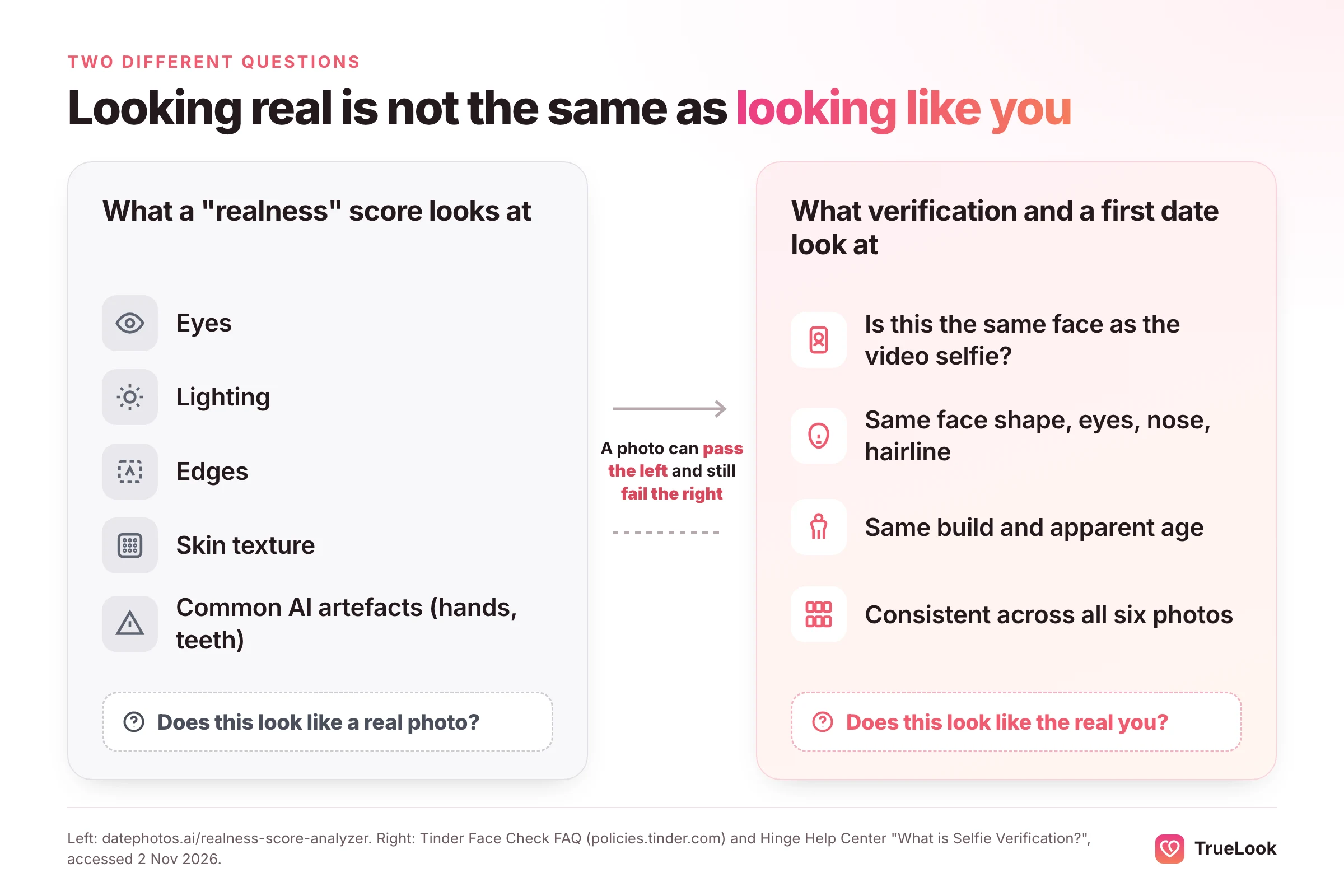
DatePhotos.AI's free Realness Score analyzer explains the method: it normalises the image, asks a vision model to look for human-versus-AI cues (eyes, lighting, edges, texture), runs some checks for common artefacts, and returns a score. It calls 85 to 100 "excellent" and says anything under 70 is "likely to be questioned or flagged". It also describes these bands as "practical thresholds, not hard rules".
That's a useful filter for spotting obvious glitches, and it's more transparency than many competitors offer. But keep two limits in mind. The score is calculated by the same company that made the photo, and the page doesn't say how it was checked against real dating-app decisions. More importantly, a score about how "human" a photo looks doesn't measure the thing that matters most on a date: whether the photo looks like you. A perfectly natural-looking photo of someone who is 10% more chiselled than you scores well and still disappoints in person.
Why likeness matters more than polish on dating apps
Research shows that people can't reliably tell modern AI faces from real ones. In a 2022 study in PNAS, Sophie Nightingale and Hany Farid found that AI-synthesised faces were indistinguishable from real faces and were rated as more trustworthy. So the real risk with AI dating photos isn't that a match spots "AI" at a glance. The risks are these:
- Verification. Tinder's Face Check FAQ says the video selfie is used to check whether you "appear to be the same person" as in your profile photos. Hinge's Selfie Verification is "based on the photos on your profile at the time of verification", and changing photos afterwards "may result in a loss of verification". A photo that drifts from your real face is the one most likely to cause trouble.
- App rules. Hinge's prohibited content page bans using "AI-generated content to mislead others", and Bumble's community guidelines ban photos with "exaggerated or unnatural digital effects" when people can't tell it's you. Bumble also added an option to report profiles that use AI-generated photos. Photos that look like you in a new place are a very different thing from photos that make you look like someone else.
- The first date. If a match feels misled when you meet, no photo score helps.
Neither DatePhotos.AI nor TrueLook can promise that a particular app will verify you; each app makes its own decision. DatePhotos.AI's FAQ doesn't address verification at all. Our guide to whether AI photos are allowed on dating apps goes through each app's rules in detail, and what to do if Tinder photo verification fails covers the fixes.
Privacy and data: what each policy says
DatePhotos.AI's privacy policy, last updated 22 October 2026, is more specific than most in this category. Here is what it says, in summary:
- Training. Your photos are used "only to train your own private AI model and to run the features you choose". The policy says the company will "never use your photos to train models for other users" and won't include them in its "general AI training datasets". It doesn't say whether generated photos are treated the same way.
- Retention of selfies. Uploaded selfies are "deleted automatically 30 days after your AI model finishes training". If you never order, they're deleted 30 days after upload.
- Retention of results. Generated photos stay in your dashboard until you delete the project or ask for your account to be deleted. Deleted photos disappear from the dashboard immediately and are erased from storage "within about five weeks".
- Who processes your photos. The policy names its AI providers: Replicate, fal.ai, Kie.ai and Google Gemini (directly or via WaveSpeed), plus OpenAI vision models hosted on Replicate and fal.ai. Photos are stored on Cloudflare R2.
Naming its providers is a point in DatePhotos.AI's favour, because it tells you exactly which companies your selfies pass through. Automatic deletion of selfies after 30 days is also a genuine strength: you don't have to remember to clean up.
TrueLook's privacy policy makes a broader promise on training: we don't use the photos you upload or the photos we generate for you to train any AI model, ours or anyone else's, and that includes a personal model. Your selfies and results stay in your account so you can keep generating, and you can delete any of them yourself from your dashboard at any time, which removes them permanently. The difference, then, is that DatePhotos.AI deletes selfies for you after a month, while TrueLook keeps them until you delete them, because TrueLook uses them to make each new photo you generate from your pack.
What users say about DatePhotos.AI
Public, independent feedback is thin, which is normal for a service this new.
- Trustpilot. On 2 November 2026, DatePhotos.AI's Trustpilot page showed a TrustScore of 3.7 from 8 reviews, all from the past 12 months: half were 5-star, a quarter 4-star, one 3-star and one 1-star. The company claimed the page in March 2026 and had replied to every negative review.
- The themes. Positive reviews from October 2026 say the results were good enough to replace a photographer, that coffee-shop and outdoor scenes worked well, and that a second run with better selfies improved the results a lot. The critical ones mention overly polished images, buggy uploads, photos wrongly rejected, inaccurate likeness and a refund that took a public review to resolve. Several reviewers praised support for granting a redo.
- The homepage. The site shows its own rating of 4.5 stars from 197 reviews. Those are collected by the company and aren't independently checked.
- Reddit and the App Store. We found no Reddit threads discussing DatePhotos.AI by name. Its iPhone companion app hadn't received enough ratings for the App Store to show a score.
Eight reviews is too small a sample to call typical in either direction. The most consistent signal in them is that results depend heavily on the selfies you upload, which is true of every tool in this category.
TrueLook vs DatePhotos.AI, dimension by dimension
| Dimension | TrueLook | DatePhotos.AI |
|---|---|---|
| Purpose | Dating profile photos only | Dating profile photos, plus a separate AI coach subscription |
| Input | 4 selfies | 5 to 20 selfies (10 or more recommended in one FAQ) |
| Output count | Up to 30 (Fix Pack) or 140 (Pro Pack), made one by one | 80, 120 or 180 per one-time package |
| Styles | 43 on both packs, 4 shots per style | 25, 35 or 45 fixed scenes, 3 to 4 poses each |
| Realism approach | HyperReal™: your face stays the same; only place, outfit and light change | Private model per user; each photo scored 0 to 100 for "realness"; you pick the best |
| Speed | About a minute per photo | 20 to 30 minutes per batch |
| Lowest price per photo | $0.35 (Pro Pack) | $0.36 (Basic) |
| Billing | One-time per pack, nothing renews | One-time per package |
| Refunds | 14 days, with usage and profile conditions | 7 days, first order only, nothing downloaded |
| Training on your photos | Never, for any model | Only for your own private model |
| Selfie retention | Until you delete them | Deleted automatically 30 days after training |
Price per photo, with the maths
On paper, the two services are closer than they look. TrueLook's Fix Pack is $29 for up to 30 photos, or $0.97 a photo. The Pro Pack is $49 for up to 140, or $0.35 a photo. DatePhotos.AI ranges from $0.36 (Basic) to $0.44 (Ultimate).
Three honest caveats change the picture:
- TrueLook counts in credits. One credit is one photo, and each style you pick makes 4 different shots. So the Pro Pack's 140 photos come to about 35 styles, and the Fix Pack's 30 to about 7.
- Both are paid once. Neither service renews, so there's nothing to cancel. If you want more photos later, DatePhotos.AI sells you another package; TrueLook sells another pack or a one-time top-up.
- What you keep matters more than what you get. A profile needs about six good photos. Here's an illustrative example, not a measurement: if you keep 8 photos from a $29 Basic batch, each kept photo costs about $3.63. If you make 15 photos with TrueLook's Fix Pack and keep 8, each kept photo also costs about $3.63. The real question is how many photos you'll actually use, and how much time you want to spend sorting to find them.
Where DatePhotos.AI is clearly better: if you want a very large number of photos once, for the lowest outlay, its Basic package gives you 80 photos for $29, almost three times the Fix Pack's count at the same price.
Control over scenes
DatePhotos.AI gives you its scene list; you don't choose each photo. That's fine if the scenes suit you, and its list covers the usual dating-profile ground well. TrueLook works the other way round: you pick each style, see the photo a minute later, and choose the next one based on what your profile still lacks. Each style gives you 4 different shots, so one choice covers a smile, a laugh, a wider scene and a close-up. If you already know you want a hiking photo, a dinner photo and a clear full-body shot, picking them one by one is more direct than hoping they're in the batch.
Speed
Thirty minutes is not long to wait, and DatePhotos.AI emails you when the batch is done. The difference is less about total time and more about feedback. With a batch, you see everything at once, and if your selfies caused a problem, every photo shares it. With one photo a minute, you see a problem on the first photo and can fix your selfies before making more.
Dating-app fit
Both are built for dating apps, which already puts them ahead of headshot tools. DatePhotos.AI lets you choose Tinder, Bumble or Hinge at the start; TrueLook's styles are set up for dating profiles across all three. Neither service decides whether an app verifies you. The best protection is the same on either: use photos that look like you on a good day, include at least one clear, front-facing photo, and keep the set consistent with each other.
Who should choose which
| If you… | Choose | Why |
|---|---|---|
| want as many photos as possible, once, for under $30 | DatePhotos.AI | 80 photos for $29, against 30 on TrueLook's Fix Pack |
| enjoy sorting a large set and picking favourites | DatePhotos.AI | The Realness Score helps you filter a big gallery |
| want selfies deleted automatically after a month | DatePhotos.AI | Its policy deletes uploads 30 days after training |
| only have a handful of good selfies | TrueLook | 4 selfies are enough |
| know exactly which photos your profile is missing | TrueLook | You pick each style and see it in about a minute |
| want your current photos checked before you pay | TrueLook | A free photo check scores each photo and suggests styles |
| want the most photos for $49 | TrueLook (Pro Pack) | Up to 140 photos, against 120 on DatePhotos.AI Pro |
| want your photos kept out of any model training, including a personal one | TrueLook | Photos are never used to train any model |
Example scenarios (illustrative)
A 29-year-old moving to a new city who wants to rebuild every profile at once and try lots of looks might prefer DatePhotos.AI's Ultimate package: 180 photos across 45 scenes in one go, at a higher 2K resolution, delivered in one batch.
A 41-year-old returning to dating with three decent selfies and a clear idea of what he needs (one smart photo, one outdoors, one relaxed weekend shot) would probably find TrueLook's Fix Pack more direct: four selfies, a handful of chosen styles, and a check on likeness after each photo.
Someone who updates their profile seasonally would pay again on either service. On DatePhotos.AI that means a new package and a fresh upload of selfies, since they're deleted 30 days after training. On TrueLook, your selfies stay in your account until you delete them, so another pack or a one-time top-up lets you carry on without uploading again.
How to switch, or use both
There's nothing to migrate: both services give you ordinary image files. If you already have a DatePhotos.AI batch, keep your best photos and use TrueLook to fill specific gaps, such as a full-body shot or a scene the batch didn't cover. Before you mix photos from two tools, put them side by side and check that your face, hair, skin tone and build look consistent across the whole set. A profile where photo three looks subtly different from photo one is more likely to raise questions, from matches and from verification, than any single photo.
If you're on DatePhotos.AI and want a refund, remember the download rule: decide before you save anything. If you're on TrueLook, there's nothing to cancel: you paid once, and nothing renews.
For a wider view of the category, see our guide to the best AI dating photo generators, our comparison of a dating photographer versus AI, and the other dating-first tools we compare: TrueLook vs TinderProfile.ai and TrueLook vs DatingShoot. All comparisons are on the compare page.
Sources
- DatePhotos.AI homepage, DatePhotos.AI (2026). https://www.datephotos.ai/
- Pricing, DatePhotos.AI (2026). https://www.datephotos.ai/pricing
- Refund Policy, DatePhotos.AI (updated 14 September 2026). https://www.datephotos.ai/refund
- Privacy Policy, DatePhotos.AI (updated 22 October 2026). https://www.datephotos.ai/privacy
- Terms of Service, DatePhotos.AI (updated 30 October 2026). https://www.datephotos.ai/terms
- DatePhotos AI: Profile Audit & Opener Maker, Apple App Store (2026). https://apps.apple.com/us/app/datephotos-ai/id6772771203
- Realness Score Analyzer, DatePhotos.AI (2026). https://www.datephotos.ai/realness-score-analyzer
- DatePhotos.AI reviews, Trustpilot (accessed 2 November 2026). https://www.trustpilot.com/review/datephotos.ai
- DatePhotos.AI introduces Realness Score for AI-generated dating photos, Global Dating Insights (2026). https://www.globaldatinginsights.com/news/datephotos-ai-introduces-realness-score-for-ai-generated-dating-photos/
- AI-synthesized faces are indistinguishable from real faces and more trustworthy, Nightingale and Farid, PNAS (2022). https://pubmed.ncbi.nlm.nih.gov/35165187/
- Face Check FAQ, Tinder (2026). https://policies.tinder.com/faq-mandatory-liveness-check/intl/en/
- What is Selfie Verification?, Hinge Help Center (2026). https://help.hinge.co/hc/en-us/articles/10303221435539-What-is-Selfie-Verification
- Prohibited Content & Behavior, Hinge Help Center (2026). https://help.hinge.co/hc/en-us/articles/42464295207187-Prohibited-Content-Behavior
- Community Guidelines, Bumble (2026). https://bumble.com/en/guidelines
- Bumble adds a way to report profiles using AI-generated photos and videos, TechCrunch (2024). https://techcrunch.com/2024/07/09/bumble-reporting-option-ai-generated-profiles/


 Photographer