
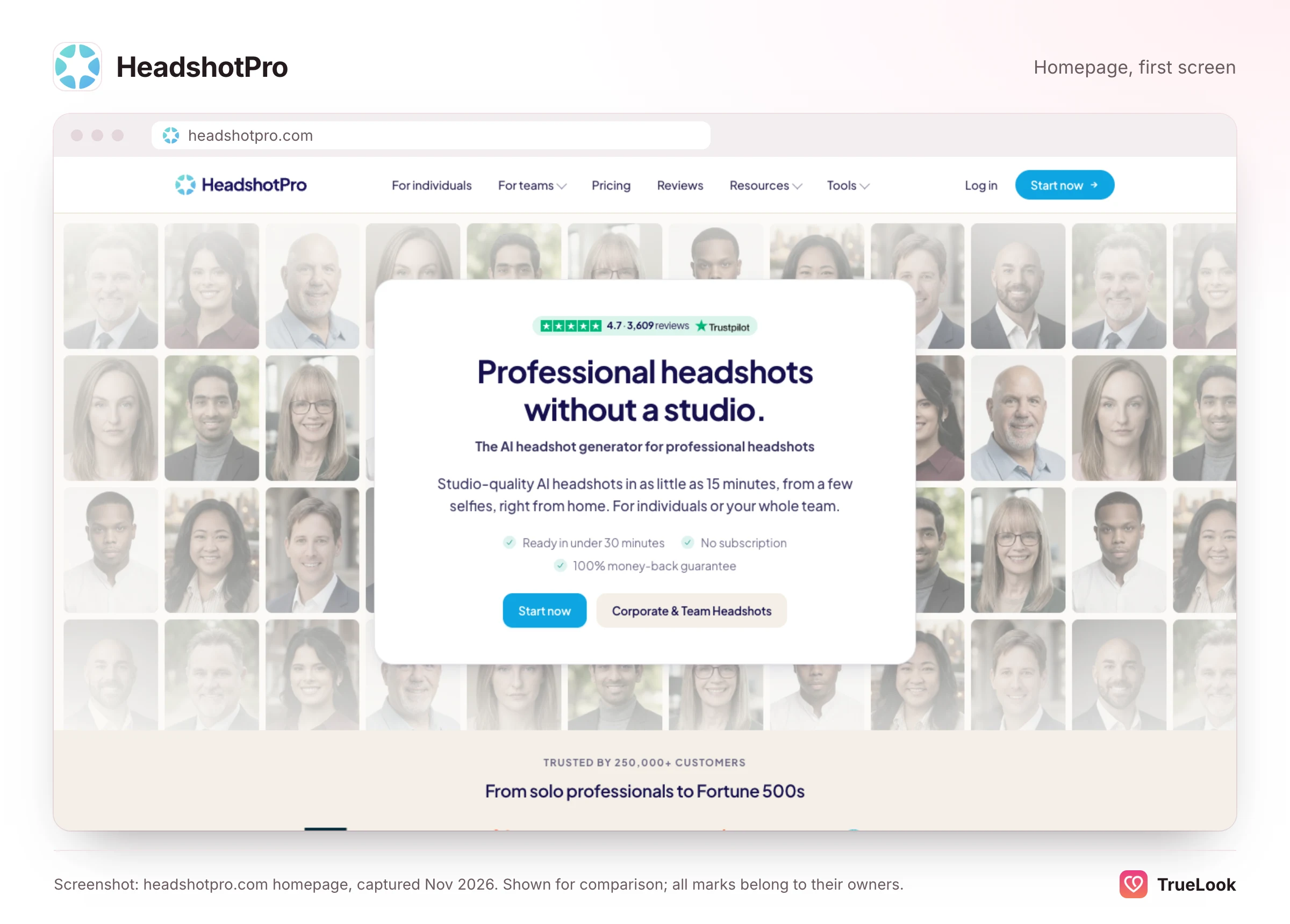
HeadshotPro is a highly rated AI headshot service for LinkedIn, résumés, company websites and team rollouts, sold as one-time packages with no subscription. TrueLook is built for something else: casual, phone-style photos for Tinder, Hinge and Bumble, made from 4 selfies with your face left exactly as it is, and it is also a one-time purchase with no subscription. For a professional headshot, HeadshotPro is the better tool; for a dating profile that needs candid, varied scenes, TrueLook is the closer fit.
Below you will find how HeadshotPro works, its prices and refund rules at the time of writing, what its privacy documents promise, what reviewers say, and a side-by-side look at where each product wins. All HeadshotPro facts come from its own website and from Trustpilot, opened on 2 November 2026 and listed under Sources.
What HeadshotPro is
According to its About page, HeadshotPro was founded by Danny Postma and launched in 2023, after proof-of-concept tests in 2022. The page reports 17 million headshots generated, more than 200,000 shoots and more than $10 million in revenue, and names corporate customers. The privacy policy identifies the operating company as Headshot Pro Photography Pte. Ltd., based in Singapore.
The product is about professional portraits and nothing else. HeadshotPro's homepage promises studio-quality headshots from "a few selfies", lists individual uses (LinkedIn, résumé and bio photos), team and company rollouts, and industry pages for real estate, sales, law firms and startups. Its headshot types include executive, realtor, actor and LinkedIn headshots. Dating is not mentioned anywhere on the homepage, and its sitemap has no dating page. That is not a weakness; it is a choice to do one job.
How a HeadshotPro order works
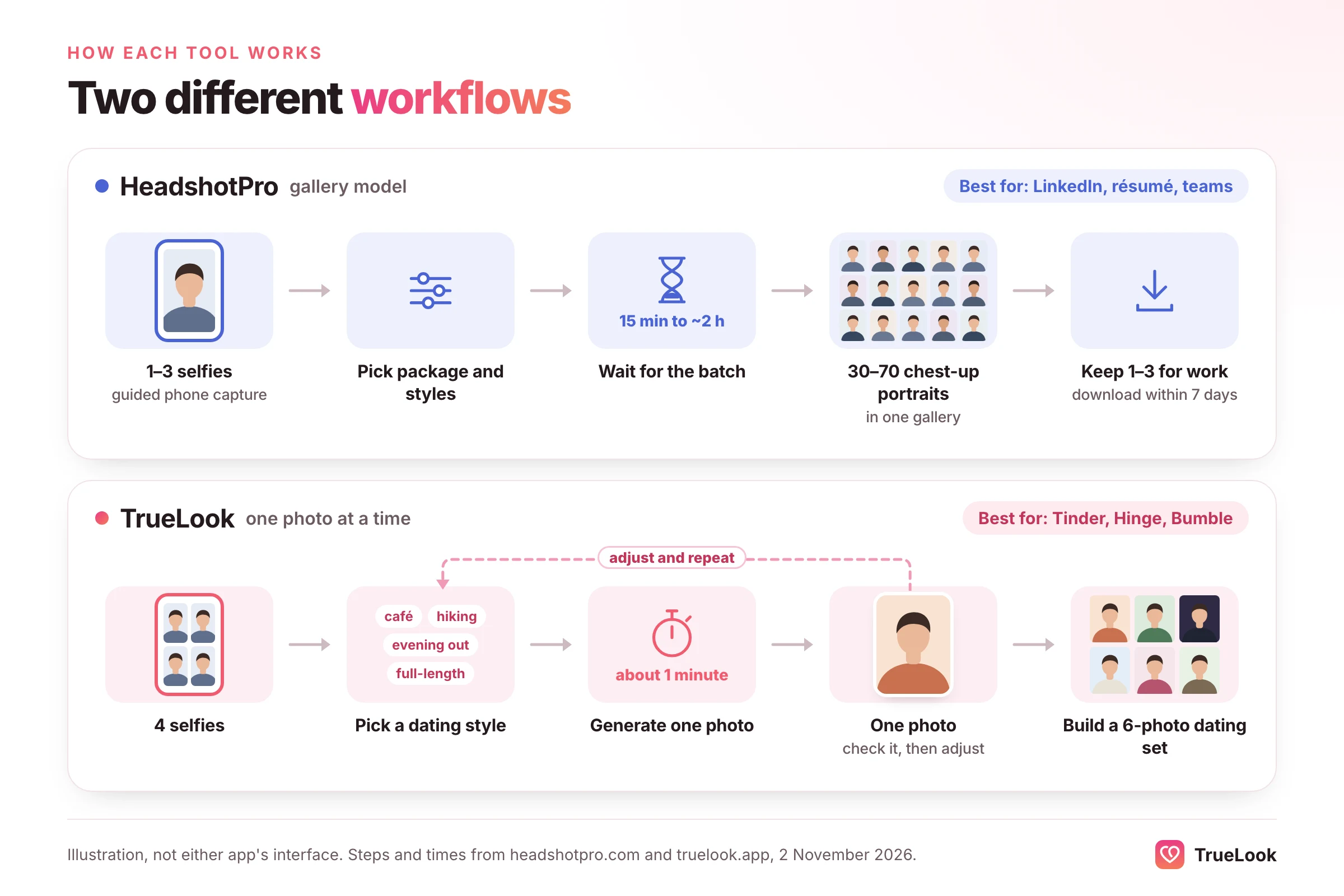
- Take or upload selfies. HeadshotPro's help article on uploading photos asks for at least 1 accepted face photo and recommends up to 3, plus 1 optional full-body photo. Each upload is checked for things like face detection, size and lighting. Its phone capture guide walks you through five poses, facing forward, left and right, neutral and smiling, and suggests the back camera, window light and a plain background.
- Pick a package and styles. The pricing page advertises "thousands of styles", meaning combinations of backdrop and outfit; on the Basic package you can let it "choose for me".
- Wait for the gallery. Stated delivery is 15 minutes to about 2 hours, depending on the package.
- Keep the best and edit. Each package includes "photo credits" for edits, and download links for kept photos last 7 days, so you need to save the ones you want.
The low upload count is distinctive. Many AI photo tools ask for a larger set of selfies; HeadshotPro's guided capture makes the input a quick, structured step, which suits a busy professional or a company asking hundreds of employees to take part.
HeadshotPro pricing in detail
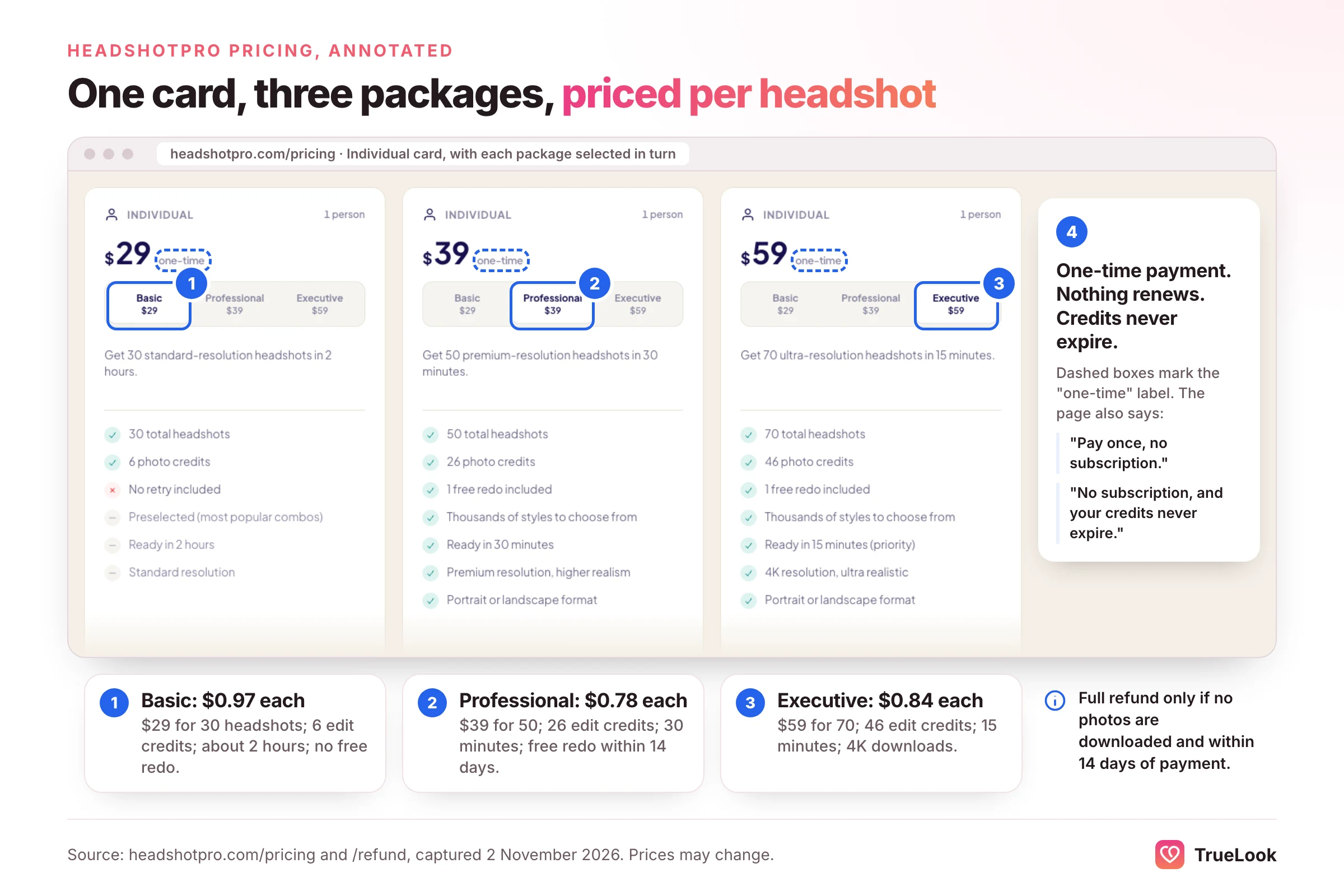
At the time of writing (Nov 2026), HeadshotPro's pricing page lists three individual packages. They are one-time payments: the FAQ says "there's no subscription and nothing renews", and "credits never expire". No crossed-out or sale prices were shown.
| Package | Price | Headshots | Photo credits for edits | Stated delivery | Extras | Cost per headshot |
|---|---|---|---|---|---|---|
| Basic | $29 | 30 | 6 | About 2 hours | Full style library or "choose for me"; no free redo | $0.97 |
| Professional | $39 | 50 | 26 | 30 minutes | Free redo within 14 days; premium resolution | $0.78 |
| Executive | $59 | 70 | 46 | 15 minutes | Free redo within 14 days; 4K downloads | $0.84 |
For companies, the same page sells team credits priced per person (at the time of writing, $25.35 per shoot when buying 100 credits), each covering one person's full shoot of 40 headshots with a free retry, admin-curated styles, custom backdrops and outfits, and automatic volume discounts. Enterprise pricing for 1,000+ people is quoted on request. Individuals pay by card through Stripe or by PayPal.
The Realism Guarantee and refunds
HeadshotPro's headline promise is a "Realism Guarantee": money back if the results do not look like you. The refund page spells out the two conditions for a full refund: you have not downloaded any photos from the completed order, and it has been less than 14 days since you paid. The page says most self-serve refunds are processed within one business day. Its terms and conditions (last updated 22 October 2026) add three details:
- quality or technical problems after download may get a partial or full refund at HeadshotPro's discretion;
- team accounts that have created 10 or more models get an "at-cost" refund, with processing costs deducted;
- customers who have had a refund before generally cannot get one on a later purchase.
The practical rule is the same as at most headshot services: look at the whole gallery before you download a single photo. Once you download, the automatic refund is gone. On Professional and Executive, ask for the free redo first if the likeness is close but not right.
Output and realism
HeadshotPro's samples show its target clearly: crisp, well-lit, chest-up portraits with professional clothing and studio, office or softly blurred outdoor backdrops. The pricing page describes the higher tiers as "premium resolution, higher realism", and the Executive package offers 4K downloads for print.
The homepage cites 96.7% customer satisfaction across 217,879 purchases from 2023 to 2026. That is HeadshotPro's own figure, and it measures satisfaction with headshots. It says nothing either way about how a headshot performs on a dating app, because that is not what customers bought it for.
Why a great headshot is not automatically a great dating photo
The dating apps themselves have published what tends to work, and it points away from the studio. Hinge's help article on why you might not be getting matches includes a table from its research: candid photos tend to get more likes than posed ones; photos that show your interests, sports, smiles and photos with friends or pets do well; selfies, filters and sunglasses tend to do worse. A professional headshot is, by design, a posed photo.
Bumble's own advice, in its guide on how to take the best Bumble profile pictures, makes the same point from another angle. It recommends a first photo of just you, using all six photo slots (its data says three or more photos can increase your chance of matching), pictures of you doing things you love, such as hiking or travel, skipping filters, smiling, and photos from the last six months. Only one of those slots is well served by a headshot.
| What a dating profile needs | Can a headshot service supply it? |
|---|---|
| A clear, solo, smiling face photo | Yes, if you choose a relaxed outfit and backdrop |
| Candid rather than posed photos | Not really; headshots are posed by design |
| Interests and activities (sport, travel, hobbies) | No; backdrops are studio, office or neutral outdoor |
| A full-length photo | No; output is chest-up portraits |
| Social context (friends, a pet, an evening out) | No |
| Recent and unfiltered | Recent, yes; a smooth studio finish can read as filtered |
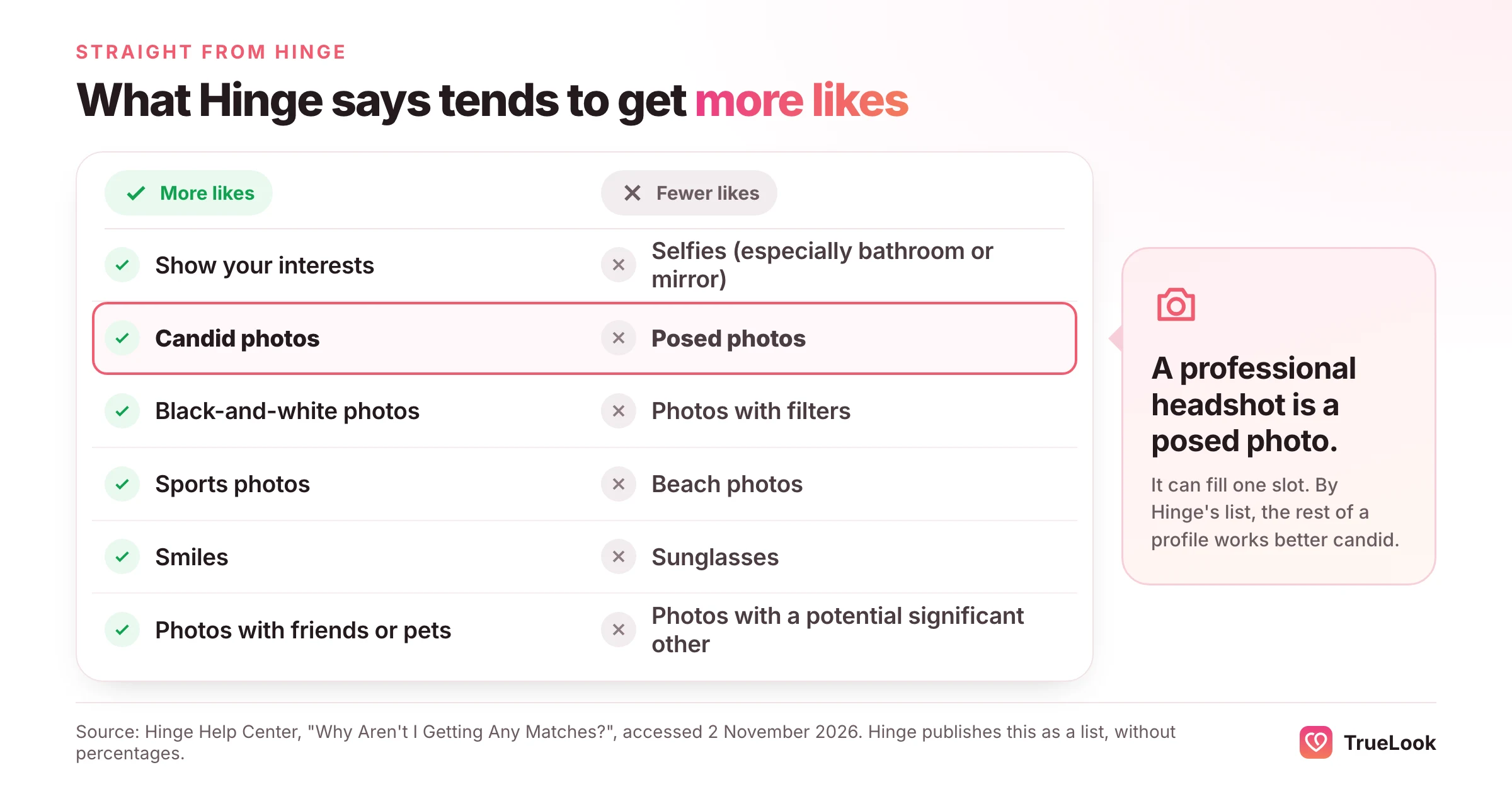
Put simply, HeadshotPro can give you an excellent first or second photo. It is not designed to fill the other four or five.
The first photo matters most
Hinge says it has learned from daters that the first profile photo is "crucial" to making a good first impression; its Top Photo feature uses a machine-learning model to predict which of your photos is most likely to get a like and moves it to the front. If you lead with a formal headshot, you are betting your most important slot on a style the same company's research associates with fewer likes. A warm, natural face photo is the safer lead; a polished headshot can sit later in the order.
Likeness and face verification
Both products put likeness first, and both are right to. Dating apps check it. Tinder's Face Check FAQ explains that a short video selfie is checked for liveness and compared with your profile photos to see whether you appear to be the same person, with a phased rollout where local rules allow. Hinge's Selfie Verification works from a video selfie too, needs at least one crisp, unfiltered, front-facing photo, and notes that support staff cannot verify you manually.
HeadshotPro does not market itself for dating verification, and TrueLook cannot promise any app's decision either. What helps in both cases is a photo that looks like you on an ordinary day. Over-smoothed skin, a changed jawline or a different hairline are what make a match hesitate, and what make verification harder. For more, read our guide to failed Tinder photo verification.
Privacy and data
HeadshotPro makes some of the clearest no-training promises in this category, spread across several documents:
- Homepage: "We don't train AI on your photos, ever", and input photos are deleted automatically 30 days after generation.
- Security policy: uploaded photos and generated headshots are "never used to train, fine-tune, or otherwise improve any AI model, ours or any third party's". Photos are stored at rest in the European Economic Area by default (Cloudflare R2, Western Europe), with encrypted failover copies in Google Cloud Storage in the US. Data is encrypted in transit and at rest.
- Terms: input photos "will not be used to train or retrain our generative models or third-party models" and are deleted 30 days after your gallery is generated, or sooner if you delete them. Elsewhere, the terms grant HeadshotPro a broad licence over your content to run and improve the service, and say it will not use your uploaded photographs for generative AI or marketing without prior written consent. HeadshotPro assigns you its rights in your headshots.
- Privacy policy (updated 22 October 2026): personal information is deleted within 14 days of a confirmed request to stop using the service. The policy itself is general and does not discuss photos or biometrics specifically.
For a privacy-minded buyer, this is a reassuring set of commitments. As with any service, delete your uploads yourself once you have the photos you want, rather than relying on the automatic timer.
TrueLook's commitment is similar in spirit: selfies and generated photos are never used to train, fine-tune or evaluate any AI model, are never shared with other users or advertisers, and can be deleted from your dashboard at any time.
What users say about HeadshotPro
On 2 November 2026, HeadshotPro's Trustpilot page showed a TrustScore of 4.7 ("Excellent") from 3,609 reviews, 459 of them in the previous 12 months. The split was 83% five-star, 12% four-star, 2% three-star, under 1% two-star and 2% one-star. Trustpilot also showed that HeadshotPro replies to all negative reviews, typically within 48 hours. That is a strong record for any consumer AI product.
- Recent five- and four-star themes: a simple, quick process, realistic results that look like the reviewer, lots of backdrop and outfit choice and good value. One recent reviewer found the number of style options overwhelming.
- One-star themes (March 2025 to September 2026): photos that did not look like the reviewer (changed skin tone, face shape or hair, added glasses or moles), an artificial or over-smooth look, batches with nothing usable, mixed refund experiences ranging from a refund within a day to long waits, and slow support.
The pattern is familiar across AI headshot tools: most people get a result they are happy with, and a small share do not recognise themselves. For a LinkedIn photo, the fix is simple: pick the one that works. For a dating profile, a photo that is slightly off costs more, because the person you meet will notice.
TrueLook vs HeadshotPro, side by side
| Dimension | TrueLook | HeadshotPro |
|---|---|---|
| Built for | Dating profiles on Tinder, Hinge and Bumble | Professional and corporate headshots; dating not listed |
| What you upload | 4 clear selfies | 1 to 3 face photos, plus an optional full-body photo, with guided phone capture |
| How many photos | Up to 30 (Fix) or 140 (Pro) per one-time pack, made one at a time | 30, 50 or 70 headshots per one-time package |
| Styles | 43 everyday dating styles on both packs, 4 shots per style | "Thousands" of backdrop and outfit combinations, all professional |
| Framing | Close-ups, half-body and full-length in real-looking places | Chest-up portraits |
| Realism approach | HyperReal™: face unchanged; only place, outfit and light change; phone-camera look | Studio-quality headshots with a Realism Guarantee |
| Speed | About a minute per photo | 15 minutes to about 2 hours per gallery, by package |
| Price per photo | $29 ÷ 30 = $0.97; $49 ÷ 140 = $0.35 (pack maximums) | $29 ÷ 30 = $0.97; $39 ÷ 50 = $0.78; $59 ÷ 70 = $0.84 |
| Billing | One-time, no subscription; another pack or a top-up if you need more | One-time; nothing renews; credits never expire |
| Refunds | Within 14 days, under the refund policy's conditions | Full refund within 14 days if nothing downloaded; free redo on Professional and Executive |
| Privacy | Never used for AI training; delete anytime | Never used for AI training; inputs deleted 30 days after generation; EEA storage by default |
| Teams | No | Yes, priced per person ($25.35 per shoot at 100 credits at the time of writing), with admin controls |
| Dating-app fit | Built for it | Good for one face photo; not built for a full dating set |
Where HeadshotPro is better
- Professional headshots, full stop. Its styles, framing, resolution and review history are all aimed at this.
- A written no-expiry promise. Both are one-time payments now, but HeadshotPro also states that unused credits never expire.
- Lower cost per headshot on the middle tier. $0.78 per headshot on Professional beats TrueLook's Fix Pack at its maximum.
- Teams and enterprises. Shared style pools, custom backdrops, bank transfer and volume discounts. TrueLook offers none of this.
- Very light input. As few as 1 to 3 face photos, with guided capture.
- Clear storage location. EEA storage by default may matter to European buyers.
Where TrueLook is better
- Scenes that dating apps reward. Candid, outdoor, social and activity photos, which is what Hinge's and Bumble's own guidance points to.
- Full-length and varied framing. A dating profile needs more than a chest-up portrait.
- Iterate one photo at a time. About a minute per photo, so you can try a style and adjust without waiting for a gallery.
- Your face, unchanged. HyperReal™ keeps you, you: only the place, outfit and light change.
- 4 shots per style. Each style gives you a smile at the camera, a candid laugh, a wider scene and a close-up.
- Volume for a big refresh. At its maximum, the Pro Pack works out at $0.35 per photo.
What a usable set really costs
Headline price per image assumes you use every image. Nobody does. A LinkedIn profile needs one photo; Bumble suggests filling all six of its photo slots. So compare cost per useful set, not per file:
- Illustrative example, one work headshot: HeadshotPro Basic at $29 gives you 30 options and nothing renews. That is the sensible buy.
- Illustrative example, a six-photo dating profile: HeadshotPro might give you an excellent face photo, but the other five slots need scenes it does not make. TrueLook's Fix Pack at $29 covers up to 30 photos, about 7 styles of 4 shots each, enough to build six and discard the rest.
- Illustrative example, both needs: HeadshotPro Basic plus TrueLook's Fix Pack comes to $58, both paid once, and each tool does the job it was built for.
One caveat on TrueLook's figures: they use each pack's maximum. One credit is one photo, and each style you pick makes 4.
Who should choose which
- If you need a LinkedIn, résumé or website headshot: choose HeadshotPro. It is built for exactly that and costs a single payment.
- If you are rolling out headshots across a company: choose HeadshotPro. TrueLook has no team product.
- If you dislike subscriptions on principle: either works. Both are one-time purchases with nothing to cancel, so choose by the job, work or dating.
- If your dating photos are old, all selfies, or all from one place: choose TrueLook for varied, everyday scenes.
- If you want candid and activity photos, not portraits: choose TrueLook; Hinge's own research favours candid photos.
- If you need a full-length photo: TrueLook; HeadshotPro's output is chest-up.
- If you need both: use each for its own job, and keep the formal headshot out of the first slot on your dating profile.
Scenarios
Illustrative example: a 29-year-old account executive. Her company is updating its sales team page and she wants a matching LinkedIn photo. HeadshotPro's team plan or Basic package fits; TrueLook would be the wrong tool.
Illustrative example: a 42-year-old teacher returning to Bumble. He has a decent school ID-style photo and little else. Bumble's guide asks for smiling, recent photos showing what he enjoys. He uses TrueLook to make a hiking photo, a café photo and a full-length shot, and keeps his best real photo too.
Illustrative example: a startup founder on Hinge. She already has a HeadshotPro headshot for investor decks. On Hinge she leads with a relaxed, smiling photo and places the headshot fourth, where it reads as "has a career" rather than "this is a job application".
How to use both, or switch
- Use HeadshotPro for work. Download the two or three headshots you like within the 7-day link window.
- Choose at most one for dating. Pick the most relaxed, smiling one with a casual backdrop, and place it after your lead photo.
- Lead with a natural face photo. Clear, smiling, solo, not posed like a portrait.
- Fill the remaining slots with variety. A full-length shot, an activity, a social or evening scene and a travel or outdoor photo. Our guide to the best Hinge profile pictures and our guide to the best Bumble profile pictures cover the order in detail.
- Re-verify. Hinge warns that changing photos can remove verification, so verify again once your new set is in place.
If you are deciding between AI and a human photographer altogether, see our comparison of dating photographers and AI. For other headshot-first tools, compare TrueLook vs Aragon AI and TrueLook vs ProfileBakery.
The bottom line
HeadshotPro is an excellent choice for what it sets out to do: polished professional portraits, one payment, strong reviews, clear no-training commitments and a straightforward refund rule. It does not try to be a dating photo tool, and its own focus makes that plain. If your problem is a dating profile that needs candid, varied photos of the real you, TrueLook is built for that job, also for a single payment.
Sources
- HeadshotPro homepage, HeadshotPro (accessed 2026). https://www.headshotpro.com/
- Pricing, HeadshotPro (accessed 2026). https://www.headshotpro.com/pricing
- Realism Guarantee and refunds, HeadshotPro (accessed 2026). https://www.headshotpro.com/refund
- About HeadshotPro, HeadshotPro (accessed 2026). https://www.headshotpro.com/about
- Privacy Policy, Headshot Pro Photography Pte. Ltd. (2026). https://www.headshotpro.com/legal/privacy-policy
- Terms and Conditions, HeadshotPro (2026). https://www.headshotpro.com/legal/terms-and-conditions
- Security Policy, HeadshotPro (accessed 2026). https://www.headshotpro.com/legal/security-policy
- Uploading photos, HeadshotPro Help Center (accessed 2026). https://www.headshotpro.com/docs/individual/creating-headshots/uploading-photos
- Uploading from your phone, HeadshotPro Help Center (accessed 2026). https://www.headshotpro.com/docs/individual/creating-headshots/uploading-from-phone
- HeadshotPro reviews, Trustpilot (accessed 2 November 2026). https://www.trustpilot.com/review/headshotpro.com
- Why Aren't I Getting Any Matches?, Hinge Help Center (updated 2026). https://help.hinge.co/hc/en-us/articles/360011321953-Why-Aren-t-I-Getting-Any-Matches
- What is Top Photo?, Hinge Help Center (updated 2026). https://help.hinge.co/hc/en-us/articles/26558052212627-What-is-Top-Photo
- How to Take the Best Bumble Profile Pics, Bumble (accessed 2026). https://bumble.com/the-buzz/best-bumble-profile-photo-tips
- FAQ: Mandatory Liveness Check (Face Check), Tinder (accessed 2026). https://policies.tinder.com/faq-mandatory-liveness-check/intl/en/
- What is Selfie Verification?, Hinge Help Center (updated 2026). https://help.hinge.co/hc/en-us/articles/10303221435539-What-is-Selfie-Verification

 Photographer