


YourMove AI and TrueLook mostly solve different problems. YourMove is a writing assistant: it drafts openers, replies and bios, and reviews the profile you already have, with AI photos sold as a separate extra. TrueLook makes the photos themselves, from 4 of your selfies, so choose YourMove if you get matches but stall in the chat, choose TrueLook if too few people are matching with you, and use both if both are true.
This page sets out what YourMove does, what it costs at the time of writing, what its policies say about refunds and your data, what users report, and how the two products line up feature by feature. Everything about YourMove comes from its own pages, its app store listings and press coverage we opened in November 2026. We have not run tests of YourMove for this page and make no claims about match results for either product. For a longer look at YourMove's individual features and the research on AI-written messages, see our full YourMove AI review.
What YourMove AI is and how it works
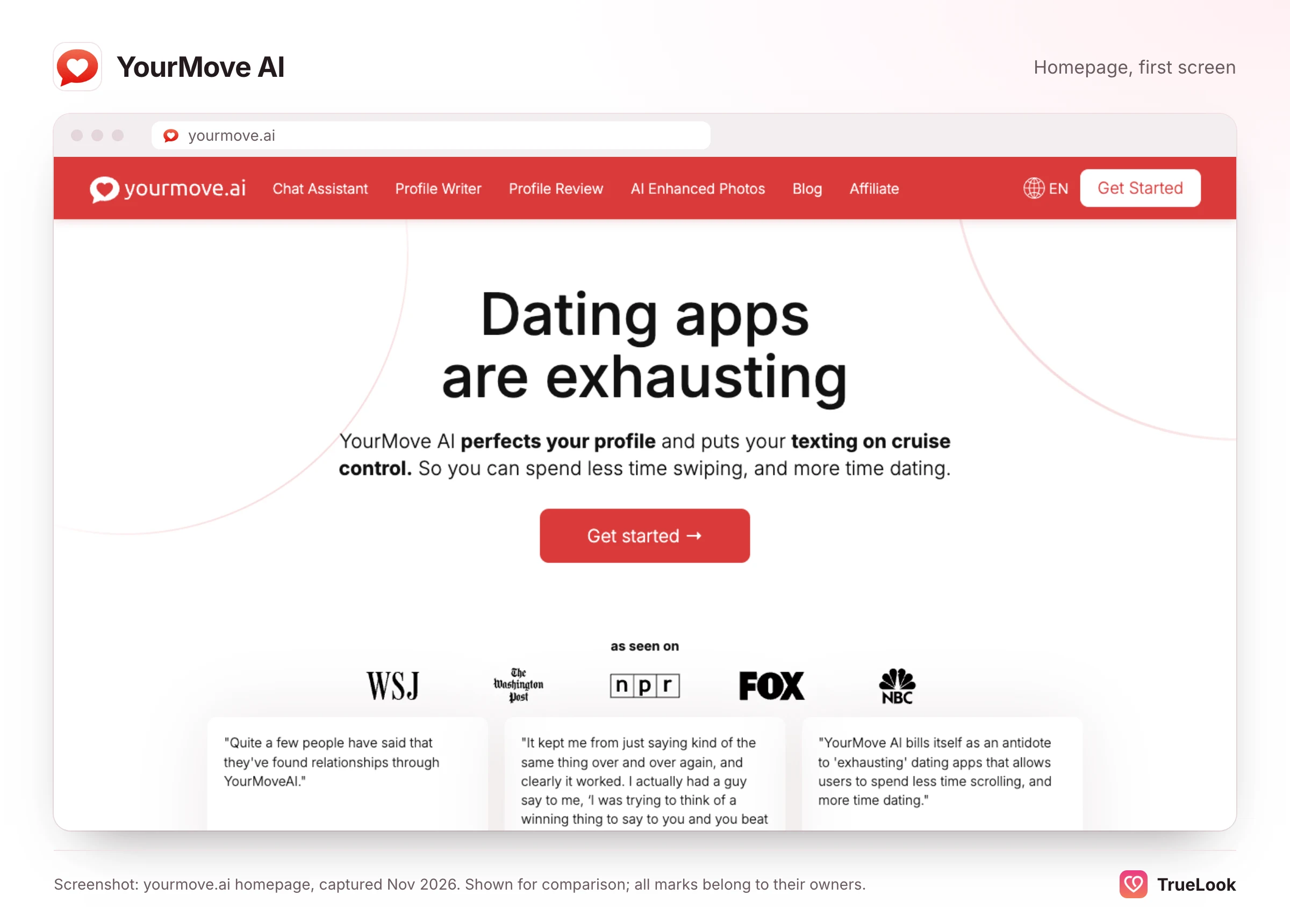
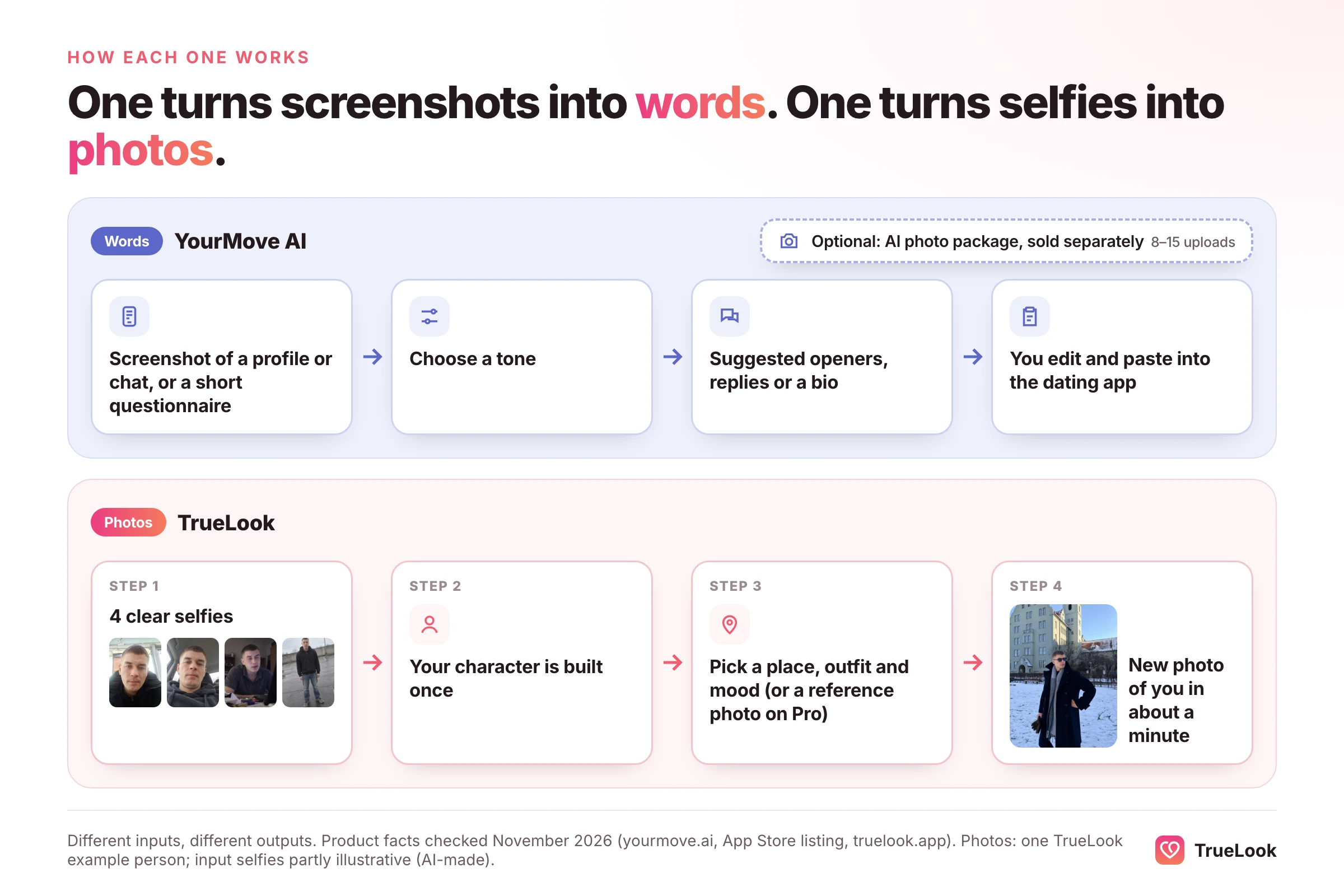
YourMove AI is a set of AI tools for people who already use Tinder, Hinge, Bumble or similar apps. You never date inside YourMove. You bring it material, such as a screenshot of a match's profile, a message you received or answers to a short questionnaire about yourself, and it hands back text for you to paste into the dating app.
The company
Its terms of use name the operator as Squip AI LLC, and the Google Play listing gives a developer address in Katy, Texas. A 2023 NPR segment described the founders as Dmitri Mirakyan, a programmer who built the first prototype over a weekend, and Jeff Li, a data scientist, funding it with their own money; at that point, NPR said, more than 50,000 people had tried it. A later Reuters report on AI "digital wingmen" says Mirakyan created the platform in 2022 for people who are shy or find dating-app dynamics hard. Today the YourMove homepage claims more than 300,000 customers.
The product began on the web. Its Android app has been on Google Play since October 2024, and the version history on its App Store listing starts with version 1.0 on 2 December 2024.
The four main tools
- Chat Assistant. Suggests first messages, replies and lines for moving towards a date. The homepage promises "3 personalized openers in 5 seconds or less" from a profile screenshot or a topic.
- Profile Writer. Turns a questionnaire into a bio and prompt answers for Tinder, Hinge, Bumble, Raya and others.
- Profile Review. The profile review page says it benchmarks your profile "against our database of 250,000+ users", flags weak spots in your bio and tells you which photos to add "and in what order".
- AI Enhanced Photos. The AI photos page asks you to upload "10-15 photos of yourself" in one step and "8-12 photos" further down, then lets you "browse dozens" of generated options. It names no styles, prices or turnaround time.
So the output of YourMove's core product is words. Photos are the one place where it overlaps with TrueLook, and YourMove's own developer describes them as an extra: replying to an App Store review in August 2025, the developer wrote that photos are "super expensive for us to run" and so are "normally separate".
How TrueLook differs in workflow
TrueLook does one thing. You upload 4 clear selfies, TrueLook builds a character from them, and you then choose places, outfits and moods for each new photo. Each photo takes about a minute. Each style you pick gives you 4 different shots of you. Nothing in TrueLook writes your messages or your bio.
YourMove AI pricing in detail
YourMove has no pricing page on its website (the address yourmove.ai/pricing returns a "not found" error), and its homepage shows no plan names or prices. Prices appear inside the apps and at checkout. At the time of writing (November 2026), the App Store listing shows these in-app purchases:
| Item | App Store price | What it is |
|---|---|---|
| Monthly | $12.99 | Subscription to the writing and review tools |
| Annual | $44.99 | Same subscription, billed yearly (about $3.75 a month) |
| Basic | $29.99 (or $19.99 "Discounted") | AI photo package |
| Plus | $49.99 (or $34.99 "Discounted") | AI photo package |
| Premium | $79.99 (or $59.99 "Discounted") | AI photo package |
The $12.99 monthly price matches the figure in the Reuters report. On Google Play, the listing only gives a range of "$8.99 - $79.99 per item", so Android prices may be presented differently. Neither store says how many photos each package contains, which is why we can't calculate a price per photo for YourMove.
Two things stand out. The annual plan is far cheaper than paying monthly: twelve months at $12.99 comes to $155.88, so $44.99 a year is roughly 71% less. And the photo packages are charged on top of either subscription. A subscriber who also buys the Basic photo package at full price pays $12.99 + $29.99 = $42.98 in the first month.
Refunds: two different statements
YourMove's refund policy, last updated 24 October 2024, sets out the following:
- Services are non-refundable unless the policy says otherwise, with exceptions at management's discretion.
- AI photo purchases are "final and non-refundable", because they are treated as delivered once processed, "regardless of satisfaction with the generated results".
- Monthly and annual subscriptions have a 7-day money-back guarantee, but only if you stay under usage caps: 10 profile generations, 3 profile reviews, 10 photo reviews and 50 message generations.
- Requests go to support by email, with your account email, order number, purchase date and reason; approved refunds take 5 to 7 business days.
The AI photos page, however, advertises a "100% satisfaction guarantee" and says that if you "don't see a significant increase in either quantity or quality of matches", you can message live support "for a 100% refund". Those two statements are hard to reconcile, so if the photo refund matters to you, ask support in writing which one applies before you buy. One more wrinkle: purchases made through the App Store are refunded by Apple, not by YourMove, as the developer itself pointed out in a May 2025 reply to a reviewer.
TrueLook's pricing, for comparison
TrueLook has no subscription. It sells two one-time packs of photos: the Fix Pack at $29 for up to 30 photos, and the Pro Pack at $49 for up to 140 photos. Both packs include all 43 styles. You pay once, nothing renews and there is nothing to cancel. A 14-day refund is available under the conditions on that page, which include using less than 20% of your credits and testing the photos on a live profile.
Output and realism
Messages and bios
For most YourMove users, the "output" is text. Its quality depends on how much the tool can see. A screenshot of a profile gives it photos and prompts to react to; a pasted message gives it a single line of context. What no screenshot shows is your history with that person or how you normally talk, which is why suggestions are best treated as drafts. The Reuters report captures the risk: a dater interviewed for it suspected her match was using a chatbot because his replies were too polished, and a relationship psychologist advised writing your own messages unless you are truly stuck, because on the date "the real you is showing up".
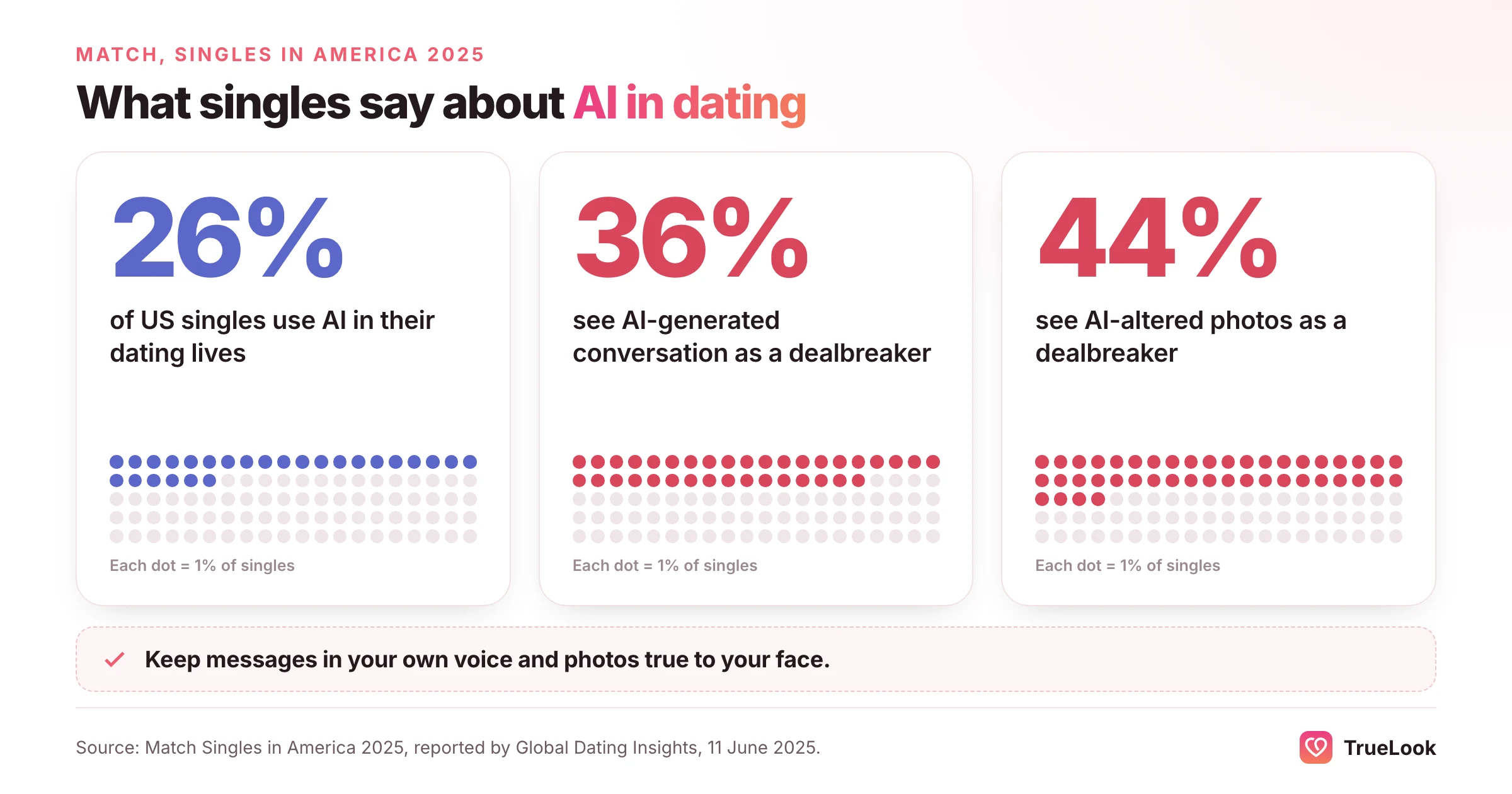
The wider mood is mixed. In Match's 2025 Singles in America study, as reported by Global Dating Insights, 26% of US singles said they use AI in their dating lives, yet 36% called AI-generated conversation a dealbreaker. Dating apps are building their own lighter-touch help, too. Hinge's Convo Starters, launched in December 2025, offers three tips based on someone's photos and prompts, but you write the message yourself; Hinge says likes sent with a comment are twice as likely to lead to a date.
YourMove's AI photos
YourMove describes its photo feature as recreating your image "from scratch" to highlight your most attractive qualities. The examples on its page are everyday scenes: a man in a car, against a brick wall, at a café table, in a suit and tie, and a woman at a gym. There is no FAQ on realism, likeness or verification, and no stated turnaround.
"From scratch" is a meaningful choice of words. It suggests the whole image, including your face, is newly generated. That can flatter, but it also leaves room for drift: smoother skin, a slightly different jaw or a face that looks like a cousin. Several app store reviewers describe exactly that kind of result (see the user section below), while others are happy with their photos.
TrueLook's approach
TrueLook's HyperReal™ method works the other way round. Your face is treated as fixed, and only the setting, clothing and lighting are generated around it. The aim is a photo that looks like a good day in your life rather than an idealised version of you.
Why likeness matters on dating apps
Likeness is not just about first impressions. Tinder's Face Check FAQ explains that a short video selfie is checked to see "whether the person in your video selfie appears to be the same person as in your profile photos", and Tinder is rolling Face Check out as a requirement wherever local rules allow. Photos that drift from your real face make that harder, and they also set up an awkward first date. The same Singles in America study found 44% of singles see AI-altered photos as a dealbreaker, which is a good reason to choose realistic, modest photos over glossy ones, whichever tool you use. Neither TrueLook nor YourMove can promise any app's verification result; each app makes its own decisions. Our guide on whether AI photos are allowed on dating apps covers each app's rules.
Privacy and data
The two products handle different kinds of data, so the privacy questions differ too.
What YourMove's policy says
YourMove's privacy policy says:
- Photos for AI photos: stored securely, "never shared with third parties under any circumstances" and automatically deleted "after 7 days".
- Training: photos are used "solely to create AI-enhanced profile photos", but AI models are "temporarily trained using these photos", and those models and the resulting photos are deleted after 30 days. Read plainly, a model is trained on your face for a limited time to make your photos, then removed.
- Screenshots: a screenshot you upload "is sent to the application and stored in our database", and "Images are deleted weekly".
- Other details: the policy names Google for ad cookies, address autocomplete and sign-in, shows no last-updated date, and gives no general process for deleting your data.
Two further sources fill some of the gaps. The Google Play data safety section says data is encrypted in transit, that no data is shared with third parties, and that you can request deletion. The App Store privacy labels list identifiers linked to you, and usage and diagnostics data not linked to you. The terms say they are governed by the law of the Netherlands.
One point is worth thinking about. A screenshot of a match's profile or of your chat contains another person's photos and words, and that person never agreed to have them uploaded. The policy deletes such images weekly, but if that bothers you, crop screenshots to the text you need help with.
What TrueLook's policy says
TrueLook's privacy policy says the photos you upload and the photos generated for you are never used to train, fine-tune or evaluate any AI model, whether TrueLook's own or a third party's, and are not sold, shared with other users or used for advertising. You can delete your data from your account or by contacting us.
What YourMove users say
We checked the main public review sources on 2 November 2026:
| Source | Rating | Volume | Notes |
|---|---|---|---|
| Apple App Store (US) | 4.4 / 5 | 49 ratings | Listed as "YourMove AI Wingman for Dating", rated 18+ |
| Google Play (US) | 4.3 / 5 | 737 reviews | 50K+ downloads; last updated 3 September 2026 |
| Trustpilot | None | None | No page exists for yourmove.ai |
The overall ratings are good, but the written reviews split along a clear line.
- Writing help gets most of the praise. App Store reviewers in December 2024 said it improved their profile, helped them brainstorm conversation topics and led to regular dates.
- Photo charges cause the most complaints. A July 2025 reviewer called it misleading that photos needed a separate payment after subscribing. A May 2026 Google Play review complained of "hidden fees behind subscriptions".
- Photo quality is mixed. An April 2025 App Store reviewer found the AI photos unusable and objected that they couldn't be refunded. An April 2025 Google Play reviewer had upload and billing trouble, but after contacting support received photos within a day and called them amazing.
- Support response is a recurring theme. A May 2026 Google Play reviewer said a premium purchase never arrived and support had not replied a week later.
The developer replies to many negative reviews, usually pointing people to its support email and sometimes offering a free photo batch or a year of access. The pattern is simple: people who use YourMove for words are mostly satisfied, and most frustration comes from photo purchases and billing.
TrueLook vs YourMove AI, dimension by dimension
| Dimension | TrueLook | YourMove AI |
|---|---|---|
| Main job | New dating photos of you | Openers, replies, bios and profile feedback |
| Input | 4 selfies | Screenshots, pasted messages, a questionnaire; 8 to 15 photos for the photo add-on |
| Output | Up to 30 (Fix) or 140 (Pro) photos per one-time pack | Text suggestions on a subscription; "dozens" of photo options per photo package |
| Styles | 43 photo styles on both packs, 4 shots per style | Text tones (flirty, funny and others); photo styles not listed |
| Realism approach | HyperReal™: your face stays the same; place, outfit and light change | Photos recreated "from scratch" |
| Speed | About a minute per photo | Openers "in 5 seconds or less"; no photo turnaround stated |
| Price | $29 or $49, one-time, photos included | $12.99 a month or $44.99 a year; photo packages $29.99 to $79.99 extra (App Store) |
| Price per photo | $29 ÷ 30 = about $0.97 (Fix); $49 ÷ 140 = about $0.35 (Pro) | Not calculable: photo counts per package are not published |
| Billing | One-time, no subscription | Monthly or annual subscription, plus one-off photo packages |
| Refunds | 14 days, under the conditions on /refund | 7 days for subscriptions within usage caps; photo purchases final under the refund policy, though the photo page advertises a 100% refund |
| Privacy | Photos never used to train any AI model | Photos deleted after 7 days; temporarily trained models deleted after 30 days; screenshots deleted weekly |
| Platforms | Web app | Web, iOS and Android |
| Dating-app fit | The photo stage: getting noticed and matched | The conversation stage, plus bio writing and feedback |
Where YourMove is the better choice
Be clear about what YourMove does well. If your problem is words, it is cheaper and more relevant than any photo tool: $44.99 a year buys a full year of message, bio and review help, less than TrueLook's $49 Pro Pack. It works from screenshots, so you don't retype anything, it has native phone apps and a free tier to try first, and its profile review gives structure to people who have never had outside feedback. TrueLook does none of that.
Where TrueLook is the better choice
If your problem is photos, TrueLook is built for that job alone. Photos are the product rather than an extra on top of a subscription, the number in each pack is published so you can work out the price per photo, you pay once with nothing to cancel, and the method keeps your face as it is. It also has a single refund policy rather than two statements that point in different directions.
The funnel view
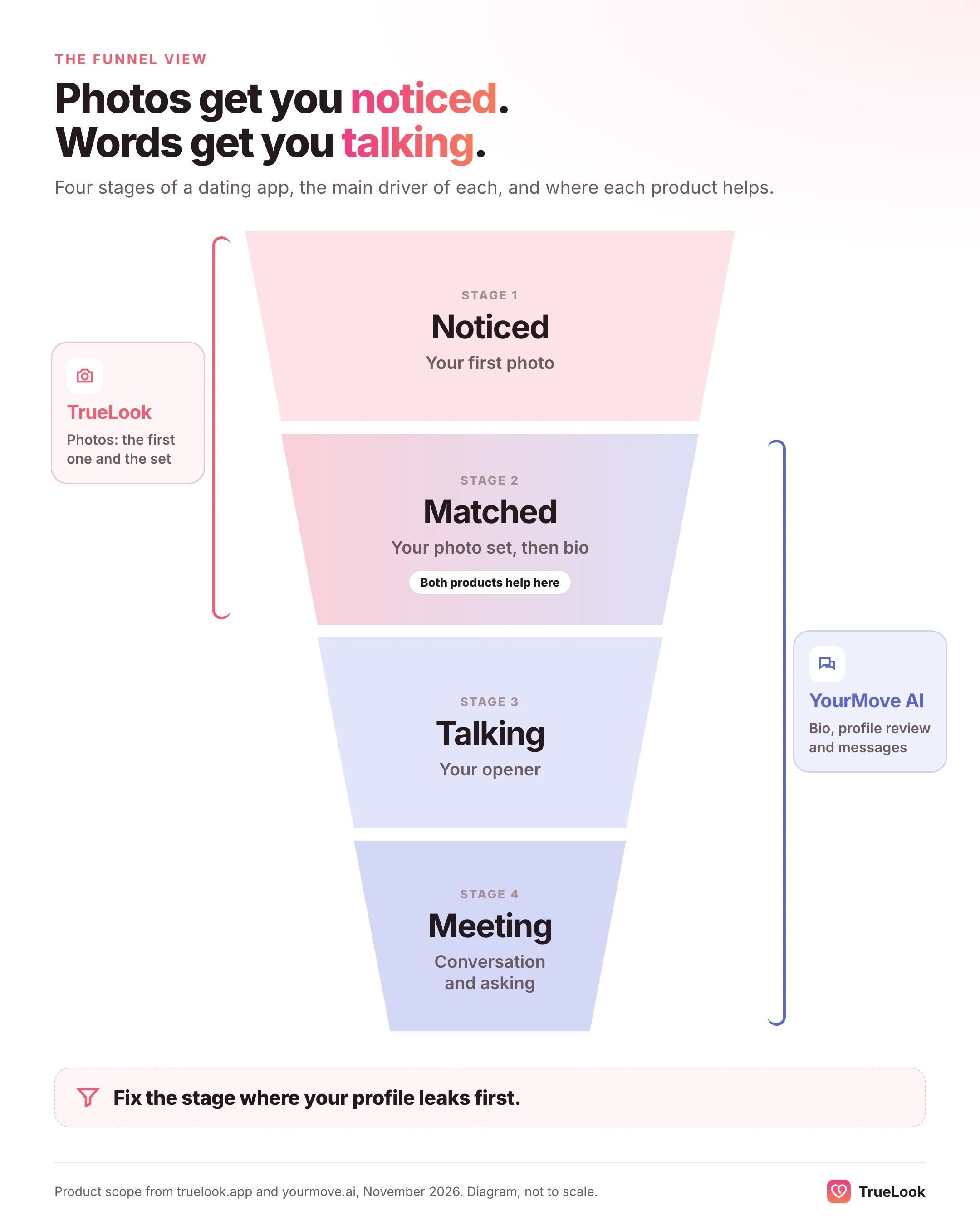
A useful way to see the difference is to think of dating apps as a funnel: noticed, matched, talking, meeting. Photos drive the first two steps. Faces are judged extremely fast; in a classic Psychological Science study, impressions formed after a 100-millisecond glance at a face closely matched those formed with no time limit. Words take over from the third step. TrueLook works at the top of the funnel and YourMove further down.
Who should choose which
| Your situation | Better fit | Why |
|---|---|---|
| Few or no matches after a month of honest swiping | TrueLook | There is nobody to message yet; photos are the bottleneck |
| Plenty of matches, but your openers get ignored | YourMove | Openers are its core job |
| Chats start, then fizzle after a few lines | YourMove, used as prompts | Reply ideas help, as long as you add your own questions |
| A blank or one-line bio | YourMove (or write it yourself) | The Profile Writer drafts from a questionnaire |
| Your photos are old, all selfies or all from one day | TrueLook | New places, outfits and light without a photoshoot |
| You need a full-body or activity photo | TrueLook | It generates the shots most profiles lack |
| A tight budget and you can only pick one | Diagnose first | Spend on whichever stage of the funnel is failing |
| A fresh profile on a new app | Both | Photos to get matched, then help with the first conversations |
Some concrete examples, all illustrative:
- If you match regularly on Hinge but freeze on the first message, YourMove's annual plan is the cheaper fix. Try Hinge's free Convo Starters first; if you still want more help, subscribe.
- If you have had three matches in two months and your photos are mostly bathroom-mirror selfies, no opener will help. Fix the photos first; our guide to getting no matches on Tinder walks through the order of fixes.
- If YourMove's profile review told you to lead with a clear, smiling headshot and add a hobby photo, that is advice about photos you may not have. That is where TrueLook fits.
- If you only want a handful of AI photos once and already pay for YourMove, its photo package may be convenient; just check the package size and refund terms before you buy.
How to use TrueLook and YourMove together
Because the two tools work at different stages, the order matters. A simple plan:
- Diagnose. Look at the last 30 days on your main app. Count matches and count conversations that got past three messages. Low matches means start with photos; low conversations means start with messages.
- Rebuild the photos. Use TrueLook to make a varied set of six: a clear headshot first, then a full-body shot, an activity, a social or travel scene and a dressed-up photo. Keep them realistic and consistent with each other.
- Get feedback on the order. YourMove's profile review, a friend or a photo-rating site can help you decide which photo leads.
- Write the bio last. Your new photos give you material. If you hike in one photo, mention the trail in your bio. Use YourMove's Profile Writer as a first draft if you're stuck, then rewrite it in your own voice.
- Use message help sparingly. Take the closest suggestion and change at least half of it, add one detail from their profile, and end with a real question. Stop using it once the chat is flowing.
- Review after two weeks. If matches rose but conversations didn't, lean on the messaging side; if neither moved, revisit the first photo.
What both together cost
Using the App Store prices, TrueLook's Fix Pack ($29, one-time) plus one month of YourMove ($12.99) comes to $41.99. For a whole year, a cheaper pattern is one TrueLook pack to rebuild your photos plus YourMove's $44.99 annual plan for conversations: $73.99 with the Fix Pack or $93.99 with the Pro Pack, and the TrueLook part doesn't grow, because it doesn't renew. Either way, skip YourMove's photo packages if you are already using TrueLook, because you would be paying twice for the same job.
Subscriptions without surprises
YourMove's subscriptions renew automatically until you cancel; TrueLook's packs are paid once and don't renew. The US Federal Trade Commission's advice on auto-renewals applies to any subscription: read how and when to cancel before you sign up, put the renewal date in your calendar, keep a copy of your cancellation, and dispute charges with your card issuer if they continue afterwards. With YourMove, remember that App Store and Google Play subscriptions are managed in your phone's subscription settings, not on the YourMove website.
One last note on the name: the website yourmove.is, which turns up in some searches, is an unrelated personal-development content site with no connection to YourMove AI. For other coaching and review products, see TrueLook vs Roast Dating and TrueLook vs Ablaze Dating, or browse all comparisons. If verification is a worry, our guide to what to do when Tinder photo verification fails explains the common causes.
Sources
- YourMove AI homepage, YourMove AI (accessed November 2026). https://www.yourmove.ai/
- AI Enhanced Photos, YourMove AI (accessed November 2026). https://www.yourmove.ai/ai-photos
- Dating Profile Review, YourMove AI (accessed November 2026). https://www.yourmove.ai/dating-profile-review
- YourMove AI Refund Policy, YourMove AI (2024). https://web.yourmove.ai/refund-policy
- Privacy Policy, YourMove AI (accessed November 2026). https://www.yourmove.ai/privacy
- Terms and Conditions, YourMove AI (accessed November 2026). https://www.yourmove.ai/terms
- YourMove AI Wingman for Dating, Apple App Store (accessed November 2026). https://apps.apple.com/us/app/apple-store/id6737511035
- YourMove AI Dating Assistant, Google Play (accessed November 2026). https://play.google.com/store/apps/details?id=ai.yourmove.app
- AI apps are being used to help people connect on dating apps, NPR via KVCR (2023). https://www.kvcrnews.org/2023-05-03/ai-apps-are-being-used-to-help-people-connect-on-dating-apps
- Perfection without the connection: how AI is becoming a digital wingman, Reuters via TradingView (2025). https://de.tradingview.com/news/reuters.com,2025:newsml_L6N3VJ0VF:0-perfection-without-the-connection-how-ai-is-becoming-a-digital-wingman
- Use of AI in online dating surges 300% according to new Match report, Global Dating Insights (2025). https://www.globaldatinginsights.com/featured/use-of-ai-in-online-dating-surges-300-according-to-new-match-report/
- Convo Starters, Hinge (2025). https://hinge.co/newsroom/convo-starters
- FAQ: Mandatory Liveness Check (Face Check), Tinder (accessed November 2026). https://policies.tinder.com/faq-mandatory-liveness-check/intl/en
- First impressions: making up your mind after a 100-ms exposure to a face, Willis and Todorov, Psychological Science (2006). https://pubmed.ncbi.nlm.nih.gov/16866745/
- Getting In and Out of Free Trials, Auto-Renewals, and Negative Option Subscriptions, U.S. Federal Trade Commission (accessed November 2026). https://www.consumer.ftc.gov/articles/getting-and-out-free-trials-auto-renewals-and-negative-option-subscriptions











 Photographer