


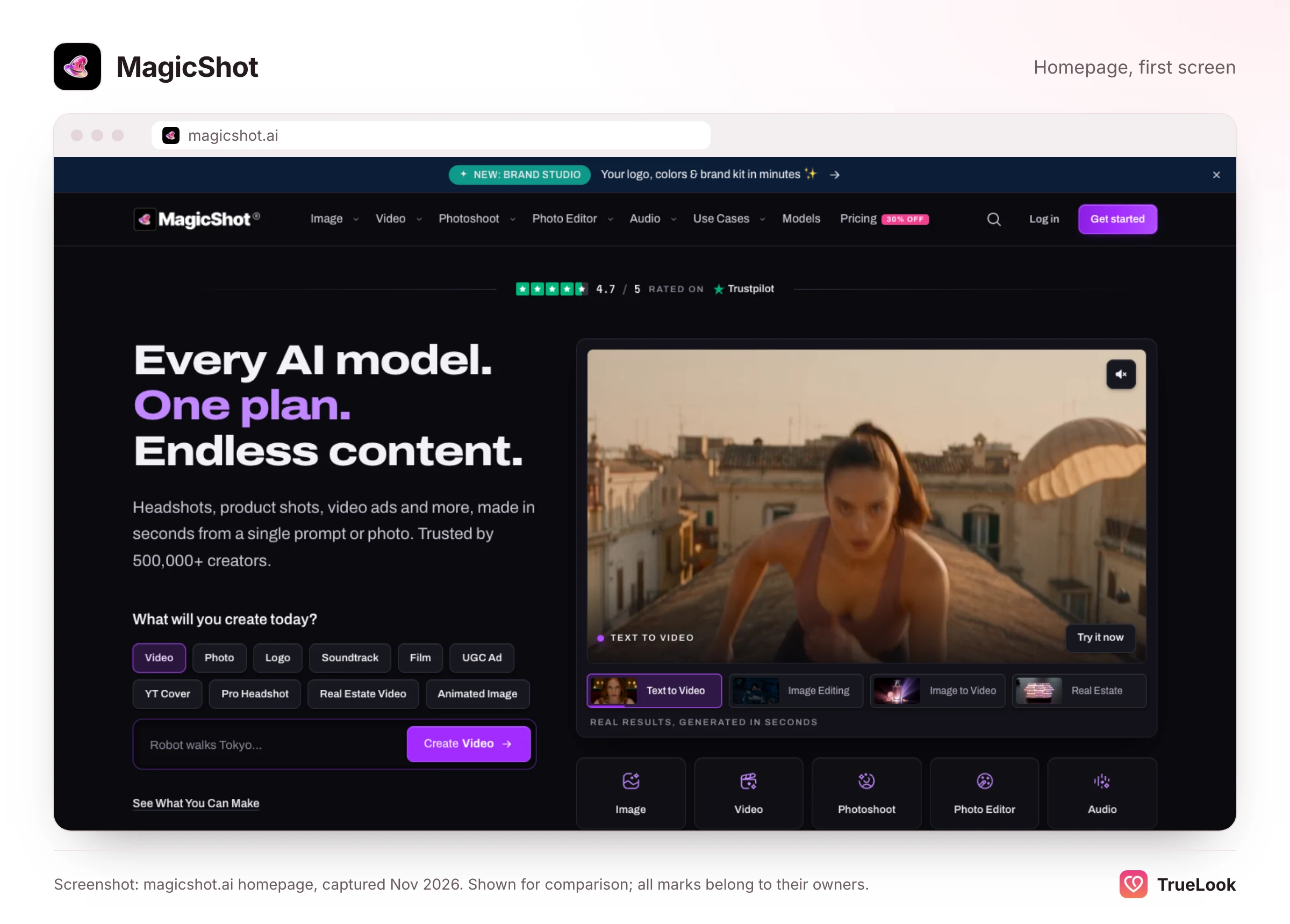
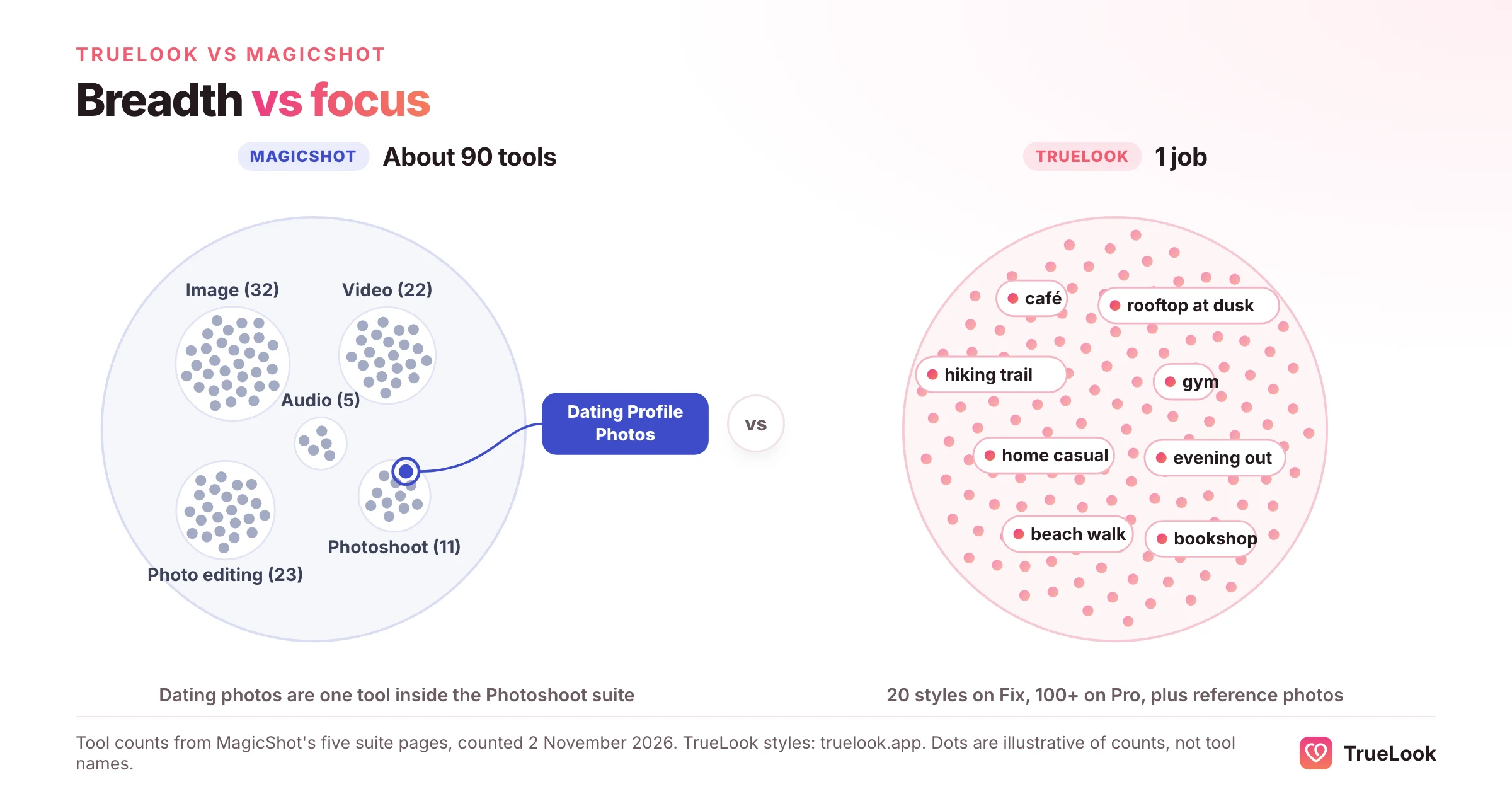
MagicShot is an all-in-one AI studio with roughly ninety tools across images, video, photoshoots, editing and audio, and its Dating Profile Photos tool is one of them, drawing on the same monthly credit balance as everything else. TrueLook makes only dating profile photos, from 4 selfies, for a one-time payment with no subscription, and keeps your face exactly as it is while the place, outfit and light change. MagicShot is the better buy if you want a cheap creative toolkit that also covers dating; TrueLook is the better fit if your profile is the only job and you want a tool built entirely around it, without another subscription.
This page covers how MagicShot and its dating tool work, every plan and what the credits mean, its refund and privacy policies, what reviewers say, and a dimension-by-dimension comparison. Every MagicShot fact comes from its own pages, its App Store listing or Trustpilot, opened on 2 November 2026 and listed at the end. We have not tested MagicShot ourselves, and no photo tool can guarantee matches.
One credit pool for everything, or one tool for one job
The trade-off between a broad suite and a specialist is easiest to see in how each one spends your money.
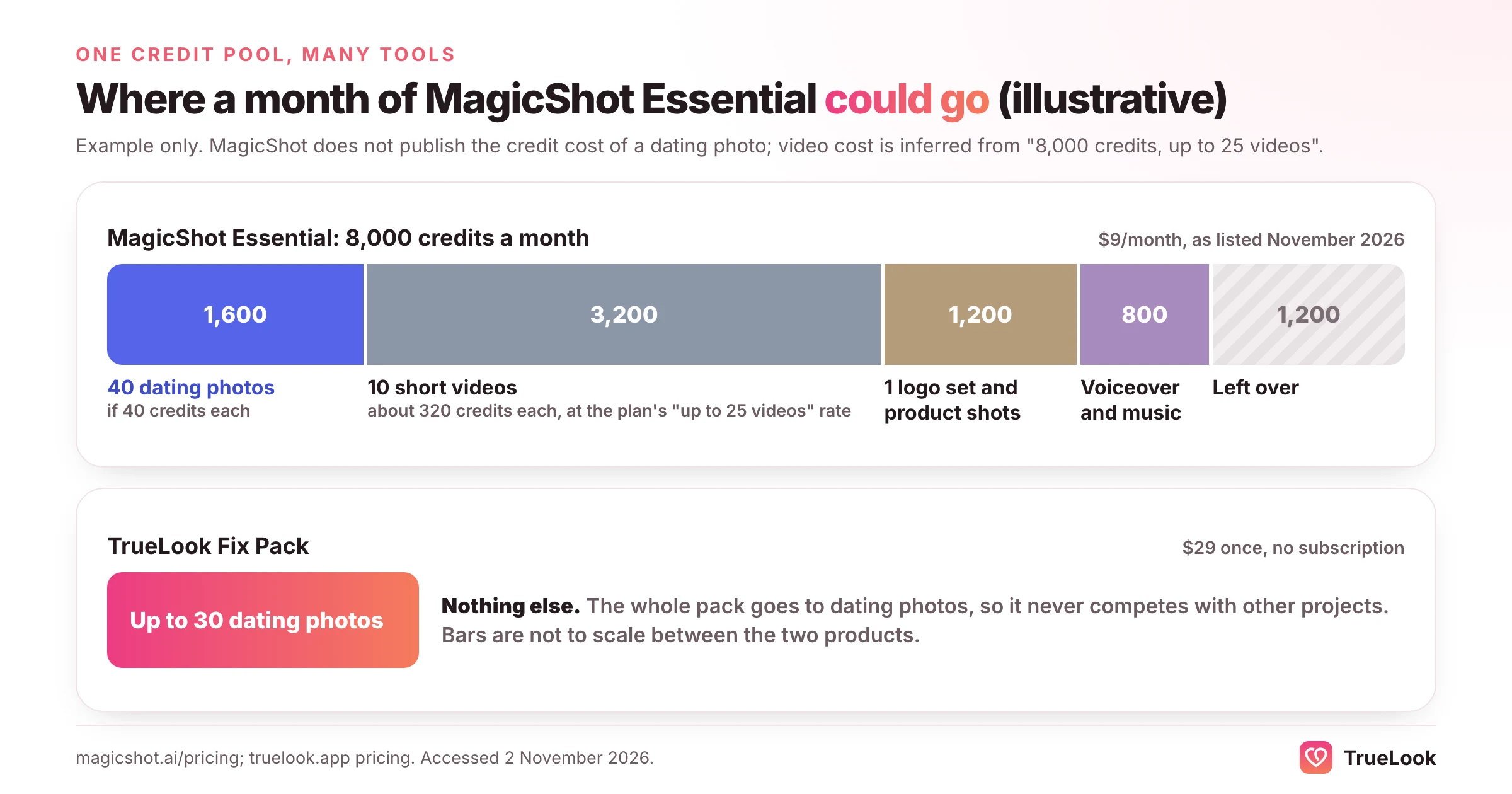
In a suite like MagicShot, every tool draws from one shared balance. That is genuinely flexible: a month's credits can go on a logo, a product video, a voiceover and a few dating photos, and nothing is wasted on features you do not use. The cost of that flexibility is attention. The dating tool is one card in a menu that also offers a baby predictor, a QR code generator, a real estate video maker and voice cloning, and the product roadmap has to serve all of them. Improvements to the dating tool compete with everything else for time.
A specialist turns that around. Every scene, default and guideline is designed for one outcome, so there is less to configure and less to decide. The cost is that it does nothing else: if you also need a logo or a voiceover, you will pay for another tool.
Neither model is better in general. The question is whether a dating profile is one of many things you want to make this month, or the only one.
What MagicShot is and how it works
MagicShot's about page names Hooman Hamzeh as founder and CEO and says the product started as a single image generator, then grew into photoshoots and headshots, video, editing and finally voice. Its privacy policy says MagicShot is based in the United States and carries an effective date of 27 December 2023, the earliest date we found for the service; we could not verify an exact launch date. Its iPhone app, AI Generation Tools: MagicShot, is published by DevelopingNow, Inc.
The MagicShot homepage describes "every AI model" in "one plan", claims more than 500,000 creators, and the about page adds 50 million images and 8 million videos generated. On 2 November 2026 its five suite pages linked to about ninety individual tools by our count: 32 image tools, 22 video tools, 23 photo-editing tools, 11 photoshoot tools and 5 audio tools.
The Dating Profile Photos tool
MagicShot's Dating Profile Photos page, marked "New" at the time of writing, sits in its AI Photoshoot suite alongside headshots, wedding photos, pet portraits and a fashion model generator. The process has three steps:
- Upload your selfies. The page asks for "a handful" of clear, recent photos with varied angles, decent light and no sunglasses or heavy filters. It does not give an exact number.
- Pick your scenes. The examples it lists are a café candid, a golden-hour walk, a smart-casual dinner and a weekend hike, with mentions elsewhere on the page of trail shots, kitchen moments and a cosy sweater by a window.
- Build the profile. You download high-resolution PNG or WebP files, up to 4K, framed vertically for app crops, and it suggests picking six and leading with a clear headshot.
Credit where it is due: the page's philosophy is sensible. It says the person you meet for coffee should recognise you, describes the goal as "you, photographed well" rather than replaced, and warns against a "porcelain-smooth filter look". It also advises skipping any photo that does not look like you on a normal good day. Those are the right principles for dating photos, and they are close to TrueLook's own.
What the page does not show is depth. It does not say how many dating scenes exist, how many selfies work best, or how many credits a dating photo costs. Those details live inside the app.
Everything else in the suite
Beyond photoshoots, MagicShot offers text-to-image in more than 100 styles, logo and sticker makers, product photography, text-to-video and image-to-video, UGC-style ads, a real estate video generator, upscaling, object and background removal, photo restoration, music generation, text-to-speech and voice cloning. Paid plans include a commercial licence on what you generate. For a small business or a creator, that range is the main attraction.
MagicShot pricing in detail
At the time of writing (November 2026), MagicShot's pricing page lists a free tier and three paid plans. All paid plans include every tool and every model, share one credit pool, and can be cancelled at any time.
| Plan | Monthly price | Yearly price | Credits per month | "Up to" images per month | "Up to" videos per month |
|---|---|---|---|---|---|
| Free | $0 | $0 | None | Free AI Photo Generator only | Free Text to Video only |
| Essential | $9 | $63 ($5.25/month) | 8,000 | 2,000 | 25 |
| Premium | $19 | $138 ($11.50/month) | 19,000 | 6,000 | 70 |
| Premium+ | $35 | $270 ($22.50/month) | 40,000 | 10,000 | 120 |
Three details matter when you read that table:
- The dating tool is not on the free list. Only Text to Video, Text to Speech and the general AI Photo Generator are free; Dating Profile Photos needs a paid plan.
- Credits reset monthly. Its pricing FAQ says monthly credits do not roll over, and its refund policy adds that unused credits expire at the end of the billing cycle when a plan is cancelled or lapses.
- "Up to" counts depend on the model. Essential's 8,000 credits for "up to 2,000 images" implies about 4 credits for the cheapest image. MagicShot's public pages do not list the credit cost of a dating photo; the app shows it before you generate.
What that means per photo
Because the dating tool's credit cost is not published, here is an illustrative range rather than a precise figure. If a dating photo cost the same 4 credits as the cheapest image, Essential would cover up to 2,000 of them for $9, under half a cent each. If it cost ten times as much, 40 credits, Essential would still cover about 200 dating photos a month, roughly 4.5 cents each. Either way, MagicShot is far cheaper per image than TrueLook, where the Fix Pack works out at $29 ÷ 30 = $0.97 a photo and the Pro Pack at $49 ÷ 140 = $0.35. Remember that every logo, video or voiceover you make that month comes out of the same balance.
The billing models differ too. MagicShot is a subscription: Essential is $9 every month until you cancel, which is $27 over three months, $54 over six and $108 over a year on monthly billing, or $63 if you pay for the year up front. TrueLook is the no-subscription option: the Fix Pack is $29 and the Pro Pack $49, paid once, and if you need more photos later you buy another pack or a one-time top-up. If you only need a month or two of dating photos and will remember to cancel, MagicShot still costs less. If you would rather not take on another subscription for a one-off job, TrueLook's single payment is the simpler deal.
In-app prices are different
The App Store listing shows its own set of in-app purchases, including weekly "Pro" options at $2.99 and $4.99, a $129.99 yearly plan, a $12.99 "Essential Monthly" and credit packs at $9.99 and $34.99. These do not match the website table, so if you subscribe on iPhone, check exactly what you are buying.
Refunds and cancellation
MagicShot publishes a detailed refund policy, last updated 14 August 2026. Its main rules are:
- New subscriptions: a full refund within 7 days of the first charge if you have not used "a meaningful portion" of your credits. The policy does not define meaningful.
- Delivered results are final: once a usable result is returned, its credits are spent, and the policy states that disliking the style, likeness or quality of a delivered result is not a technical failure.
- Failures and blocks: credits for technical failures are returned in full automatically; generations blocked by content moderation get 50% back, with the rest restorable on a successful appeal.
- Renewals: not automatically refundable. Cancelling stops future billing and you keep access to the end of the period. Billing errors and charges after a confirmed cancellation are refunded in full.
- App stores: purchases made through Apple or Google must be refunded through them.
The likeness clause matters for dating. If the photos do not look like you, MagicShot's policy treats that as a creative outcome, not a refundable fault. TrueLook offers a 14-day refund under the conditions on our refund page, which include having used less than 20% of your credits and having tested the photos on a live dating profile. Both policies have conditions worth reading before you pay.
Output, realism and dating-app fit
What MagicShot shows and claims
The dating page shows a before-and-after example labelled as a real result, "not a mockup", and makes careful claims: recognisably you, natural light and honest skin texture, scenes that give a match something to talk about, framing that survives each app's crop. It does not claim match increases or verification results, which is to its credit.
What it cannot show on one page is consistency across many people and many photos. Its own refund policy acknowledges that AI output is inherently variable. That is true of every generator, including TrueLook, and it is why the selection step matters as much as the generation step.
Depth versus breadth in practice
For dating, the practical difference between MagicShot and TrueLook is how much of each product is devoted to the job. MagicShot's dating tool is one of about ninety tools and lists a handful of example scenes. TrueLook's whole product is dating photos: 43 styles in 9 categories, on both packs, all chosen for dating profiles, with the HyperReal™ approach applied to every image so that your face is never the thing that changes.
What the dating apps expect
Whatever tool you use, the apps care about one thing: that your profile represents you.
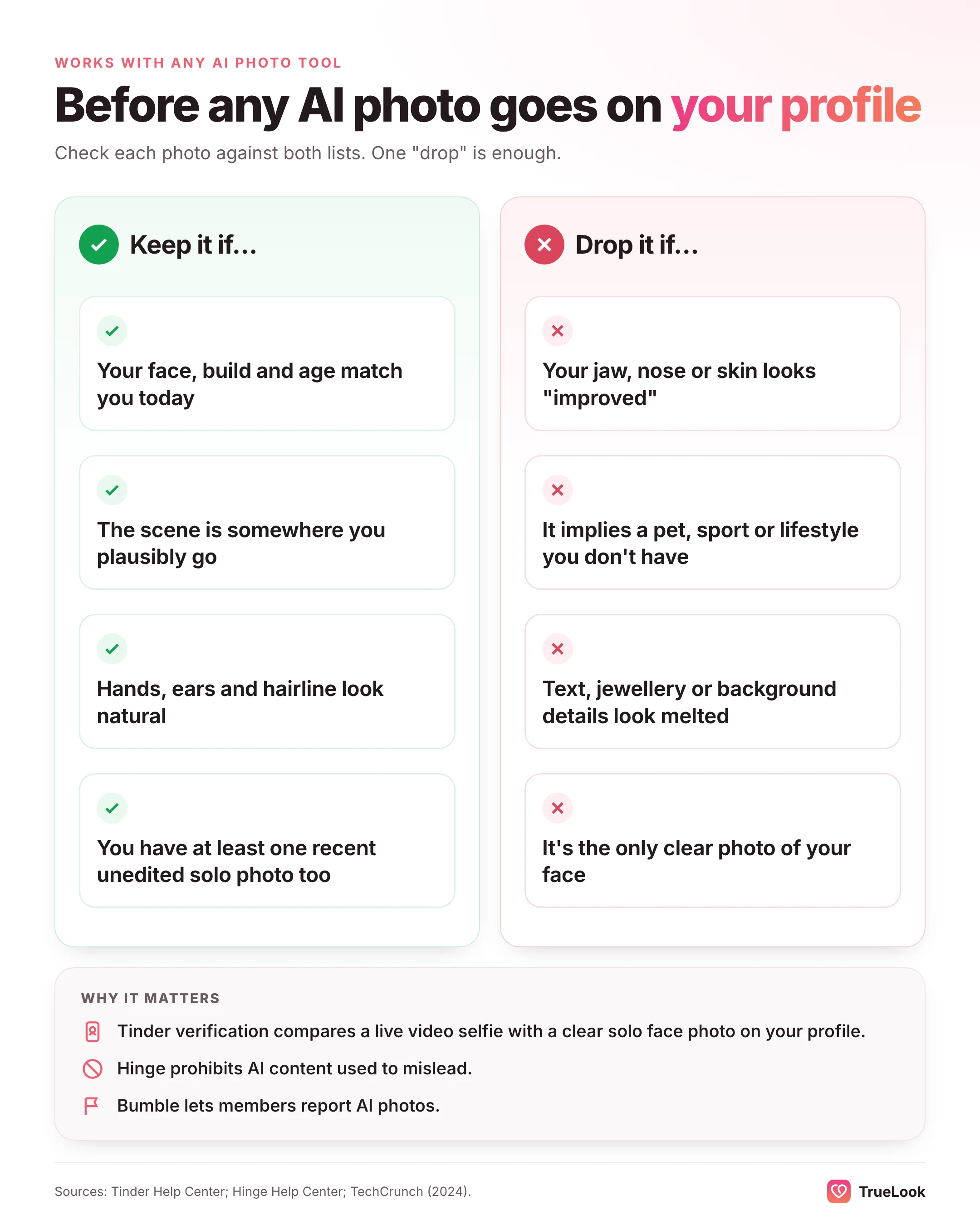
- Tinder's community guidelines ask members to show the real person, not a fake persona, and its Photo Verification checks a live video selfie against a clear solo face photo on your profile.
- Hinge's prohibited content rules include using "fake identities or AI-generated content to mislead others".
- Bumble members can report a profile for using AI-generated photos, an option TechCrunch reported in 2024.
In practice: keep at least one recent, unedited solo photo; drop any generated image where your face, body or age has drifted; and never use a scene that implies something untrue about your life in a way that matters, such as a pet you do not have or a sport you have never played. Our guide to dating profile pictures covers how to choose and order a set.
Privacy and data: what MagicShot's policy says
MagicShot's privacy policy, last updated 13 October 2026, is clear on the points that matter most.
- No training. A dedicated section states that MagicShot does not use your uploads, prompts or generated results to train AI models, on every plan, with nothing to opt out of. Its terms repeat that the licence you grant does not allow training.
- Third-party model providers. To generate results, your prompts and uploads, including photos that show faces, are sent to the AI model providers it works with, and each provider's own terms also govern that data. The policy does not name the providers.
- Face data. Uploaded photos stay in your account until you delete them. Face data derived to produce a result is stored temporarily and purged periodically. It says it does not sell face data, use it for advertising, or use it to identify or profile you.
- Moderation. Prompts and images pass through automated content moderation. Content flagged or removed for policy reasons may be kept for moderation, abuse prevention and legal purposes even after you delete it or your account.
- Analytics and ads. Optional analytics cookies from Google and Microsoft are set only with consent; ad-measurement cookies from Google, Meta and TikTok are set only if you switch them on.
- Deletion. Its dating page says you can remove any result, or your whole account, whenever you want.
The iPhone app's privacy label, provided by the developer, says no data is collected from the app.
On training, MagicShot and TrueLook make the same promise. TrueLook's privacy policy says uploaded and generated photos are never used to train, fine-tune or evaluate any AI model, ours or a third party's, and you can delete any photo yourself.
What users say about MagicShot
On 2 November 2026, MagicShot's Trustpilot page showed a TrustScore of 4.7 out of 5 ("Excellent") from 39 reviews, all from the previous 12 months, with 97% five-star. The profile was claimed in December 2025, the company replies to many reviews, and Trustpilot noted no recent history of the company asking for reviews. Recent reviews praise ease of use, speed, the number of tools in one place and output quality; the mild criticisms were occasional glitches and a request for a dark theme. None of the recent reviews mentioned dating photos.
The App Store listing showed 4.1 out of 5 from 453 ratings. The written reviews on the page praise the range of tools and the simple interface; one complains that a "lifetime" subscription was replaced by a credit system, and the developer replied that early users now receive a monthly credit allowance.
Both samples are small, and they rate the whole suite rather than the dating tool, which is new. Use them as a signal about the company's service, not about dating results.
TrueLook vs MagicShot, dimension by dimension
| Dimension | TrueLook | MagicShot |
|---|---|---|
| Purpose | Dating profile photos only | All-in-one creative suite; dating is one of about 90 tools |
| Input | 4 selfies | "A handful" of clear, recent selfies (no exact number given) |
| Dating styles | 43 on both packs, 4 shots per style | Example scenes listed: café, golden-hour walk, dinner, hike and a few more |
| Realism approach | HyperReal™: your face stays the same; only place, outfit and light change | Learns your features from your selfies; aims for "you, photographed well" |
| Output | Up to 30 (Fix) or 140 (Pro) photos per one-time pack | 8,000 to 40,000 credits a month shared across all tools |
| Speed | About a minute per photo | "Seconds", per its pages |
| Price per photo | $29 / 30 = $0.97 (Fix); $49 / 140 = $0.35 (Pro) | Not published; illustratively under $0.01 to about $0.05 on Essential |
| Billing | One-time payment, no subscription | Monthly or yearly; different options in the iPhone app |
| Refunds | 14 days, under the conditions on /refund | 7 days for new plans without meaningful credit use; likeness complaints not refundable |
| Privacy | Never used for AI training; delete anytime | Never used for AI training; sent to unnamed model providers; delete anytime |
| Other uses | None | Images, video, editing, audio, logos, product shots; commercial licence |
| Dating-app fit | Built for it | Sensible principles; one feature within a broad suite |
Where MagicShot is better
On price and range, MagicShot wins clearly. A $9 plan that covers dating photos, product shots, logos, short videos and voiceovers is remarkable value if you will use several of those tools, and its per-image cost is far below TrueLook's under any reasonable assumption. It also has a strong Trustpilot record, a commercial licence on every paid plan and a transparent refund policy for technical failures.
Where TrueLook is better
TrueLook is better when the dating profile is the point. All of its styles, on both packs, are chosen for dating, it asks for a defined number of selfies, and its refund conditions are built around whether the photos worked on a real profile rather than excluding likeness complaints. You pay once, with no subscription to cancel, every photo in your pack goes to your dating profile rather than competing with other projects, and you do not have to learn a suite to find the one tool you came for.
Who should choose which
- If you run a small business or make content: MagicShot. Product shots, ads, logos and voiceovers in one inexpensive plan, with dating photos as a bonus.
- If you want to experiment cheaply first: MagicShot's Essential plan is the lowest-cost way to see what AI photos of you look like, though the dating tool is not in its free tier.
- If you only need a stronger Tinder, Hinge or Bumble profile: TrueLook. You get dating-specific styles from the start and nothing to configure.
- If you don't want another subscription: TrueLook. You pay $29 or $49 once; MagicShot's plans bill every month or year until you cancel.
- If you worry about photos that don't look like you: TrueLook's whole method is built around keeping your face unchanged, and its refund is tied to real-profile use. MagicShot's refund policy excludes likeness complaints once a result is delivered.
- If you want a large variety of dating scenes: TrueLook offers 43 dating styles on both packs, 4 shots each, against the handful of example scenes MagicShot lists publicly.
- If privacy is decisive: both commit to never training AI on your photos; MagicShot adds that uploads go to unnamed third-party model providers.
How to switch, or use both
Plenty of people could use both sensibly: MagicShot for content, logos and video, TrueLook for the dating profile. If you do, or if you are moving from one to the other:
- Spend or lose your credits. MagicShot's monthly credits do not roll over, so time any switch for the end of a billing cycle.
- Cancel in the right place. If you subscribed on iPhone, cancel through your Apple subscriptions; web subscriptions are cancelled on MagicShot's site.
- Reuse good inputs. The same rules help in both tools: recent selfies, good daylight, a clear view of your face, no sunglasses or filters. TrueLook needs 4.
- Keep one look per profile. Pick your dating set from one tool so colour and lighting stay consistent, then add a real photo or two.
Looking at other broad tools? See TrueLook vs Pose AI, TrueLook vs Photo AI and TrueLook vs PixelPanda. For a ranked overview of dating-specific options, read our guide to the best AI Hinge photo generators, and for what to put in a set, the best photos for Tinder.
Sources
- MagicShot homepage, MagicShot (checked 2 November 2026). https://magicshot.ai/
- Pricing, MagicShot (checked 2 November 2026). https://magicshot.ai/pricing
- Dating Profile Photos, MagicShot (checked 2 November 2026). https://magicshot.ai/ai-photoshoot/dating-profile-photos
- About MagicShot, MagicShot (checked 2 November 2026). https://magicshot.ai/about
- Refund Policy, MagicShot (last updated 14 August 2026). https://magicshot.ai/refund-policy
- Privacy Policy, MagicShot (last updated 13 October 2026). https://magicshot.ai/privacy-policy
- Terms of Service, MagicShot (checked 2 November 2026). https://magicshot.ai/terms
- MagicShot reviews, Trustpilot (checked 2 November 2026). https://www.trustpilot.com/review/magicshot.ai
- AI Generation Tools: MagicShot, Apple App Store (checked 2 November 2026). https://apps.apple.com/us/app/ai-generation-tools-magicshot/id6464404342
- Community Guidelines, Tinder (checked 2 November 2026). https://policies.tinder.com/community-guidelines/intl/en
- How Does Photo Verification Work?, Tinder Help Center (updated 2026). https://www.help.tinder.com/hc/en-us/articles/4422771431309-How-Does-Photo-Verification-Work
- Prohibited Content & Behavior, Hinge Help Center (updated 2026). https://help.hinge.co/hc/en-us/articles/42464295207187-Prohibited-Content-Behavior
- Bumble users can now report profiles that use AI-generated photos, TechCrunch (2024). https://techcrunch.com/2024/07/09/bumble-reporting-option-ai-generated-profiles/













 Photographer