

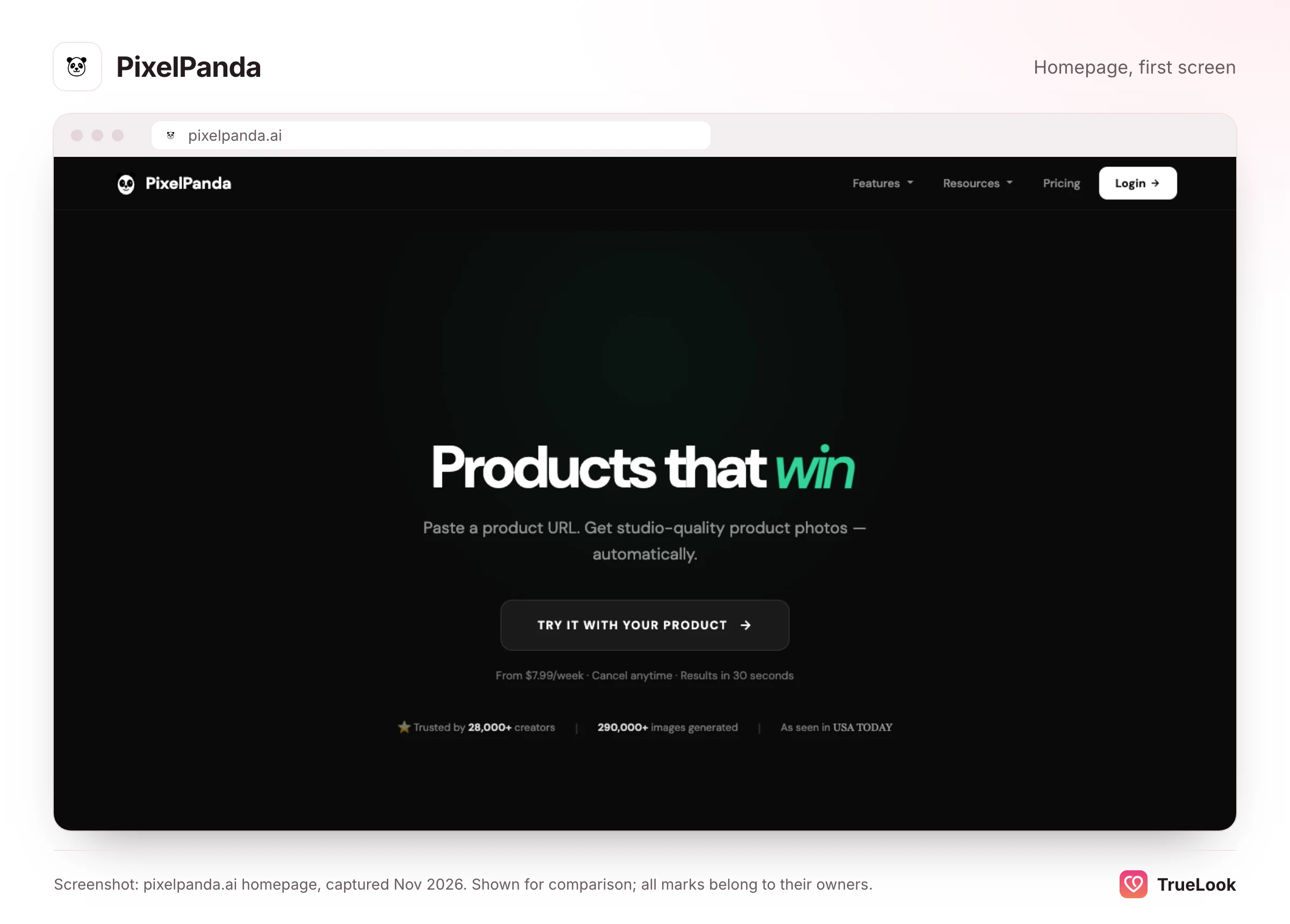
PixelPanda today is an AI studio for online sellers: product photos, UGC-style video ads and ad creatives, paid for with credits on a weekly or monthly plan. Its homepage does not mention dating photos, although its "AI Dating Photos" pages are still online and still point you to the same general sign-up. TrueLook does one job: hyperrealistic dating photos made from 4 of your selfies, for a one-time payment with no subscription. Choose PixelPanda if you mainly need product or marketing images and want a few portraits as a side use. Choose TrueLook if the photos are for your Tinder, Hinge or Bumble profile and have to look exactly like you.
This page explains what PixelPanda offers now, how its dating pages fit in, what each plan costs, what its terms and privacy policy say about your photos, and how it compares with TrueLook. Every PixelPanda fact below comes from its own pages, archived copies of them, or public review sites, opened in November 2026. We have not tested its output and quote no scores.
What PixelPanda is today
The PixelPanda homepage opens with a single promise: paste a product URL and get studio-quality product photos, with results in about 30 seconds. Its main features are product scene photos (lifestyle, flat lay, studio, outdoor), lip-synced talking-head video ads in 35+ languages, and static ad creatives for Instagram, TikTok, Facebook, LinkedIn, X and Pinterest. Around those sit background removal, upscaling, text removal, "product holding" and outfit swaps, an API, and about 38 free image tools. The marketplaces it names are Shopify, Amazon, Etsy, eBay and a handful of others. The homepage claims 13,000+ creators and 85,000+ images generated. Nothing on it mentions dating, Tinder, Hinge or Bumble.
Its legal pages are light on company detail. The terms of service, updated in May 2026, refer only to "the PixelPanda team", name no legal entity or address, and set Delaware law with arbitration in Delaware. The privacy policy gives only a support email address.
How the site has changed
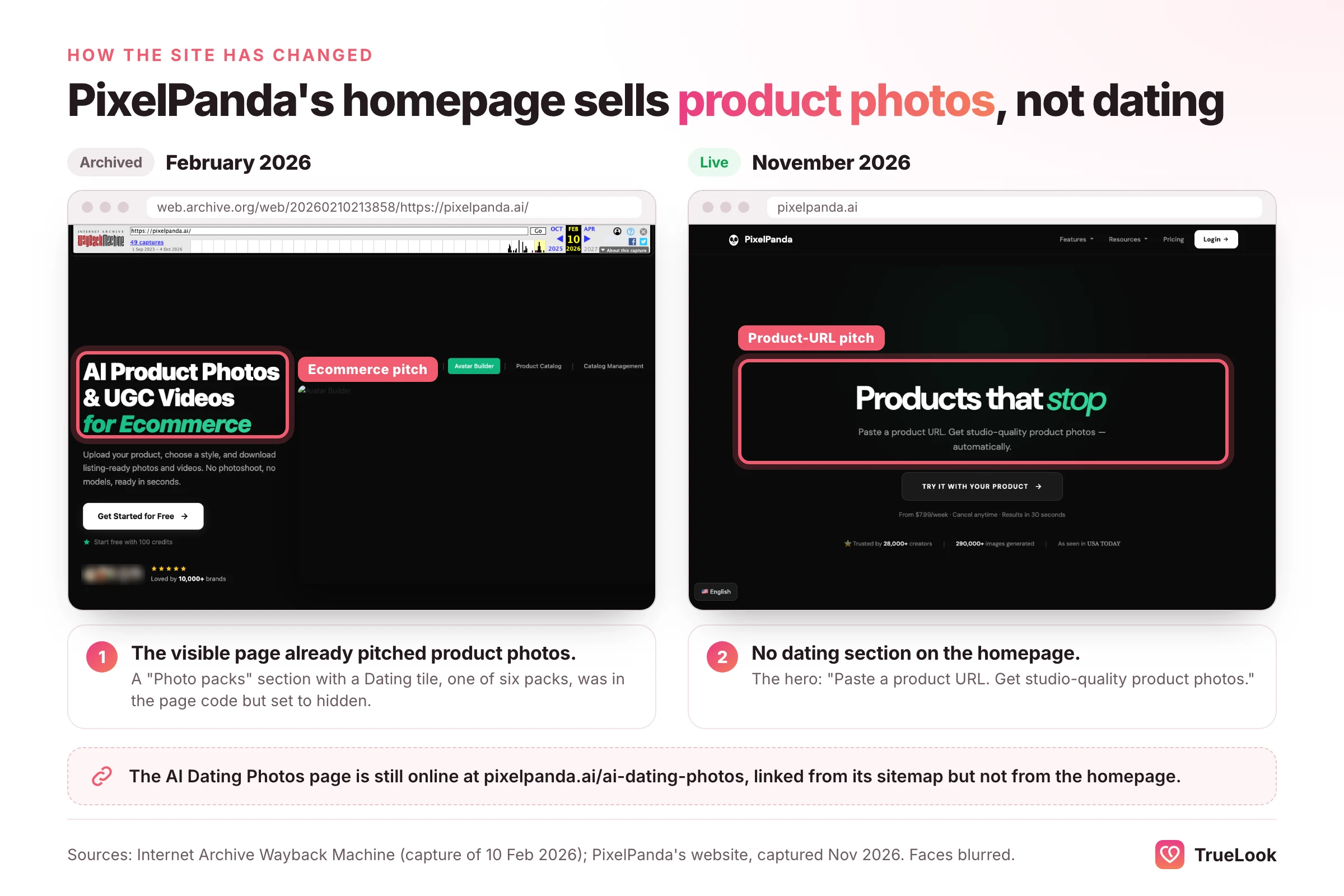
Archived copies show what visitors actually saw. In February 2026 the homepage already pitched AI product photos and UGC videos for online sellers. Its code also contained a "photo packs" section featuring your AI avatar (Dating, Instagram, Professional, Travel, Fitness and Creative), but that section was hidden, so visitors never saw it; copies from January and March 2026 are the same. By early May 2026 the hidden section was gone too. Today the homepage rotates between product-focused headlines, and dating is not mentioned on it at all.
Where the dating photos went
The dating pages were not deleted. PixelPanda's sitemap still lists an AI Dating Photos page plus sub-pages for Tinder, Hinge, Bumble, OkCupid, Badoo, Coffee Meets Bagel, Match.com and one labelled "LinkedIn Dating". At the time of writing, the main page says:
- Upload: 10 to 20 casual selfies from different angles, some smiling, some serious, some full-body.
- Output: "6 diverse photos", in lifestyle, portrait, travel and activity styles, sized for each app.
- Time: about 30 minutes.
- Claims: "3x more matches", attributed to studies it doesn't name, and "95% cost savings" with no stated baseline.
- Call to action: a button reading "Start Now - 10 Credits" that leads to the site's general Google sign-in, not a separate dating checkout.
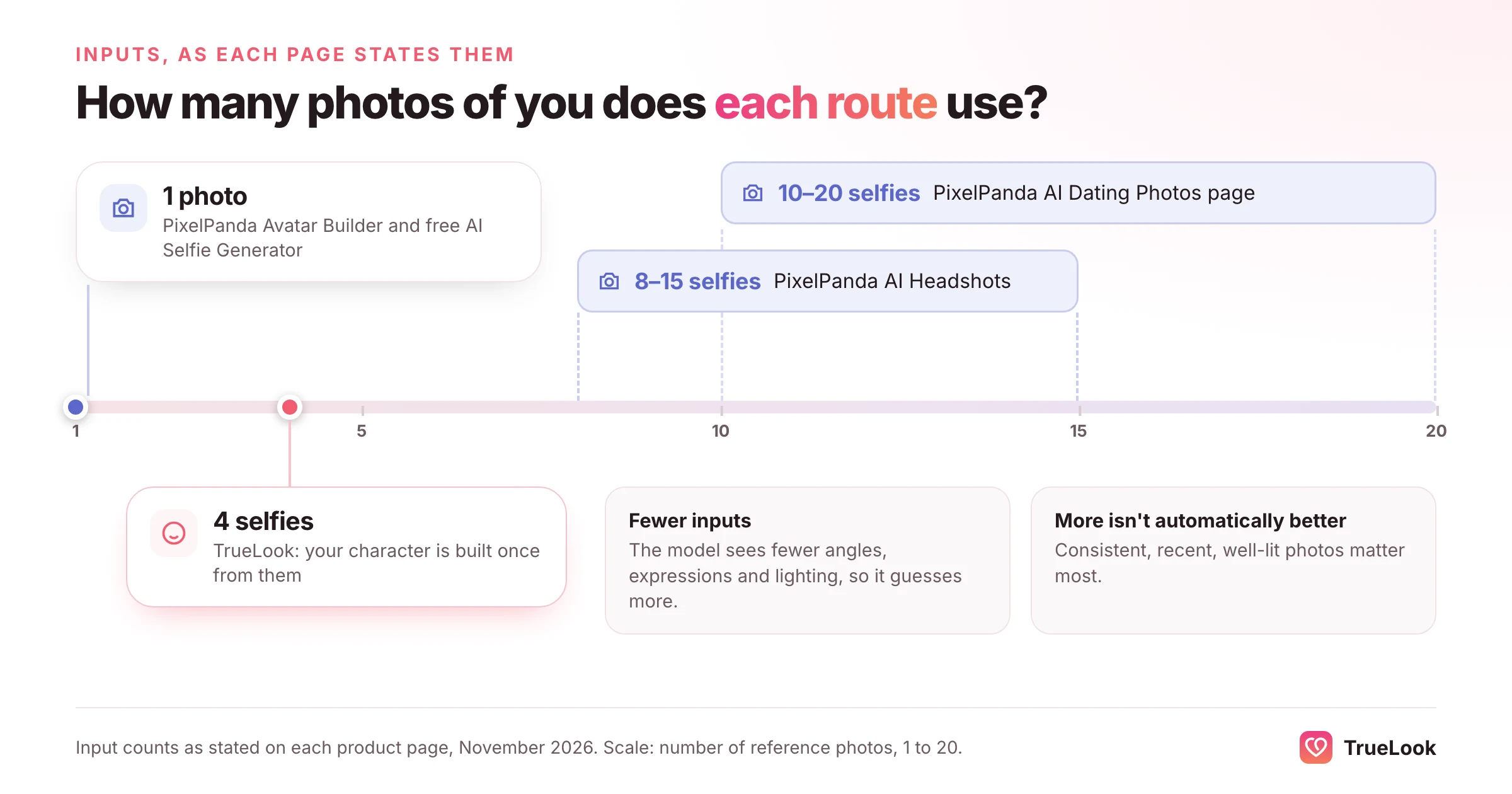
Other pages describe other routes to a photo of yourself. The FAQ says you can make AI pictures of yourself with the Avatar Builder and lists dating profiles as one use. The Avatar Builder page asks for one reference photo, or a text description, and says it runs on Flux 1.1 Pro Ultra. Its own list of uses (UGC ads, product try-ons, catalog shots) doesn't include dating. The AI Headshots page asks for 8 to 15 selfies. Finally, a free AI Selfie Generator turns one uploaded photo into a new image in a chosen style, "Dating Profile" among them, with a few free generations a day.
So the honest summary is this: PixelPanda can still make photos of you that you could put on a dating profile, but which route the dating button leads to after sign-in isn't described on its public pages. The input it asks for ranges from 1 photo to 20 depending on the page. Because we didn't create an account, we can't tell you which flow you'll land in. If you try it, check the in-app screen before spending credits.
PixelPanda pricing in detail
At the time of writing (Nov 2026), the pricing page describes "One plan. Everything included." It is sold in several credit sizes:
| Plan | Price | Credits | Cost per credit |
|---|---|---|---|
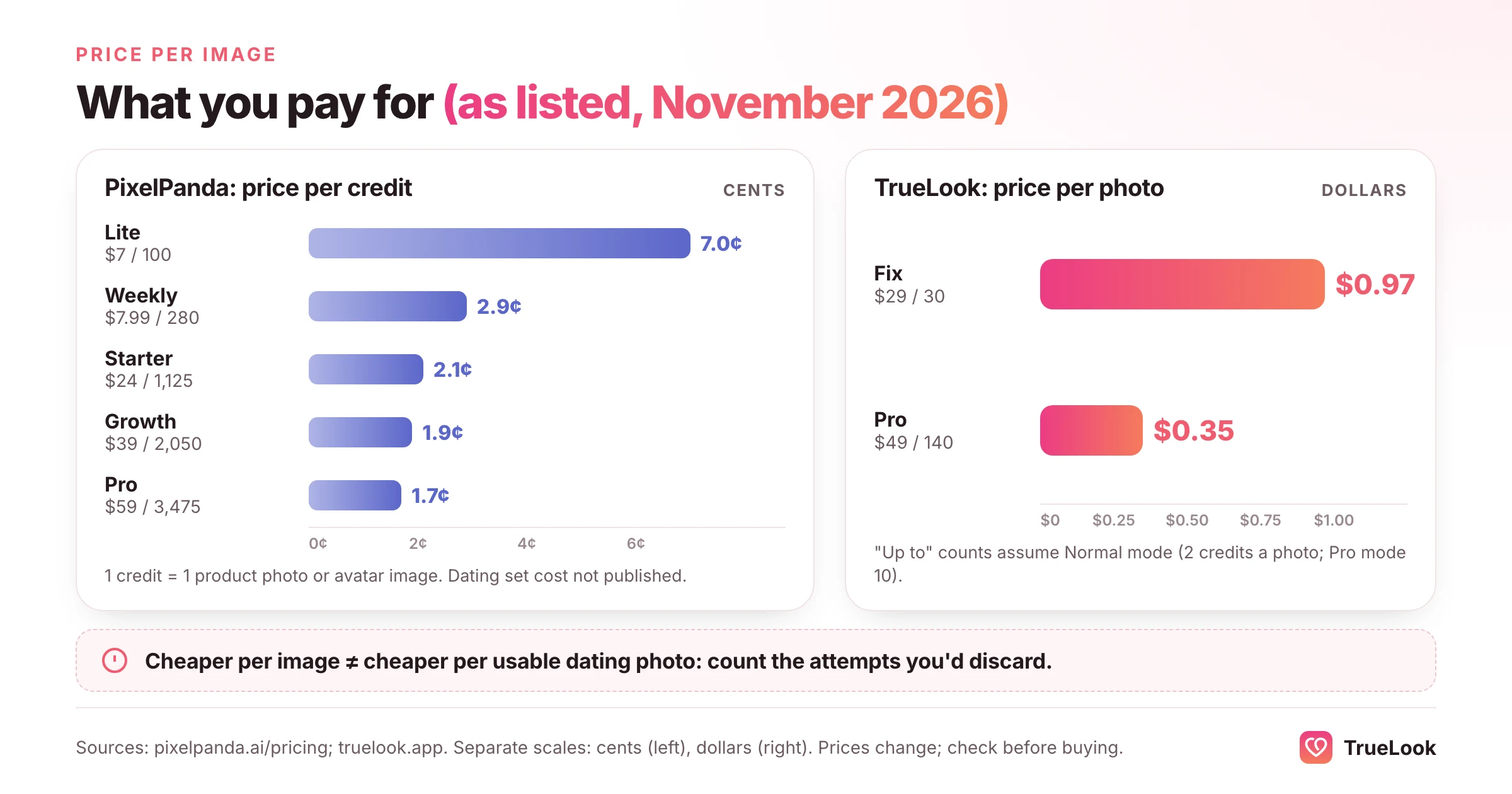
| Lite | $7 a month | 100 | 7.0 cents |
| Weekly | $7.99 a week | 280 | 2.9 cents |
| Starter ("Most popular") | $24 a month | 1,125 | 2.1 cents |
| Growth | $39 a month | 2,050 | 1.9 cents |
| Pro | $59 a month | 3,475 | 1.7 cents |
Credit costs on the same page: a product photo, a background removal or a 2x upscale costs 1 credit, an 8x upscale 2, a lip-synced UGC video 50, and an avatar's six-image sample gallery 6. Static ads are free. The Avatar Builder page adds that each avatar generation costs 1 credit. The headshots page says a typical session uses 30 to 80 credits. No page gives a dollar price for a dating set. The only figure is the "10 Credits" on the dating page's button.
- Renewal: plans renew automatically, weekly or monthly. You can cancel from account settings and keep access until the end of the period you've paid for.
- Credits roll over while you're subscribed. The terms say they stay usable until the end of the paid period after you cancel.
- Refunds: the terms say "Case by case". Someone who signed up yesterday and used no credits will "probably" get a yes. Someone three weeks in with half the credits gone, "probably not". There is no fixed refund window.
- Free use: the free tools need no plan. Their terms differ from paid use, as the privacy section below explains.
Output and realism
What the pages promise
The dating page's FAQ says the AI improves "the quality of your photos, not your appearance": better lighting, fewer distractions, tidier composition. The same page also talks about generating AI photos of yourself in new scenes, which is generation, not just enhancement. Both are useful, but they carry different risks. Enhancing a photo you already have keeps your real face and real setting. Generating a new scene asks a model to redraw your face, and the fewer reference photos it has, the more it has to guess.
That matters most on the routes that use a single image. The Avatar Builder says reference-based avatars preserve likeness, and the free selfie tool aims to keep your face recognisable. But one photo shows one angle, one expression and one kind of light. Research on first impressions shows how much small changes count: a 2014 study in Psychological Science by Todorov and Porter found that different photos of the same person can change how they're judged about as much as photos of different people. A photo that is 90% you can still read as someone else.
A general tool for a specific job
PixelPanda's models and presets are built around products, ads and avatars that "pass as real UGC", in the words of its Avatar Builder page. That is a different brief from a dating photo, where the viewer's main question is whether this is really the person they'll meet. The AI Headshots page is frank about the gap: its FAQ says the presets are tuned for professional settings and that the casual ones "could" work for dating-style photos. Its selfie tool and dating page do offer dating styles, but a six-photo set or a single image is a starting point, not a curated lineup.
Verification and app rules
Whichever tool you use, dating apps increasingly check your face. Tinder's Face Check FAQ explains that a video selfie is turned into a face map and compared with your profile photos to see whether you appear to be the same person. Hinge offers a similar optional selfie check. Bumble's community guidelines forbid catfishing and photos with "exaggerated or unnatural digital effects" when it isn't clear you are the person shown. None of these apps approves particular photo tools, and no tool can promise you'll pass, TrueLook included. The practical rule is simple: post only photos a friend would recognise as you immediately. Our guide on whether AI photos are allowed on dating apps covers each app's rules in more depth.
Privacy and data
PixelPanda's privacy rules depend on whether you use paid credits or the free tools. This is the most important detail on this page if you plan to upload your face.
Paid uploads
- No training. The privacy policy, updated in February 2026, says: "we don't train AI on your photos. Period." The terms say the same for regular uploads.
- Auto-deletion after 30 days. Uploads and generated images are kept for 30 days and then deleted. After account deletion, personal data is removed within 90 days. Payment records are kept for 7 years.
- Processors: the policy names Replicate (which runs the AI models), Stripe, Cloudflare R2 for storage and Google Cloud. It says the servers are in North America.
- Ownership: you own your uploads and outputs, with full commercial rights on paid plans.
Free tools and free credits
The terms set different rules for free use:
- Free generations can be made public. Images made with free credits, a free onboarding flow or the free tools may be published at a public link on pixelpanda.ai, added to its community gallery and sitemap, and used as marketing examples, in watermarked form. Paid outputs are "never auto-published".
- Free-tool uploads come with a broad licence. The terms say a photo uploaded to a free tool, the AI Selfie Generator included, can be used for marketing, social media, blog content, "AI model training" and other purposes, without asking or paying you.
The free selfie tool's own page says something different: that uploads are processed in memory, not stored, not used for training and not shared. We can't tell you which statement reflects current practice. The terms are the agreement you accept by using the site, though, so if you're uploading your face for dating photos, use paid credits or ask support in writing first.
For comparison, TrueLook's privacy policy says your uploaded and generated photos are never used to train any AI model and are never shared with other users, advertisers or third parties, on every plan. Photos stay in your account until you delete them, which you can do yourself from the dashboard at any time.
What users say
On 2 November 2026, PixelPanda's Trustpilot page showed a TrustScore of 4.2 from 6 reviews, all five-star, posted between April and October 2026. The company claimed the profile in April 2026, and three of the six reviews were posted on the same day that month. Four reviews describe product photos, ad creatives and AI avatar videos for online stores. The other two praise the platform in general. None mentions dating photos. Two note a learning curve or needing several attempts to get a usable result.
We found no PixelPanda app in Apple's App Store. We couldn't open Reddit search results to check discussion there. With six reviews, none about dating, there is no independent evidence either way on how PixelPanda's dating photos turn out. Weigh its "3x more matches" headline accordingly.
TrueLook vs PixelPanda, dimension by dimension
| Dimension | TrueLook | PixelPanda |
|---|---|---|
| Purpose | Dating photos for Tinder, Hinge and Bumble | Product photos, UGC video ads and ad creatives; dating pages still online but not on the homepage |
| Input | 4 selfies | 1 reference photo (Avatar Builder, selfie tool), 8 to 15 selfies (headshots) or 10 to 20 (dating page) |
| Output | Up to 30 photos (Fix) or 140 (Pro) per one-time pack | 6 photos per dating set (stated); otherwise as many images as your credits allow |
| Styles | 43 dating styles on both packs, 4 shots per style | Lifestyle, portrait, travel and activity for dating; a dozen or more selfie styles; 50+ headshot presets |
| Realism approach | HyperReal™: your face stays the same; only place, outfit and light change | General image models (it names Flux 1.1 Pro Ultra and Flux Kontext) tuned for products and avatars |
| Speed | About a minute per photo | About 30 minutes per dating set; 15 to 40 seconds per avatar image (stated) |
| Price per photo | $0.97 (Fix) or $0.35 (Pro) | About 2 to 7 cents per credit; a dating set's credit cost isn't published |
| Billing | One-time payment, no subscription; one-time top-ups | Weekly or monthly, cancel anytime; credits roll over |
| Refunds | 14 days, under the conditions in the refund policy | Case by case |
| Privacy | Never used for training or shared, on every plan | Paid: no training, deleted after 30 days. Free tools: broad licence including training and marketing |
| Dating-app fit | Built for dating; no verification guarantee | Secondary use; no verification guarantee |
Price per photo: the maths
TrueLook's Fix Pack is $29 for up to 30 photos, or $0.97 a photo. The Pro Pack is $49 for up to 140, or $0.35 a photo. One credit is one photo, and each style you pick makes 4.
PixelPanda prices credits, not photos. If a portrait costs 1 credit, as a product image or an avatar generation does, the Weekly plan's 280 credits for $7.99 work out to about 3 cents an image, and the Pro plan's 3,475 credits for $59 to under 2 cents. That is far cheaper per image than any dedicated dating service. The catch is that the cost of a usable dating photo includes the attempts you discard. With a single reference photo and a general model, you may make many images to get a few you'd post. If the dating set really costs 10 credits for 6 photos, as the button suggests, it's about 29 cents for the set on the Weekly plan. We can't confirm that figure.
The billing models differ too. PixelPanda is a subscription: the Weekly plan's $7.99 comes round every seven days, about $35 a month, and Starter is $24 every month until you cancel. TrueLook is the no-subscription option: $29 or $49, paid once, and if you need more photos later you buy another pack or a one-time top-up. For a quick experiment, a single PixelPanda week costs less; for a dating set without another recurring charge, TrueLook's single payment is simpler.
Where PixelPanda is better
- Cost per image. A few cents a credit beats every dedicated dating tool on raw price.
- Breadth. Product photos, background removal, upscaling, talking-head video ads, static ads and an API all come under one subscription. If you run a shop or a side business, that's a lot of value.
- Short commitment. The $7.99 Weekly plan lets you try it for a week.
- Credits roll over while you're subscribed, so a quiet month isn't wasted.
- Automatic deletion. Paid uploads disappear after 30 days without you doing anything.
Where TrueLook is better
- Purpose-built for dating. Every style is made for a dating profile, and there's a clear path from selfies to photos instead of a dating page that leads to a general sign-up.
- Likeness. HyperReal™ keeps your face the same in every photo, which is what verification checks and real-life dates both test.
- One set of privacy rules. No training and no sharing, with no separate free-tool licence to watch out for.
- A defined refund window. Fourteen days with written conditions, instead of case by case.
- No subscription. You pay $29 or $49 once, with nothing to cancel; PixelPanda's plans renew weekly or monthly until you do.
Who should choose which
- If you sell products online and need listing photos and ads, PixelPanda is the tool, and TrueLook doesn't compete there. You might also try its portrait tools for a dating photo on the same subscription.
- If you only need dating photos, a product-photo platform is a detour. TrueLook's whole workflow is the job you came for, and you pay once instead of subscribing.
- If you want to experiment for almost nothing, PixelPanda's Weekly plan or its free selfie tool costs little. Read the free-tool licence before uploading your face, and use paid credits if that licence bothers you.
- If you've had a verification check fail, or care about the badge, choose the tool that keeps your face steady across a whole set. See our guide to fixing a failed Tinder photo verification.
- If you need LinkedIn headshots too, PixelPanda's 50+ headshot presets cover that. TrueLook's styles are made for dating.
- If you want a full, varied lineup, think in roles: a clear face shot, a full-body photo, a social photo and an activity. Our guide to dating profile pictures walks through each.
Using both, or switching
The two tools do different jobs, so using both is reasonable: PixelPanda for your shop or marketing images, TrueLook for your dating profile. If you've tried PixelPanda for dating photos and want to move on:
- Download anything you want to keep. Paid uploads and outputs are deleted automatically after 30 days.
- Ask about free-tool uploads. If you used the free selfie tool, email support to ask whether your photo or any public free generation can be removed. The terms grant a broad licence, so get the answer in writing.
- Cancel before renewal. Weekly plans renew every seven days, which is easy to forget.
- Take 4 fresh selfies for TrueLook on the same day: good light, no sunglasses or hats, your current hair.
- Don't mix sets if your face looks different between them. Viewers notice, and face checks can too.
For the wider field, see our roundup of the best AI dating photo generators and our guide to the best AI Hinge photo generators. Related comparisons: TrueLook vs Fotto.ai and TrueLook vs MagicShot, another multi-purpose suite with dating as one feature.
Sources
- PixelPanda homepage, PixelPanda (2026). https://pixelpanda.ai/
- AI Dating Photos, PixelPanda (2026). https://pixelpanda.ai/ai-dating-photos
- Pricing, PixelPanda (2026). https://pixelpanda.ai/pricing
- FAQ, PixelPanda (2026). https://pixelpanda.ai/faq
- Terms of Service, PixelPanda (2026). https://pixelpanda.ai/terms
- Privacy Policy, PixelPanda (2026). https://pixelpanda.ai/privacy
- AI Avatar Builder, PixelPanda (2026). https://pixelpanda.ai/ai-avatar-builder
- AI Headshots, PixelPanda (2026). https://pixelpanda.ai/ai-headshots
- Free AI Selfie Generator, PixelPanda (2026). https://pixelpanda.ai/free-tools/ai-selfie
- PixelPanda homepage, archived 10 February 2026, Internet Archive Wayback Machine (2026). https://web.archive.org/web/20260210213858/https://pixelpanda.ai/
- PixelPanda homepage, archived 2 May 2026, Internet Archive Wayback Machine (2026). https://web.archive.org/web/20260502123452/https://pixelpanda.ai/
- Pixelpanda reviews, Trustpilot (2026). https://www.trustpilot.com/review/pixelpanda.ai
- FAQ: Mandatory liveness check (Face Check), Tinder (2026). https://policies.tinder.com/faq-mandatory-liveness-check/intl/en/
- Community Guidelines, Bumble (2026). https://bumble.com/en/guidelines
- Todorov, A. and Porter, J. M., Misleading first impressions: different for different facial images of the same person, Psychological Science (2014). https://pubmed.ncbi.nlm.nih.gov/24866921/







 Photographer